
If you’ve narrowed your email marketing search down to two names — ConvertKit (now called Kit) and Mailchimp — you’ve probably noticed something frustrating while researching:
Half the articles say “ConvertKit’s free plan is unbeatable,” and the other half say “ConvertKit got way more expensive in 2025.” Which one is true right now, in 2026?
Both, actually — and that contradiction is exactly why this comparison needs updating. A lot of “ConvertKit vs Mailchimp” content floating around still reflects pricing from before September 2025, when Kit (ConvertKit’s new name) more than doubled its paid plan prices. If you’re comparing based on older numbers, you’re not seeing the real picture.
I went through both platforms specifically to answer the question creators and small businesses are actually asking in 2026:
- Is Kit’s free plan still worth it after the rebrand and price changes?
- How do the current paid plans compare at real subscriber counts (1,000, 2,500, 5,000, 10,000)?
- Which platform’s automation actually fits a creator’s workflow better?
- Does Kit’s built-in product-selling justify the higher price?
- Who should pick Mailchimp instead — and why?
Short answer: Kit’s free plan (10,000 subscribers) is still one of the best in the industry for creators just starting out. But once you need automation and upgrade to a paid plan, the September 2025 price increase means Kit now costs significantly more than Mailchimp at the same list size — and whether that’s worth it depends entirely on whether you’ll actually use Kit’s creator-specific tools (digital product selling, the Creator Network, subscriber tagging).
Let’s break down exactly where each platform wins.
ConvertKit (Kit) vs Mailchimp: Quick Overview
Before diving into specifics, here’s the framing that matters most: these two platforms were built for different people, and most of the “which is better” confusion comes from comparing them as if they’re interchangeable.
Kit (formerly ConvertKit) rebranded from ConvertKit to Kit in October 2024, but the product itself is the same: an email-first platform built specifically for bloggers, newsletter writers, podcasters, and course creators — people who think in terms of subscribers, sequences, and digital products rather than “marketing campaigns.”
I Tested MailChimp for 7 Days with Real Workflows. Read Detailed Review. Click Here
Mailchimp, founded in 2001 and now owned by Intuit, is a much broader marketing platform. Email is one piece of a toolkit that also includes landing pages, social ads, postcards, basic CRM features, and ecommerce integrations — aimed at small businesses and agencies, not just solo creators.
Here’s the high-level split:
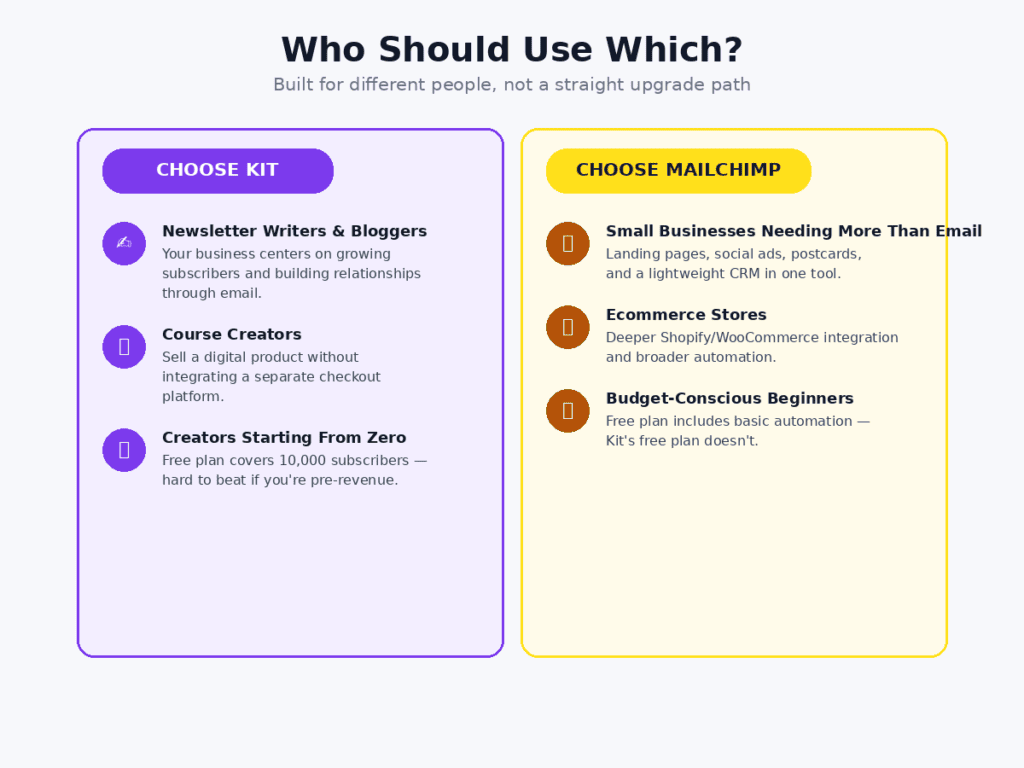
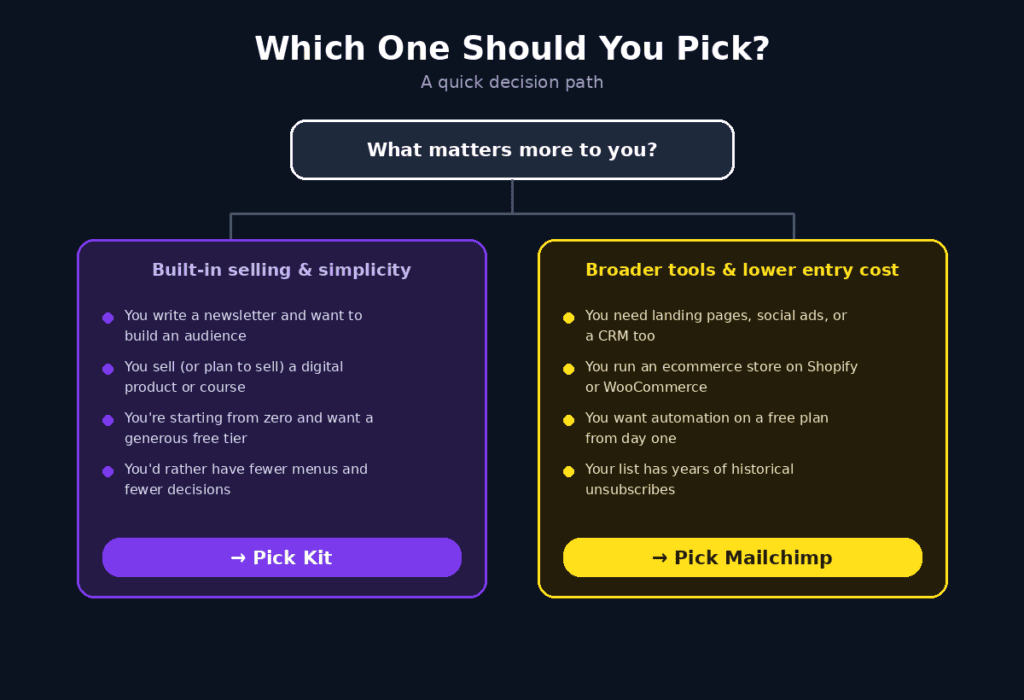
- Choose Kit if: you’re a content creator who wants to build an audience, write newsletters, and sell digital products — all from one focused tool
- Choose Mailchimp if: you run a small business that needs broader marketing tools (landing pages, social ads, ecommerce) alongside email, and want the lowest possible entry price
Now let’s get into the details — starting with the part that’s changed the most since most existing comparisons were written.
Pricing in 2026: What Actually Changed
Kit’s September 2025 Price Increase (The Detail Most Articles Miss)
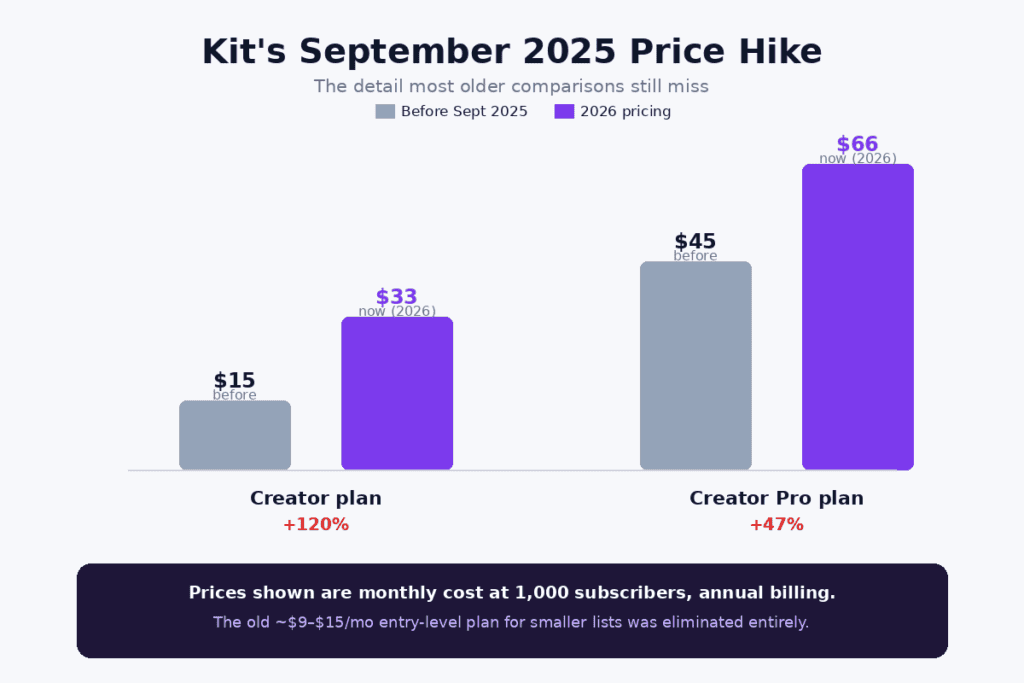
In September 2025, Kit raised prices across its paid tiers — and the increase wasn’t small:
- Creator plan: went from $15/month to $33/month (annual billing) for 1,000 subscribers — more than double
- Creator Pro plan: went from $45/month to $66/month (annual billing) for 1,000 subscribers
- The old entry-level plan for smaller lists (around 300 subscribers, previously $9-$15/month) was eliminated entirely
If you read a “ConvertKit vs Mailchimp” comparison that lists ConvertKit’s Creator plan at $15 or $29/month, that information is outdated. As of 2026, $33/month (annual) or $39/month (monthly) is the real starting price for Kit’s paid automation tier.
Kit Pricing Breakdown (2026)
- Newsletter (Free): Up to 10,000 subscribers, unlimited emails, landing pages, and forms — but only 1 automation and 1 sequence, Kit branding on emails, and no A/B testing
- Creator: $33/month (annual) or $39/month (monthly) for 1,000 subscribers — unlimited automations and sequences, integrations, removes the single-automation limit
- Creator Pro: $66/month (annual) or $79/month (monthly) for 1,000 subscribers — adds subscriber engagement scoring, advanced reporting, A/B testing beyond subject lines, and the Creator Network referral system
Pricing scales with subscriber count from there: at 5,000 subscribers, Creator runs about $89/month and Creator Pro about $139/month. At 25,000 subscribers, Creator is roughly $199/month and Creator Pro roughly $279/month.
Mailchimp Pricing Breakdown (2026)
- Free: Up to 500 contacts and 1,000 monthly email sends — includes basic automation, which Kit’s free plan doesn’t offer
- Essentials: Starting around $13/month for smaller lists, scaling to roughly $26.50/month at 1,000 contacts
- Standard: Mailchimp’s most popular tier, with deeper automation, A/B testing, and audience segmentation
- Premium: Advanced features for larger teams — multivariate testing, advanced segmentation, and priority support
At 10,000 subscribers, Mailchimp runs around $100/month versus roughly $139/month for Kit Creator — a meaningful gap that widens further at Creator Pro.
The Hidden Detail: How Each Platform Counts Subscribers
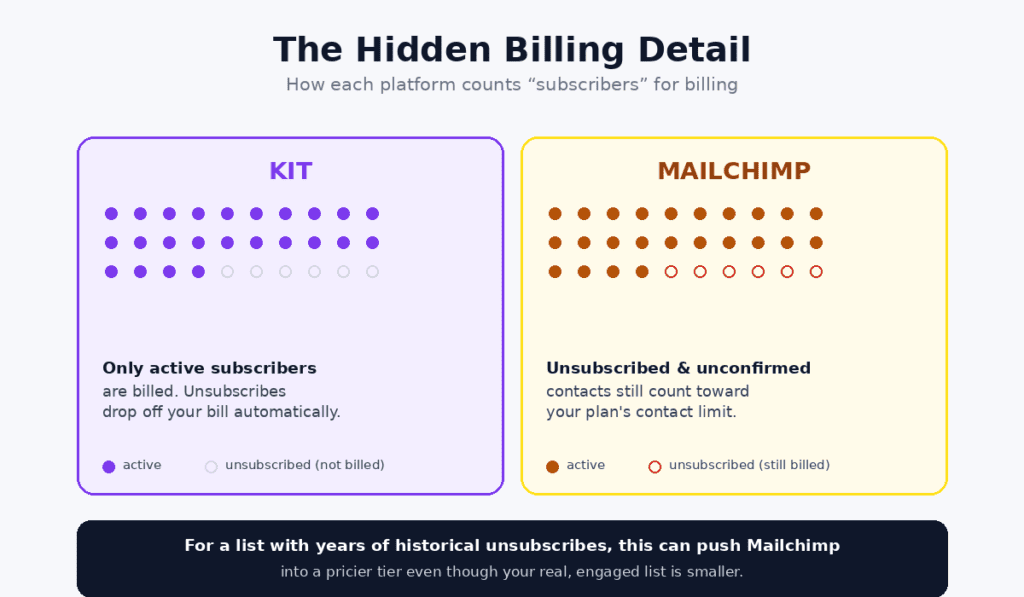
This is the kind of detail that changes the math but rarely gets mentioned upfront: Mailchimp counts unsubscribed and unconfirmed contacts against your plan limit. Kit only bills for active subscribers.
In practice, this means if you have a list with meaningful churn — people who unsubscribe over time — Mailchimp’s effective cost per “real” subscriber can be higher than the sticker price suggests, because those unsubscribed contacts still count toward your tier. Kit’s “active subscribers only” billing avoids this entirely.
For a list with low churn, this barely matters. For a list that’s been running for years with thousands of historical unsubscribes, it can be the difference between staying on a cheaper Mailchimp tier and being pushed into the next one.
Practical Use Case: A Creator at 2,500 Subscribers
Let’s ground this in a real scenario. Imagine a course creator with 2,500 email subscribers, sending a weekly newsletter, running a 5-email welcome sequence for new subscribers, and selling one digital course priced at $97.
On Kit (Creator plan, ~$59/month at 2,500 subscribers)
- Welcome sequence built using Kit’s visual automation builder — designed specifically for “subscriber joins → nurture → pitch” funnels
- Course sold directly through Kit’s built-in commerce tools — no separate checkout platform needed, though Kit takes a 3.5% + $0.30 transaction fee per sale
- Subscribers automatically tagged based on which lead magnet they downloaded, letting future emails be tailored to their interest
On Mailchimp (Standard plan, roughly comparable cost at this list size)
- Welcome sequence built using Mailchimp’s customer journey builder — more general-purpose, with more visual design options for the emails themselves
- Course sale would need a separate checkout tool (Gumroad, Teachable, etc.) connected via integration — Mailchimp doesn’t have Kit’s built-in product-selling
- Segmentation based on tags, purchase behavior (if ecommerce-connected), and engagement — more granular but with a steeper learning curve
The deciding factor here isn’t price — at 2,500 subscribers, the two platforms land in a similar cost range. It’s whether you want product-selling built into your email tool (Kit) or whether you’re comfortable connecting a separate checkout tool in exchange for broader marketing features and better email design flexibility (Mailchimp).
List Growth Tools: Landing Pages, Forms, and Popups
Before comparing automation and design, it’s worth looking at how each platform helps you actually grow your list in the first place — since for most creators and small businesses, list growth is the bottleneck that matters most early on.
Kit’s Approach: Landing Pages Built for Lead Magnets
Kit includes unlimited landing pages and forms on every plan, including free. The landing page templates are designed specifically around the “trade an email for a lead magnet” model — think a simple page with a headline, a description of a free ebook or checklist, and an email capture form. They’re fast to set up and convert well for this specific use case, but they’re not meant to replace a full website builder.
Forms can be embedded directly into a WordPress site, a Carrd page, or linked to from social media bios — a common pattern for creators who drive traffic from Instagram, YouTube, or a podcast.
Mailchimp’s Approach: Broader, But Less Specialized
Mailchimp also offers landing pages and signup forms, with more design flexibility (matching its broader template library), plus pop-up forms that can be triggered by exit intent or time-on-page. Where Mailchimp pulls ahead is in connecting list growth to its other tools — for example, a landing page that feeds into a Facebook/Instagram ad audience, or a signup form embedded on a Shopify store page.
For a creator whose only goal is “convert blog readers into newsletter subscribers,” Kit’s more focused tools tend to get the job done faster. For a small business that wants list growth tied into paid advertising or an online store, Mailchimp’s broader toolkit has the edge.
For a closer look at a platform built specifically around landing pages and list-building for creators, see our MailerLite review — it takes a similar approach to Kit’s, with unlimited landing pages on every plan including free.
Real Cost Comparison at Different List Sizes
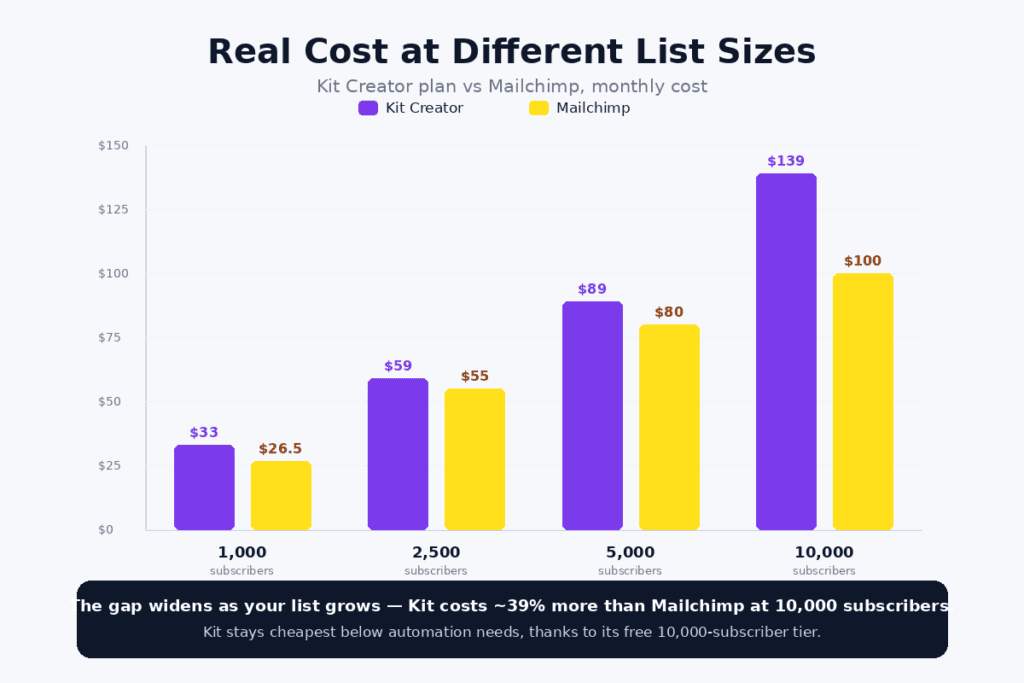
Pricing pages show starting prices, but the number that actually matters is what you’ll pay once your list grows past the entry tier. Here’s how the two platforms compare at the subscriber counts most creators and small businesses actually hit:
- 1,000 subscribers: Kit Creator ~$33/month (annual) vs Mailchimp Essentials ~$26.50/month — Mailchimp is cheaper here, but Kit’s free plan covers up to 10,000 subscribers if you don’t need automation yet
- 2,500 subscribers: Kit Creator ~$59/month vs Mailchimp Standard in a broadly similar range — the gap narrows and the decision becomes more about features than price
- 5,000 subscribers: Kit Creator ~$89/month, Kit Creator Pro ~$139/month vs Mailchimp scaling into its higher tiers — Mailchimp tends to stay more competitive at this range
- 10,000 subscribers: Mailchimp ~$100/month vs Kit Creator ~$139/month — roughly a 39% premium for Kit at this size, which needs to be justified by the built-in commerce and automation tools to make sense
The pattern that emerges: Kit is most cost-competitive at the very small end (thanks to its free plan) and the gap to Mailchimp widens as your list grows. If your list is likely to grow past 5,000-10,000 subscribers within a year or two, it’s worth running these numbers for your specific growth trajectory rather than just comparing entry prices.
If pure cost-per-subscriber at scale is your main concern and you don’t need Kit’s creator-commerce tools, it’s also worth comparing against GetResponse or Moosend, both of which tend to offer more competitive per-subscriber pricing at the 5,000-25,000 range than either Kit or Mailchimp.
Feature-by-Feature Comparison
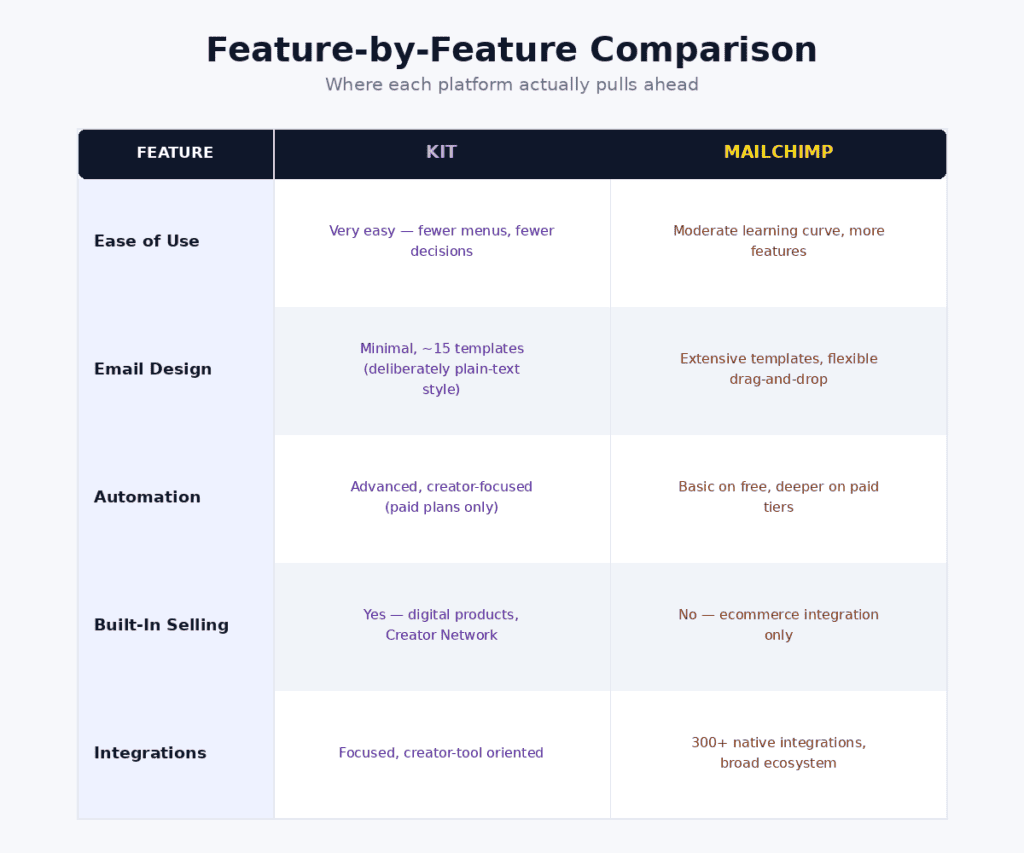
Ease of Use
Kit is built around a deliberately simple philosophy: write an email, tag subscribers, automate sequences. The interface has fewer menus and fewer decisions to make, which creators consistently describe as “very easy to use.”
Mailchimp has more going on — more menu items, more settings, more features you’ll never touch if you’re a solo creator. The learning curve is moderate rather than steep, but it’s noticeably more than Kit’s.
Email Design and Templates
This is where the two platforms diverge sharply. Mailchimp has a large library of customizable templates and a more flexible drag-and-drop editor with advanced layout options.
Kit’s email design is intentionally minimal — only around 15 templates, with limited free-form layout customization. This is a deliberate choice: Kit’s philosophy is that plain-text-style emails perform better for creator newsletters (they feel more personal and land better in inboxes), so heavy design tools weren’t prioritized. If you want highly designed, branded HTML emails with multiple columns and complex layouts, Mailchimp will serve you better.
Automation
Kit’s automation (on paid plans) is described consistently as “advanced and intuitive” for creator-style funnels — visual sequences that branch based on subscriber tags, link clicks, and form submissions, purpose-built for “lead magnet → nurture → offer” flows.
Mailchimp’s automation ranges from basic to moderate depending on plan — the free plan includes some automation (an advantage over Kit’s free plan, which includes none), but the most sophisticated branching workflows are reserved for Standard and Premium tiers.
Built-In Monetization
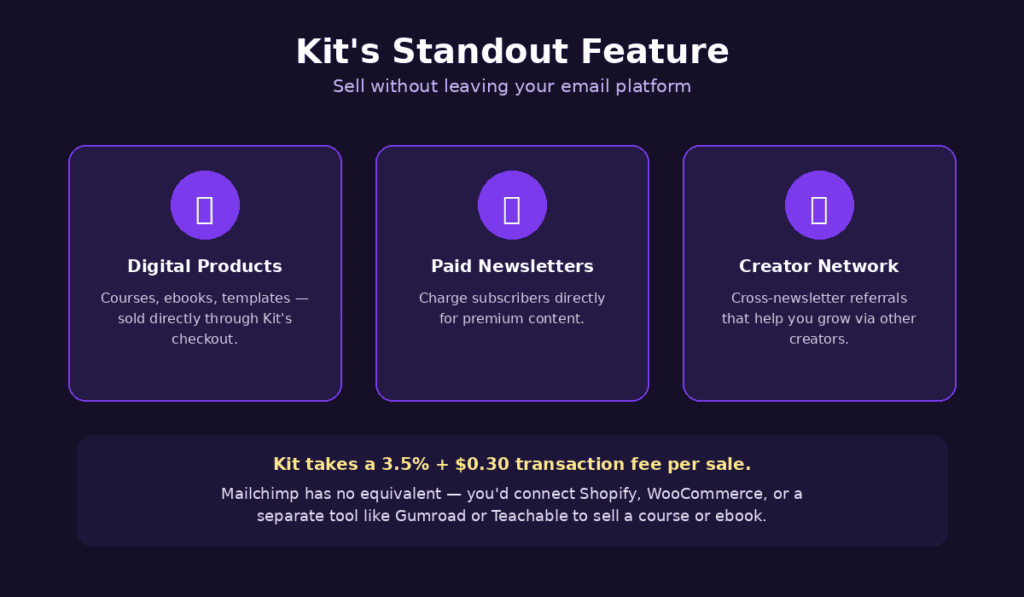
This is Kit’s standout feature: you can sell digital products, paid newsletter subscriptions, and access the Creator Network (a cross-newsletter referral system that helps you grow your list through other creators’ recommendations) — all without leaving the platform.
Mailchimp doesn’t have an equivalent. It connects to ecommerce platforms (Shopify, WooCommerce) for store-based selling, but if you’re an individual creator selling a course or ebook without a full “store,” you’ll need a separate tool like Gumroad or Teachable.
Integrations
Mailchimp’s ecosystem is significantly larger — over 300 native integrations, reflecting its position as a general-purpose marketing platform used across many business types.
Kit’s integrations are more focused, covering the tools creators actually use (Shopify, WordPress, Kajabi, Teachable, Zapier), but a meaningful number of “advertised” integrations on Kit’s free plan require Zapier or manual setup rather than a native one-click connection.
Who Should Use Kit (ConvertKit)?
Newsletter Writers and Bloggers
If your business model centers on a newsletter — growing subscribers, building relationships through email, and occasionally promoting digital products — Kit’s entire platform is built around this workflow.
Course Creators and Digital Product Sellers
The built-in commerce tools mean you can launch and sell a digital product without integrating a separate checkout platform — genuinely useful if you’re just starting out and want to minimize the number of tools you’re paying for and learning.
Creators Starting From Zero (Free Plan)
Even after the price increases, Kit’s free Newsletter plan — 10,000 subscribers, unlimited sends, unlimited landing pages and forms — remains one of the most generous free tiers in email marketing, roughly 40x Mailchimp’s free-plan limit of 500 contacts. If you’re pre-revenue and just building an audience, this is hard to beat.
Who Should Use Mailchimp?
Small Businesses Needing More Than Email
If you need landing pages, social media ad management, postcards, or a lightweight CRM alongside email, Mailchimp’s all-in-one approach avoids juggling multiple tools — something Kit isn’t trying to be.
Ecommerce Stores
Mailchimp’s deeper ecommerce integrations (Shopify, WooCommerce) and broader automation options make it a better fit for a store-based business than Kit, which is oriented toward individual creators rather than product catalogs.
Budget-Conscious Beginners Who Need Automation Immediately
Mailchimp’s free plan includes basic automation — Kit’s free plan doesn’t (just 1 automation, 1 sequence). If you need automated sequences from day one but aren’t ready to pay $33+/month, Mailchimp’s free tier gets you there; Kit’s doesn’t.
That said, if automation on a free plan is your priority and you’re not tied to either of these two platforms, it’s worth comparing against MailerLite, which includes automation on every plan — including free — at a lower entry price than either Kit or Mailchimp’s paid tiers.
Who Should Avoid Both?
An honest comparison should also point out when neither platform is the right answer.
If you’re running a large ecommerce store doing $1M+ in annual revenue, neither Kit nor Mailchimp is likely your best option — a dedicated ecommerce email platform built around revenue attribution and deep store integration will serve you better.
And if your primary need is a CRM and sales pipeline with email as a secondary function — a B2B business with a sales team — look at a CRM-integrated platform like ActiveCampaign instead. Neither Kit nor Mailchimp is built around deal stages or sales activity.
ConvertKit (Kit) vs Mailchimp: Side-by-Side Summary
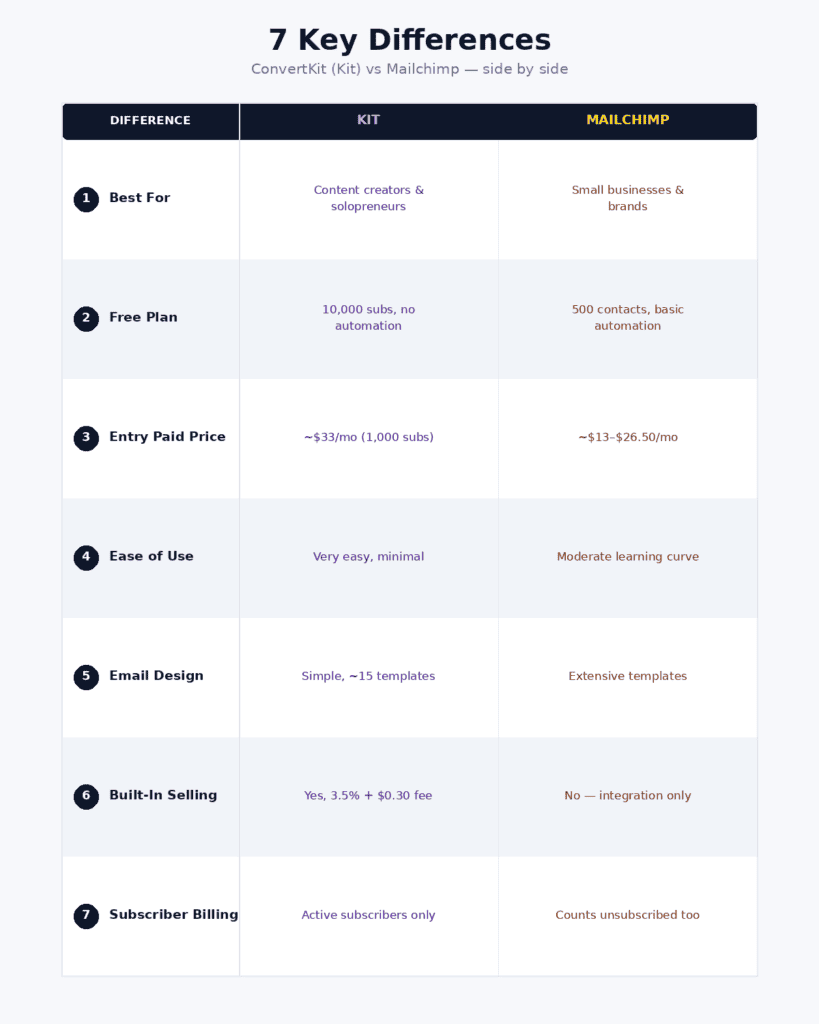
- Best for: Kit — content creators and solopreneurs | Mailchimp — small businesses and brands
- Free plan: Kit — 10,000 subscribers, no automation | Mailchimp — 500 contacts, basic automation included
- Entry paid price: Kit — ~$33/month (1,000 subs) | Mailchimp — ~$13/month (lower tiers)
- Ease of use: Kit — very easy, minimal | Mailchimp — moderate learning curve, more features
- Email design: Kit — simple, ~15 templates | Mailchimp — extensive templates and customization
- Automation: Kit — advanced, creator-focused (paid plans only) | Mailchimp — basic on free, deeper on paid tiers
- Built-in product selling: Kit — yes, with 3.5% + $0.30 transaction fee | Mailchimp — no (ecommerce integration only)
- Subscriber billing: Kit — active subscribers only | Mailchimp — counts unsubscribed/unconfirmed contacts too
- Integrations: Kit — focused, creator-tool oriented | Mailchimp — 300+ integrations, broad ecosystem
Deliverability: Does It Differ Between the Two?
Deliverability — whether your emails actually land in the inbox versus spam — matters more than almost any feature on this list, and it’s worth addressing directly since neither platform’s marketing materials lead with this.
Both Kit and Mailchimp support standard authentication (SPF, DKIM, DMARC) and have established sending infrastructure as long-running platforms. Neither has a well-documented deliverability problem, but neither publishes the kind of independent third-party inbox-placement benchmarks that some competitors (like MailerLite) do.
In practice, the deliverability difference between Kit and Mailchimp is likely to be smaller than the difference caused by your own list hygiene — how often you clean inactive subscribers, whether you use double opt-in, and how consistently you send. Regardless of which platform you choose, set up domain authentication immediately and avoid buying or importing old, unverified lists.
Switching Between Platforms: How Hard Is Migration?
If you’re currently on one platform and considering the other, migration is more straightforward than people often expect.
Kit’s import tool can pull in subscriber lists, tags, and (with some manual rebuilding) automation sequences from Mailchimp exports. The subscriber data transfers cleanly; what takes time is rebuilding automations and email templates to match Kit’s simpler, tag-based structure — especially if your Mailchimp automations rely on heavily designed templates that don’t translate to Kit’s minimal editor.
Going the other direction (Kit to Mailchimp), subscriber and tag data import cleanly as well, but you’ll likely want to rebuild your automations using Mailchimp’s customer journey builder, which works differently from Kit’s linear/branching sequence model.
Either way, budget a few hours (not days) for the data migration itself, and a bit more time to recreate automation logic in the new platform’s interface. Most providers, including both Kit and Mailchimp, offer free migration assistance for new paid accounts — worth asking about before you start manually rebuilding anything.
Final Verdict
After comparing both platforms across pricing, features, and real-world workflows, here’s where this lands in 2026: the right answer depends much more on what kind of business you’re running than on which platform is “better” in the abstract.
If you’re a content creator, newsletter writer, or course seller — and especially if you’re just starting out — Kit’s free plan (10,000 subscribers) remains an excellent starting point, and its built-in commerce tools and creator-focused automation are genuinely well-designed once you’re ready to pay. Just budget for $33+/month when you outgrow the free tier, not the $15/month figure you may have seen in older articles.
If you’re a small business that needs email alongside broader marketing tools — landing pages, social ads, ecommerce — or you want automation available on a free plan from day one, Mailchimp’s lower entry price and wider feature set make more sense.
My honest recommendation: if you’re unsure, start on Kit’s free plan (no cost, 10,000-subscriber ceiling) or Mailchimp’s free plan (500 contacts, but with automation) and use the platform for a month before paying anything. The “right” platform often becomes obvious once you see which one’s workflow actually matches how you write and send emails.
1. Is ConvertKit the same as Kit?
Yes. ConvertKit rebranded to Kit in October 2024. The product, features, and team are the same — only the name changed. Most people still search for it as ‘ConvertKit,’ but the official product and pricing pages now use the name ‘Kit.’
2. How much does Kit (ConvertKit) cost in 2026?
Kit’s free Newsletter plan supports up to 10,000 subscribers with unlimited emails, landing pages, and forms, but only 1 automation and 1 sequence. The Creator plan costs $33/month (annual) or $39/month (monthly) for 1,000 subscribers and unlocks unlimited automations. Creator Pro costs $66/month (annual) or $79/month (monthly) for 1,000 subscribers, adding engagement scoring, advanced reporting, and A/B testing.
3. Did ConvertKit (Kit) raise its prices?
Yes. In September 2025, Kit raised prices across its paid tiers significantly — the Creator plan went from $15/month to $33/month (annual) for 1,000 subscribers, more than doubling, and Creator Pro went from $45/month to $66/month. The previous entry-level plan for smaller lists (around $9-15/month) was eliminated entirely.
4. Which has a better free plan, ConvertKit (Kit) or Mailchimp?
It depends on what you need. Kit’s free plan supports up to 10,000 subscribers (about 40x Mailchimp’s 500-contact limit) with unlimited sends, but includes no real automation (just 1 automation, 1 sequence). Mailchimp’s free plan caps at 500 contacts and 1,000 monthly sends, but includes basic automation. If list size matters most, Kit wins; if automation on a free plan matters most, Mailchimp wins.
5. Can I sell digital products with ConvertKit (Kit)?
Yes, Kit has built-in commerce tools for selling digital products, paid newsletter subscriptions, and accessing the Creator Network for cross-newsletter referrals — all without a separate checkout platform. Kit takes a 3.5% + $0.30 transaction fee per sale. Mailchimp doesn’t have an equivalent built-in feature; it connects to ecommerce platforms like Shopify and WooCommerce instead.
6. How does subscriber counting differ between Kit and Mailchimp?
Kit only bills for active subscribers. Mailchimp counts unsubscribed and unconfirmed contacts toward your plan’s contact limit. For lists with significant historical unsubscribes, this means Mailchimp’s effective cost per active subscriber can be higher than the advertised price suggests.
7. Is Kit (ConvertKit) or Mailchimp better for beginners?
For a beginner with no list yet who wants to focus purely on growing an audience through a newsletter, Kit’s generous free plan (10,000 subscribers) is a strong starting point. For a beginner who wants basic automated sequences (like a welcome email series) without paying anything, Mailchimp’s free plan includes automation that Kit’s free plan doesn’t.
8. What are the best alternatives to ConvertKit and Mailchimp?
For automation on every plan including free, MailerLite is a strong lower-cost alternative. For ecommerce-focused email with revenue attribution, Drip, Klaviyo, or Omnisend are better fits. For businesses needing a CRM with email attached, ActiveCampaign or HubSpot are worth considering instead.





I am Ashish Yadav a software engineer and AI tools researcher with over five years of practical experience working with real-world systems and automation. I am founder of CognifyFuture, where I analyzes, tests, and breaks down AI tools with a focus on what actually works—not what’s trending.
My content is built on hands-on usage, not theory. Instead of generic advice, I focuses on real implementation—how AI tools can be used to automate tasks, improve efficiency, and solve any specific business or individual problems.
Through CognifyFuture, My aims is to eliminate confusion around AI by delivering clear, honest, and actionable insights that help users make smarter technology decisions.







