

Affiliate Disclosure: This Gamma App review contains affiliate links. If you sign up through them, I may earn a small commission at no extra cost to you. I personally tested Gamma across multiple presentation types before writing this, and my honest opinion is what drives everything here.
Is AI the Future of Presentations?
Let me describe a situation most people reading this will recognise. You have a presentation due tomorrow — a pitch deck, a client update, a class project. You open PowerPoint or Google Slides, stare at the blank canvas, spend forty minutes choosing a template, realise the colours are wrong, start adjusting font sizes, and two hours later you have six slides that look passable but not great. You’re exhausted before you’ve even written the actual content.
This is the problem Gamma App is built to solve. Not “make slides prettier” — the actual root problem, which is that presentation creation is a time-consuming, design-skill-dependent task that gets in the way of the thinking and communicating that actually matters. In this Gamma App review, I’ll show you exactly how it solves that problem, where it falls short, what the real 2026 pricing looks like, and how to get the most out of it — including the specific workarounds I use when its output isn’t quite right.
What Is Gamma App?
Gamma App is an AI-powered platform that lets you create presentations, documents, and lightweight web pages from a text prompt — in seconds rather than hours. Unlike PowerPoint or Google Slides, where you start with an empty slide and manually build every element, Gamma starts with your idea and generates a fully structured, visually designed deck that you then refine. The time savings are real and significant.
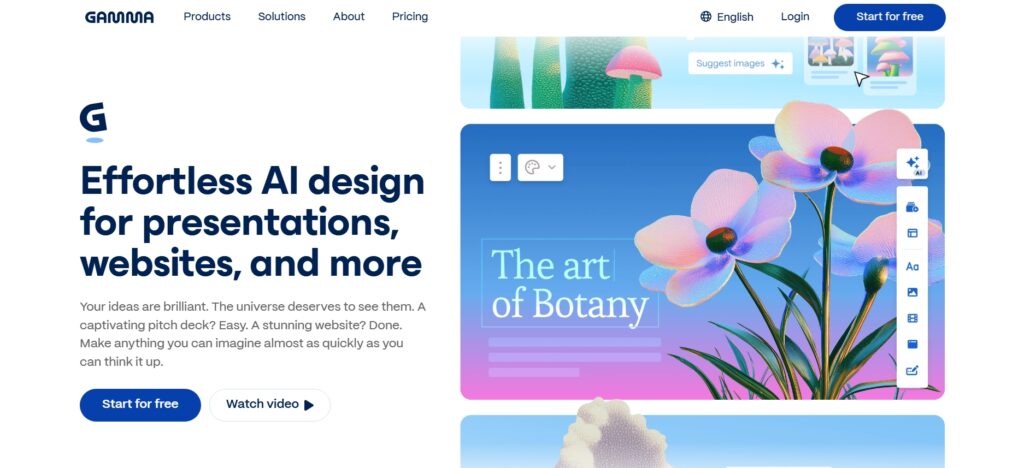
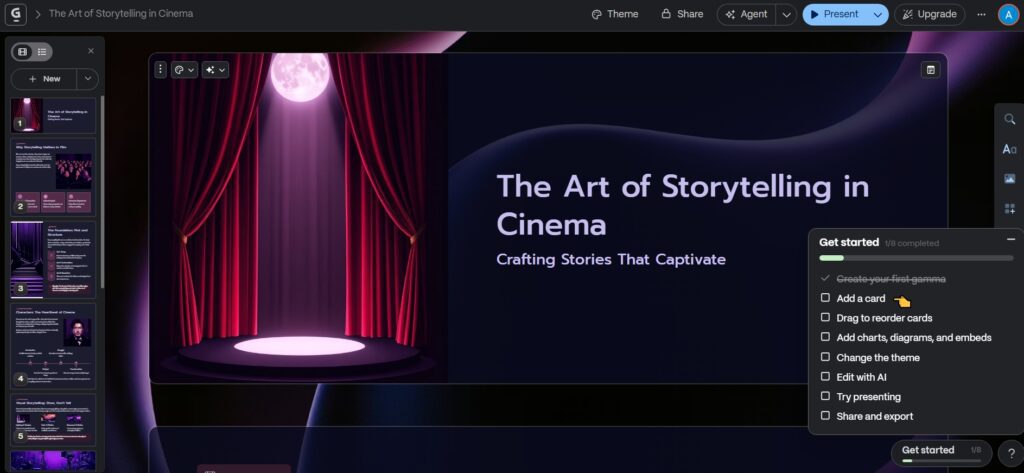
The core architectural difference is that Gamma uses a card-based layout rather than fixed slides. Each card is a self-contained content block — more flexible than a slide, more structured than a blank document, and optimised for both screen presentations and web sharing. This format is one of Gamma’s genuine innovations: it removes the rigid grid that makes traditional slide design so frustrating, while keeping enough structure that the output looks professional without any manual design work.
Read the Best AI Tools for Presentation in 2026 Click Here
How to Use Gamma App (Step-by-Step)
Gamma’s workflow is genuinely simple — even for people who have never used an AI creative tool before. Here’s exactly what happens from the moment you open it.
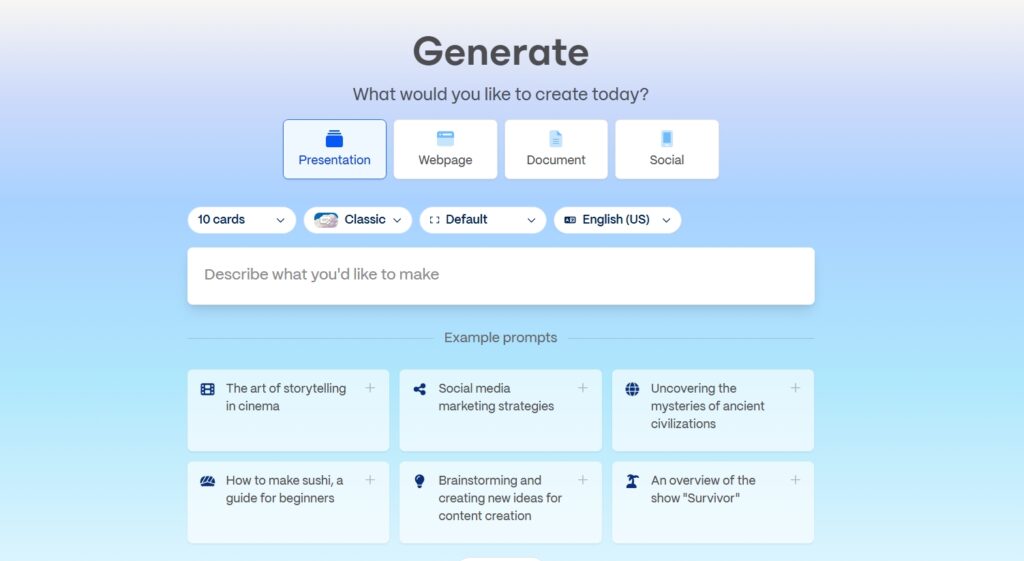
Step 1 – Start With a Prompt
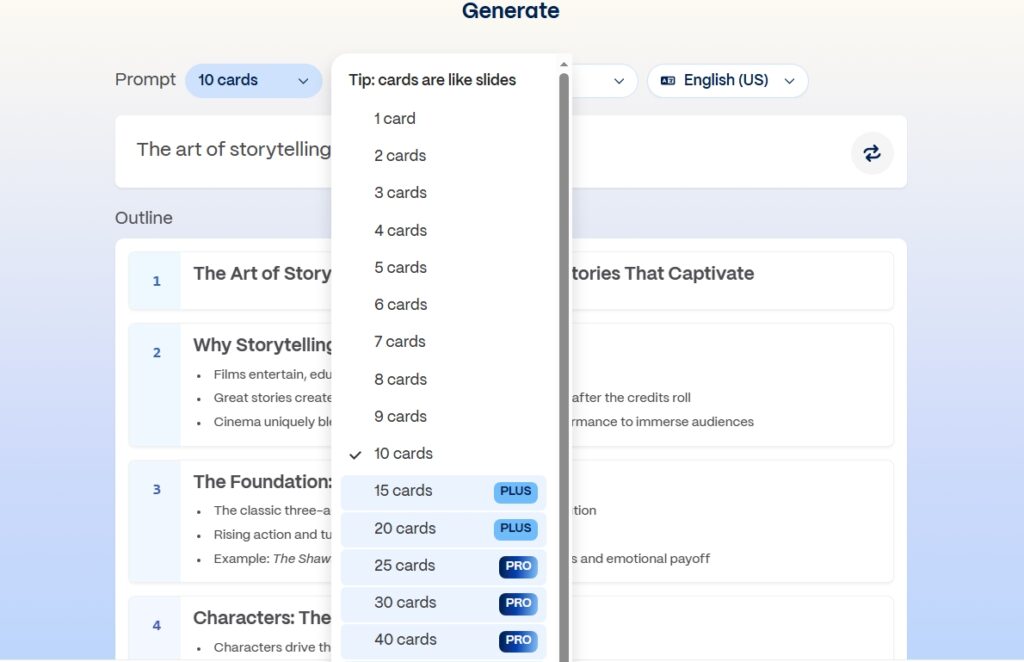
You type a topic, paste an outline, or write a short description of what you need. The more specific you are, the better the output — but even a broad prompt like “create a sales pitch for an AI startup” produces something usable. Gamma also lets you choose between generating from a prompt, importing an existing document, or starting from a template if you prefer more control from the start.
Step 2 – AI Generates the Structure
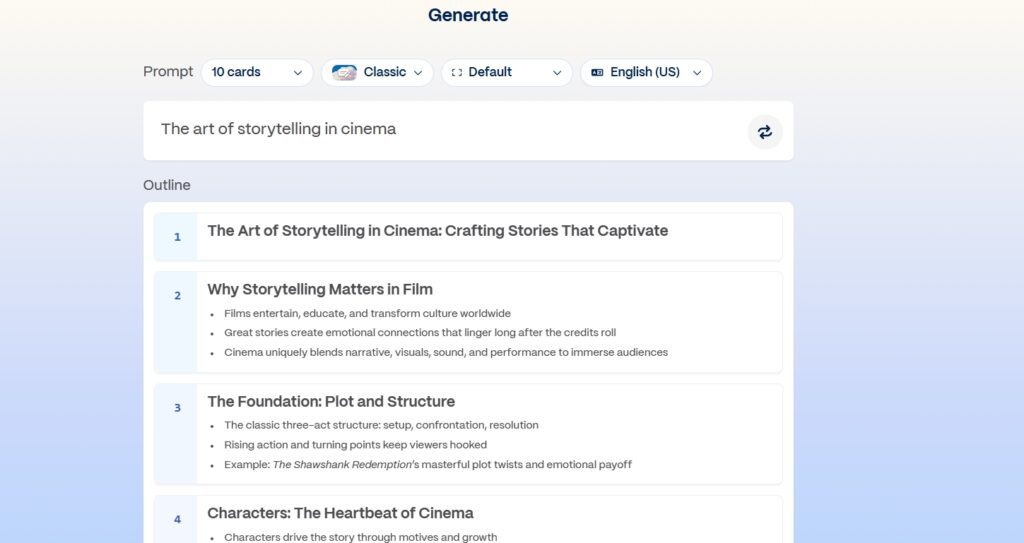
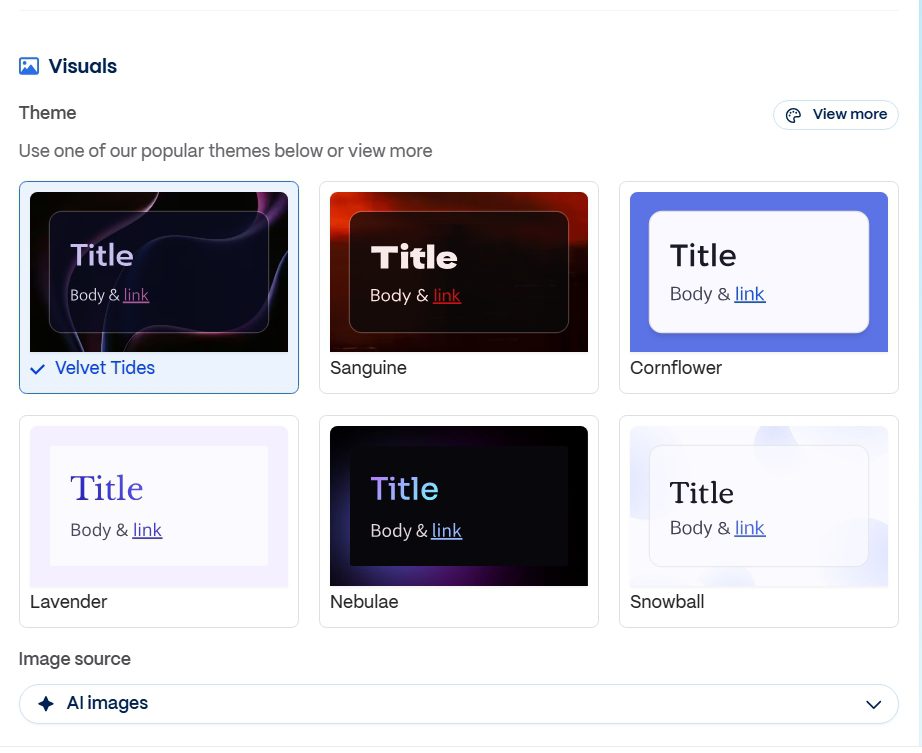
Within 40–60 seconds, Gamma’s AI generates a complete deck: a logical narrative flow, written content for each card, and a modern visual design applied automatically. The structure is usually solid — problem, solution, market, proof, call to action — which reflects Gamma’s training on effective presentation formats. The design applies colour palettes, typography, and layout choices that would take a non-designer significantly longer to replicate manually.
Step 3 – Customize and Enhance
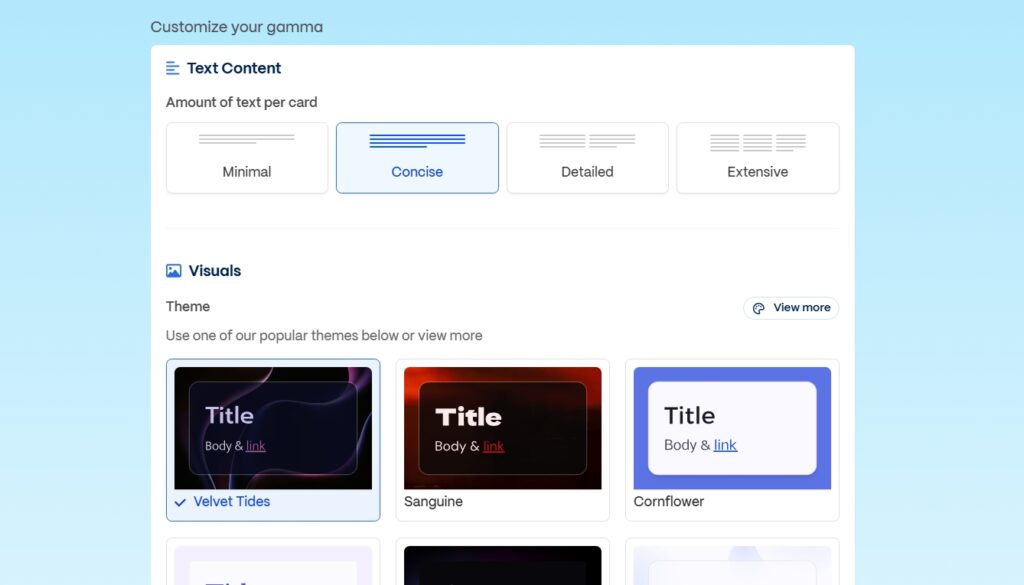
After generation, you’re in the editor — a clean interface where you can edit text directly on the card, rearrange the card order, swap themes, add your own images or videos, insert charts, embed links, and refine the content. The editing experience is considerably faster than PowerPoint because you’re adjusting an existing structure rather than building from scratch. Most people spend 15–20 minutes editing versus 2+ hours building from zero.
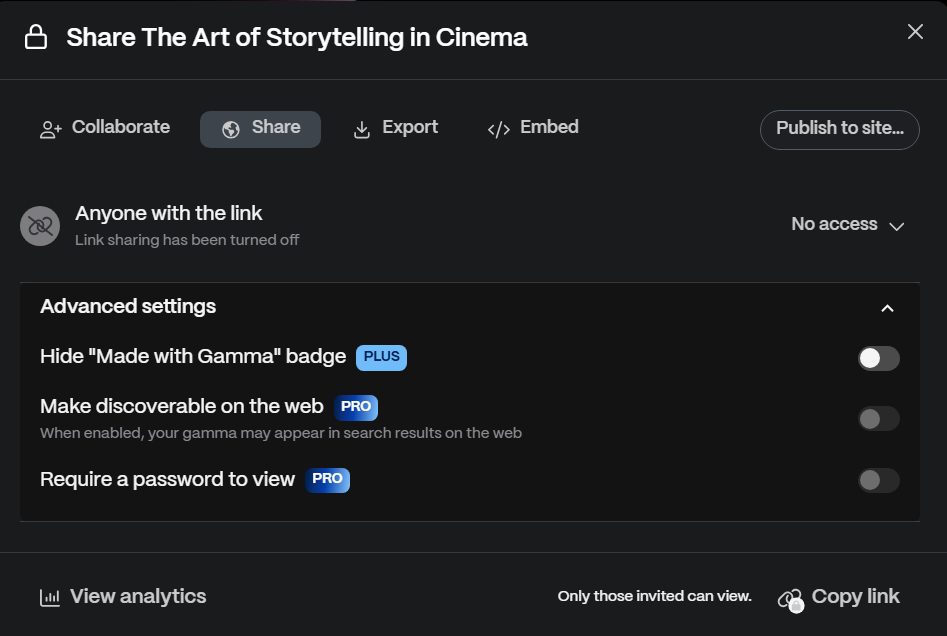
Step 4 – Share or Export
This is one of Gamma’s clearest advantages over traditional tools. You can share a live web link — no download required, no version compatibility issues, works on any device — embed it on a website, export to PDF for printing, or export to PowerPoint if the recipient insists on a .pptx file. The link sharing is particularly powerful for remote teams and client presentations where you want the recipient to see the final version without managing email attachments.
My Real Testing Experience With Gamma App
I don’t review AI tools by reading their feature pages — I put them through real-world scenarios, the kind of tasks the people reading this are actually trying to accomplish. Here’s an honest account of what I found.
Test 1: Creating a Startup Pitch Deck
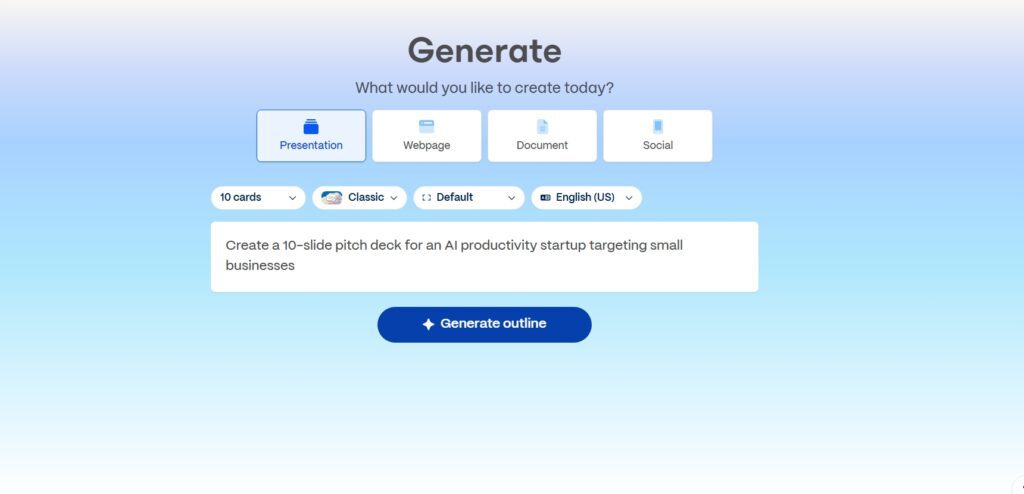
Prompt I used:
“Create a 10-slide pitch deck for an AI productivity startup targeting small businesses.”
What happened?
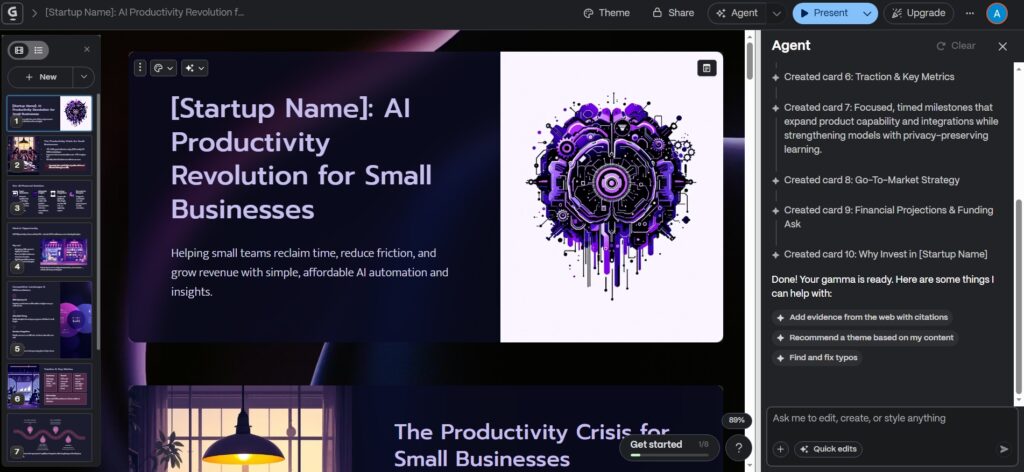
The deck was ready in around 45 seconds. The structure impressed me — it followed the Problem → Solution → Market Size → Revenue Model → Roadmap → Team arc that investor decks typically need, without me specifying any of that. The design was clean and modern. I genuinely would not have been embarrassed to send this to someone as a first draft.
What needed fixing?
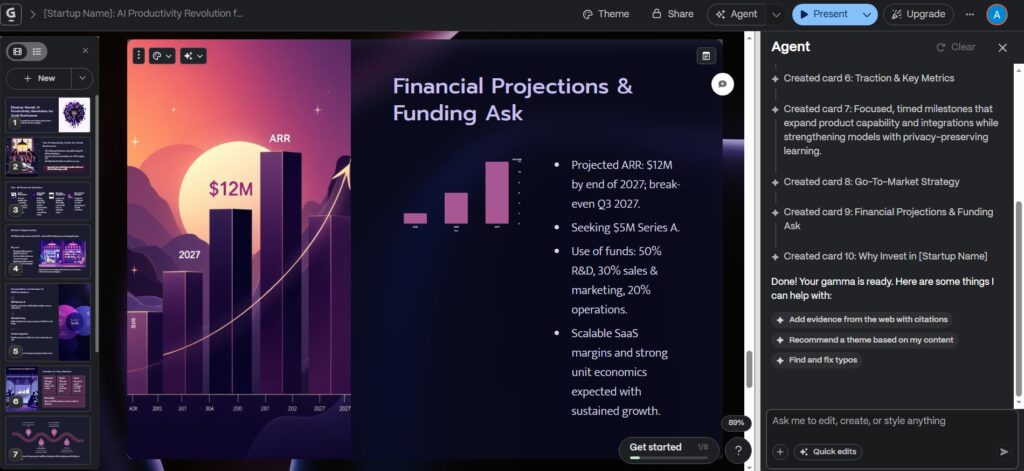
The financial projections slide was generic placeholders — it had a chart but no real numbers, which makes sense since Gamma has no context for actual business data. The content on several cards had that slightly formal “AI textbook” register — structurally correct but lacking personality and specificity. I rewrote about 25–30% of the text to make it sound like a real founder had written it. The honest summary: excellent for getting a structured first draft in under a minute; not ready to send to investors without a meaningful editing pass.
My Honest Take after Creating:
For first-draft creation and rapid prototyping, Gamma is genuinely excellent — it’s the fastest way I’ve found to go from “I need to present this” to “I have something to work with.” For a polished investor-ready or client-facing deck, plan on 20–30 minutes of personalisation after generation. That’s still dramatically faster than building from scratch, but it’s an important expectation to set.
If want to Test Gamma App Yourself?
Start with the free plan, generate a few slides, and see how it performs for your use case.
Try Gamma App Free Here By Clicking & Build Your First Deck →Real Problems What I Face and You Might Face (And Solutions)
Every AI tool has friction points that most reviews gloss over. Here are the four problems I actually hit while using Gamma — and the specific fixes I found for each.
Problem 1: “The AI text feels generic.”
This is the most common frustration with Gamma, and it happens because the AI optimises for structure and coherence rather than voice and specificity. The output reads like a well-organised Wikipedia summary — accurate, but not differentiated. If you’re building a pitch deck for your actual company, or a proposal for a specific client, the generic framing becomes a problem immediately.
Solution:
The fix is in how you write the prompt. Instead of “create a pitch deck for an AI startup,” try: “Create a 10-slide pitch deck for an AI tool that helps solo consultants automate client reporting. The tone should be confident but not corporate. The audience is non-technical small business owners who are frustrated by time spent on admin.” That level of specificity cuts the generic output dramatically. Also, plan to rewrite the most visible slides — the problem statement, the hook, and the call to action — manually, because those are where voice matters most and AI is weakest.
Problem 2: PowerPoint Export Looks Slightly Different
Gamma’s card-based layout doesn’t map perfectly to PowerPoint’s fixed-grid slide format. When you export to .pptx, some elements shift position, custom fonts may not carry over, and spacing can look different from what you saw in Gamma’s browser interface. If you’re sending to a client who will view it in PowerPoint, this can create an embarrassing gap between what you designed and what they see.
Solution:
Whenever possible, share via Gamma’s live web link rather than exporting. The link is always pixel-perfect and works on any device without software. If a .pptx is genuinely required, use PDF export for static presentations where layout must be exact, or do a test export early in your workflow — before spending time on heavy design customisation — so you can spot and fix layout issues before they matter.
Problem 3: Free Plan Credits Run Out Fast
Gamma’s free plan gives you 400 one-time AI credits — and they don’t refresh. A full presentation creation costs roughly 40 credits, which means you get about 8–10 full decks from the free plan total, forever. If you experiment heavily — regenerating slides, trying different themes, testing prompts — you can burn through those credits in an afternoon without producing much usable output.
Solution:
Use the outline mode before committing credits to full generation — Gamma lets you preview and adjust the outline structure before the AI generates the full deck. This means you can get the narrative flow right without spending credits on versions you’ll discard. Also, avoid regenerating entire decks when you just need to change one card — you can edit individual cards in the editor without using AI credits at all. If you’re using Gamma regularly for work, the Plus plan at $8/month (annual) is the realistic upgrade: it gives you 1,000 monthly credits — enough for about 25 full presentations per month — and removes the Gamma branding from shared links, which is the most visually noticeable free-tier limitation.
Problem 4: Limited Deep Customization
If you’re used to PowerPoint’s granular control — custom animation timing, precise pixel-level element positioning, complex slide master templates — Gamma will feel restrictive. The customisation options are intentionally limited in service of speed and simplicity, which is the right trade-off for most users but the wrong one for professional designers or presentations with strict brand requirements.
Solution:
Use Gamma as your drafting and structure tool, then finish in the platform that gives you the control you need. A common workflow for presentation-heavy teams: generate the structure and initial content in Gamma (5–10 minutes), then import the outline or PDF into Canva or PowerPoint for final design polish (30–45 minutes). You still save significant time on the thinking and structuring phases, even if you’re not using Gamma for final delivery.
Key Features of Gamma App
AI-Powered Content Creation
Gamma doesn’t just arrange your existing text into slides — it writes the content too. Given a topic, it structures the argument, writes the copy for each card, and applies appropriate visual hierarchy. For users who struggle with presentation structure (which section comes first? how detailed should each slide be?) or who simply don’t want to write slides from scratch, this is genuinely transformative. The quality of the AI writing is solid for drafts — not final copy, but a strong starting point that’s much faster to edit than to write from zero.
Card-Based Presentation Design
The card format is one of Gamma’s most important design decisions, and it’s easy to underestimate. Traditional slides force you to think in terms of fixed rectangles that will be projected on a screen. Cards think in terms of content blocks that can be any length, that adapt to different screen sizes, and that work equally well in a live presentation or as a shared document someone scrolls through on their phone. For presentations that will be shared rather than projected, this format is significantly better than slides.
Web-First Experience
Every Gamma presentation has a native web URL — no download, no software, no “I can’t open this file” email from a client. The web-first design also means presentations are automatically responsive across desktop, mobile, and tablet, which matters increasingly as more content is consumed on phones. For anyone sharing decks externally — with clients, investors, or event audiences — the link-based sharing model removes friction that traditional file-based presentations create every time.
Rich Media Integration
Adding media to a Gamma presentation is genuinely easy — you can embed images, GIFs, videos, interactive charts, and external links directly into any card. The AI also generates images as part of the initial creation (using credits), so you don’t start with blank placeholder boxes. For content creators and marketers, the ability to embed live content — a YouTube video, a live data chart, a website preview — inside a presentation is a capability that PowerPoint simply doesn’t offer cleanly.
Collaboration Tools
Gamma supports real-time collaboration — multiple team members can edit the same presentation simultaneously, with changes appearing live, similar to Google Docs. Access control lets you share a view-only link with some people while giving edit access to others. On the Pro plan and above, you get per-viewer analytics — you can see who opened your shared link, how long they spent on each card, and where they dropped off. For sales decks and investor presentations, that engagement data is genuinely valuable for prioritising follow-up.
Who Should Use Gamma App?
Students & Educators
For students, Gamma solves the presentation problem most efficiently — you can go from lecture notes or a research topic to a fully structured visual presentation in under ten minutes, leaving more time for the actual content and thinking. For educators, creating course materials, lesson summaries, and knowledge explainers becomes dramatically faster. The web link sharing means students can access materials on any device, and the card format works well for reference content people scroll through after a class.
Professionals & Corporate Teams
The biggest time sink in corporate presentation culture is the hours spent on formatting, aligning, and designing slides that could have been emails. Gamma removes most of that friction — weekly status updates, strategy documents, internal reports, and client-facing presentations can all be produced significantly faster. The real-time collaboration and link sharing also streamline the review process, which tends to be another major time cost in corporate contexts.
Startup Founders & Entrepreneurs
Founders are perpetually producing presentations — investor pitches, partner decks, product demos, team updates — while simultaneously trying to build a company. Gamma compresses the time cost of that communication work substantially. The pitch deck use case is particularly strong: Gamma’s default structure follows investor-standard narrative arcs, and even the generic first draft gives you a solid framework to personalise. Getting from “I need a deck” to “I have a working draft” in under ten minutes versus over two hours is a meaningful productivity gain when you’re running lean.
Content Creators & Bloggers
For content creators, Gamma opens up presentation-format content as a viable output type without requiring PowerPoint expertise. A detailed blog post can become a visual slide deck in minutes — repurposed for LinkedIn, shared as a link in a newsletter, or embedded on a website. The AI image generation means you’re not hunting for stock photos to fill empty slides. And because Gamma presentations are web pages, they’re searchable and shareable in ways that traditional slide files aren’t.
Gamma App Pricing Plans: Free vs Pro Explained
Gamma uses a credit-based pricing model — AI actions consume credits, and your plan determines how many you get and whether they refresh monthly. Here are the verified 2026 prices:
Free Plan
The free plan gives you 400 one-time AI credits — enough for roughly 8–10 full presentations total. Credits do not refresh; once used, you earn more through referrals (200 credits per referral) or by upgrading. Gamma branding appears on all shared or exported content. The free plan is genuinely useful for testing the platform, occasional one-off presentations, or students who only create a few decks per semester.
Paid Plans
| Plan | Annual Price | Monthly Price | Monthly Credits | Key Unlocks |
|---|---|---|---|---|
| Free | $0 | $0 | 400 one-time | Basic creation, Gamma branding |
| Plus | $8/mo | $10/mo | 1,000 (~25 decks) | Removes Gamma branding, 20 cards/prompt, advanced image models |
| Pro | $15/mo | $20/mo | 4,000 (~100 decks) | Custom domains, analytics, password protection, API access, custom fonts |
| Ultra | $100/mo | $100/mo | 20,000 | Premium AI models, maximum generation headroom |
| Team | $20/seat/mo | — | Shared pool | Shared brand kits, team workspace (min. 2 seats) |
| Business | $40/seat/mo | — | Shared pool | SSO, advanced admin, priority support (min. 10 seats) |
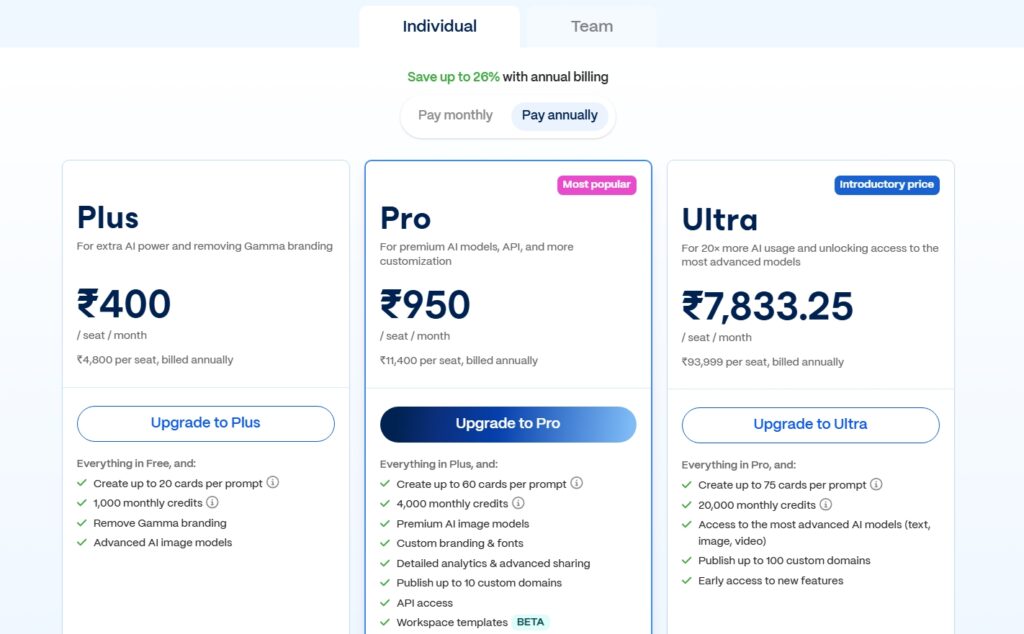
For most individual professionals, Plus at $8/month (annual) is the right upgrade. The two most impactful changes are: removing the Gamma branding from shared links (which looks unprofessional when sharing with clients or investors) and getting 1,000 monthly refreshing credits (roughly 25 full decks per month). If you need analytics to track who views your decks, custom domains, or API access, Pro at $15/month is the next step. Annual billing saves approximately 20–25% across all plans.
Pros and Cons of Gamma App
Pros
- Dramatically faster than PowerPoint or Google Slides for first-draft creation
- Zero design skills required — the AI handles layout, typography, and visual hierarchy
- Card-based format works better than slides for web sharing and mobile viewing
- Live web link sharing removes download and compatibility friction
- Real-time collaboration and per-viewer analytics on Pro plan
- Rich media embedding (video, GIFs, charts, live links) natively supported
- Plus plan ($8/mo annual) is genuinely affordable for regular professional use
Cons
- AI-generated content is generic by default — requires meaningful personalisation for professional use
- PowerPoint export quality is imperfect — layout shifts and font issues are common
- Free plan’s 400 one-time credits run out quickly with heavy experimentation
- Limited animation and transition control compared to PowerPoint
- No offline access — requires an internet connection
- Not suitable for enterprise brand-governance environments without the Business plan
Gamma vs Google Slides vs PowerPoint: Which AI Presentation Tool Is Better?
This is the comparison most people searching for Gamma are trying to make. Here’s an honest side-by-side across the dimensions that actually drive the choice:
| Feature | Gamma App | PowerPoint / Google Slides |
|---|---|---|
| AI Content Generation | Yes — full deck from a prompt | Limited (Copilot add-on for PPT) |
| Design Automation | Yes — automatic layout + styling | Manual (templates help, not automate) |
| Web Sharing | Excellent — native live links | Limited — file download or Drive share |
| Animation Control | Basic | Advanced (PPT) / Moderate (Slides) |
| Learning Curve | Very Low | Medium (PPT) / Low (Slides) |
| Time to First Draft | Under 2 minutes | 1–3 hours from blank |
| Custom Branding | Moderate (Pro plan) | Full control |
The clearest way to frame this: Gamma wins decisively on speed, simplicity, and web-native sharing. PowerPoint wins on design control, animation depth, and enterprise brand compliance. For the majority of business presentations — where the goal is communicating clearly, not showcasing design skills — Gamma’s trade-offs are the right ones.
Gamma App vs Canva AI vs Beautiful AI vs Tome AI Feature Comparison
When you’re evaluating AI presentation tools specifically, the real competition isn’t PowerPoint — it’s Canva AI, Beautiful.ai, and Tome. Here’s how Gamma compares across the dimensions that matter most:
| Feature | Gamma | Canva AI | Beautiful.ai |
|---|---|---|---|
| AI Full-Deck Generation | Yes — prompt to full deck | Partial — needs template selection | Yes — smart slide templates |
| Starting Price | Free / $8/mo | Free / $15/mo (Pro) | $12/mo (no free plan) |
| Custom Branding | Moderate (Pro plan) | Strong — brand kits on free | Strong — brand controls built-in |
| PPT Export Quality | Medium — layout shifts | High — reliable export | High — designed for PPT compatibility |
| Offline Access | No | Limited (desktop app) | Yes |
| Web Sharing | Excellent — native links | Good — share links available | Good |
| Best For | Speed, first drafts, web sharing | Design quality, brand compliance | Professional slide quality + PPT |
If brand compliance and high-quality PowerPoint export are your primary requirements, Beautiful.ai or Canva AI are stronger choices. If speed of creation and web-native sharing are what you need most — and you’re comfortable editing the AI output — Gamma is the fastest tool in this category.
Who Should Use / Who Should Avoid Gamma App For Quick Decision
Who Should Use Gamma App?
Gamma is the right tool if you create presentations frequently, hate the time it takes to build them from scratch, and are comfortable spending 15–20 minutes editing AI-generated output rather than 2+ hours designing from zero. Students who need fast, good-looking decks for class; startup founders building pitch materials; marketers producing client-facing content; bloggers and creators repurposing written content into visual formats — all of these users will get genuine, measurable value from Gamma’s speed advantage.
Who Should Avoid It?
Gamma is not the right tool if precise brand compliance is non-negotiable (Canva AI or Beautiful.ai handle this better), if you need enterprise-grade PowerPoint output with pixel-perfect export (Beautiful.ai wins here), if you work without internet access, or if your presentation use case requires complex animations and transitions that Gamma simply doesn’t support. Professional designers who need full creative control will find Gamma’s intentionally limited customisation frustrating rather than helpful.
Is Gamma App Safe and Trustworthy?
Gamma operates on secure cloud infrastructure with controlled sharing permissions — you choose who can view or edit each presentation, and access can be revoked at any time. The platform is used by tens of thousands of professionals, educators, and enterprise teams globally, and it complies with standard SaaS security expectations. Content you create in Gamma is not used to train their AI models without explicit consent. For most business and educational use cases, the security posture is adequate. For regulated industries handling sensitive data (healthcare, finance, legal), you’d want to review Gamma’s data processing agreement before putting confidential information into the platform — a reasonable precaution with any cloud-based AI tool.
Expert Opinion – Is Gamma App Worth Using in 2026?
Having tested Gamma extensively across pitch decks, client presentations, internal reports, and educational materials, my honest assessment is this: Gamma is one of the most genuinely useful AI tools I’ve evaluated, because it solves a real and common problem — the time cost of presentation creation — in a way that actually works in practice. The time savings are real. The learning curve is minimal. The output quality, after personalisation, is professional.
The important caveat is that Gamma is a first-draft tool, not a final-output tool. If you expect to prompt it and publish without editing, you’ll be disappointed by the generic quality of the raw output. But if you treat it as an AI collaborator that handles structure and design while you handle voice and specificity, it compresses a 2-hour task into a 20-minute one. That’s a meaningful productivity gain for anyone who creates presentations regularly.
Conclusion: Should You Use Gamma App?
If presentations eat more of your time than they should — and they do for most people — Gamma App is worth trying. Start with the free plan, use the 400 one-time credits on a presentation type you actually need (a pitch deck, a client proposal, a class project), and judge it by the time you save and the quality of the output after your editing pass. Most people who try it don’t go back to building from scratch in PowerPoint. When you’re ready to use it for professional work, Plus at $8/month removes the Gamma branding and gives you enough monthly credits for 25 full presentations — which is a reasonable price for what it replaces in hours of design work.
What is Gamma App used for?
Gamma App is used to create AI-powered presentations, documents, and web-based content from a text prompt. It’s most commonly used for pitch decks, business presentations, client proposals, educational materials, and any scenario where you need a professionally designed, structured visual presentation faster than traditional tools allow. The AI writes the content and applies visual design automatically, which means you can go from idea to working deck in under two minutes.
Is Gamma App free?
Yes. Gamma’s free plan gives you 400 one-time AI credits — enough for roughly 8–10 full presentations. The credits don’t refresh, so once used you either earn more through referrals or upgrade to a paid plan. The free tier includes Gamma branding on all shared content. For regular professional use, Plus at $8/month (annual billing) is the practical upgrade — it removes branding and gives you 1,000 monthly refreshing credits, supporting about 25 decks per month.
Is Gamma App better than PowerPoint?
It depends on what you’re optimising for. For speed and first-draft creation, Gamma is dramatically faster — a full deck in under two minutes versus 1–3 hours building from scratch in PowerPoint. For design control, animation complexity, brand compliance, and high-quality PowerPoint export, PowerPoint wins. The practical answer for most users is that Gamma is better for creating and sharing, while PowerPoint is better for precise final-output control. Many professionals use both: Gamma for drafting, PowerPoint for final delivery when required.
Can I export Gamma App presentations?
Yes. Gamma supports PDF export (recommended for layout-critical sharing), PowerPoint .pptx export (available but formatting may shift), and live web link sharing (the best-quality option for most use cases). Exporting to PowerPoint is available on all paid plans. If layout precision matters, PDF or the live web link will always look better than the .pptx export, because Gamma’s card-based format doesn’t map perfectly to PowerPoint’s fixed grid.
Does Gamma App require design skills?
No — this is one of Gamma’s core value propositions. The AI handles layout selection, typography, colour palettes, spacing, and visual hierarchy automatically. You don’t need to know anything about slide design to produce a presentation that looks modern and professional. You do need to edit the AI-generated content to make it specific and on-voice for your audience, but that’s editing rather than designing — a different and generally faster skill set.
Is Gamma App good for startups?
Yes — it’s one of the best use cases for Gamma. Startup founders need to create pitch decks, investor updates, partner presentations, and product demos constantly, usually with limited time and no dedicated design resource. Gamma’s default deck structure for pitch content follows investor-standard narrative arcs (problem, solution, market, traction, ask), which gives you a solid structural foundation to personalise. Going from ‘I need a pitch deck’ to ‘I have a working draft’ in under ten minutes is a genuine advantage when you’re operating lean.
Can teams collaborate using Gamma App?
Yes. Gamma supports real-time collaboration — multiple users can edit the same presentation simultaneously, with live changes visible to all editors. You can share view-only links with some people and edit access with others. On the Pro plan, you get per-viewer analytics showing who opened your shared link and how long they spent on each card. Team and Business plans add shared brand kits, team workspaces, and admin controls for organisations managing multiple presenters.
Is Gamma App suitable for Google Discover content?
Yes. Gamma’s visual-first, AI-powered content format aligns well with the type of engaging, media-rich content that performs on Google Discover. Presentations created with Gamma can be shared as web pages with clean URLs, making them discoverable and indexable. The card-based format also creates naturally scroll-friendly content that matches how Discover users consume content on mobile devices.





I am Ashish Yadav a software engineer and AI tools researcher with over five years of practical experience working with real-world systems and automation. I am founder of CognifyFuture, where I analyzes, tests, and breaks down AI tools with a focus on what actually works—not what’s trending.
My content is built on hands-on usage, not theory. Instead of generic advice, I focuses on real implementation—how AI tools can be used to automate tasks, improve efficiency, and solve any specific business or individual problems.
Through CognifyFuture, My aims is to eliminate confusion around AI by delivering clear, honest, and actionable insights that help users make smarter technology decisions.