
Disclosure: This comparison may contain affiliate links. If you sign up through them, I may earn a small commission at no extra cost to you. Both tools were personally tested across 100+ image generations before writing this.
The question I kept getting asked after publishing the Leonardo AI review: “Should I just use Stable Diffusion instead? It’s free and supposedly more powerful.” So I ran both tools through 100+ image generations across five different creative categories — cinematic scenes, character portraits, game assets, photorealistic product mockups, and abstract art — and documented what I actually found. The answer is more nuanced than “one is better.”
The fundamental difference is not capability — it’s philosophy. Leonardo AI is a cloud-based creative tool designed for people who want excellent results immediately. Stable Diffusion is open-source infrastructure designed for people who want unlimited control and are willing to invest time to achieve it. Understanding which philosophy matches your actual workflow is the only comparison that matters.
What Is Leonardo AI?
Leonardo AI is a cloud-based AI image generation platform built on top of Stable Diffusion’s underlying architecture, with a polished web interface, curated pre-trained models, and workflow tools that make the generation process accessible without any technical knowledge. It has grown rapidly since launching in late 2022, now serving designers, game developers, content creators, marketers, and bloggers who need high-quality AI visuals without setting up local infrastructure.
What distinguishes Leonardo from raw Stable Diffusion is not the underlying model — it’s the curation layer on top. Leonardo has trained specific models for specific use cases (PhotoReal v2 for photorealism, Anime XL for stylised illustration, Phoenix for general versatility) and built LoRA training, prompt guidance, upscaling, background removal, and video generation into a single browser-based workflow. You get the power of Stable Diffusion’s ecosystem without the setup complexity.
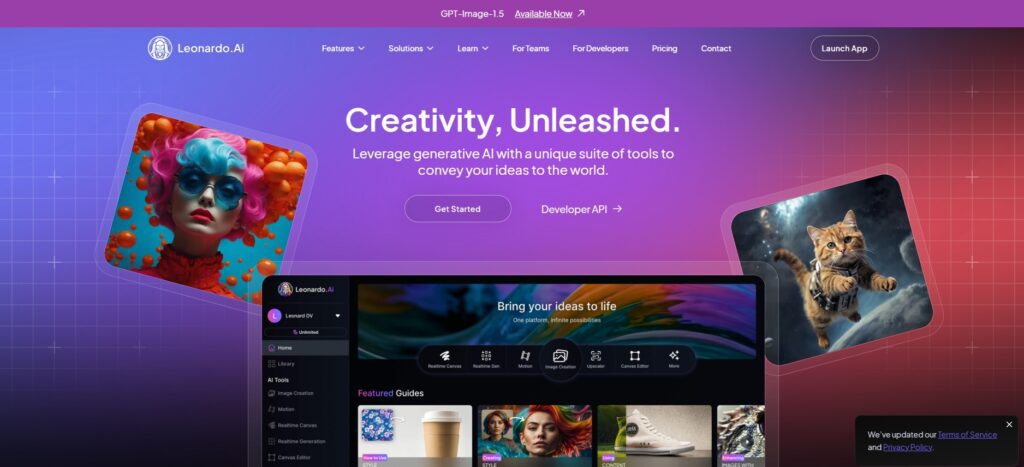
Key Features of Leonardo AI
Leonardo’s core feature set covers the complete AI image workflow: text-to-image and image-to-image generation across 30+ foundational models, custom LoRA model training for style and character consistency, prompt enhancement tools that improve prompt quality automatically, a Universal Upscaler and Alchemy Refiner for resolution and detail enhancement, background removal and inpainting for targeted edits, 3D texture generation for game assets, and video generation through Veo 3 integration. All of this runs in the browser with no installation or GPU required — you log in and start generating.
Read the full Leonardo AI review with detailed pricing breakdown Click Here
What Is Stable Diffusion?
Stable Diffusion is an open-source latent diffusion model developed by Stability AI and released publicly in August 2022. The model weights are freely available, the architecture is open, and an enormous global community has built on top of it — producing thousands of custom checkpoints, LoRA models, extensions, and interfaces. Stable Diffusion 3.5 (the current release as of mid-2026) represents a significant architectural improvement over earlier versions, with better prompt adherence, improved human anatomy, and superior text rendering within images.
Stable Diffusion doesn’t have a single official interface — it’s an underlying model that runs through community-built frontends. The two most widely used are AUTOMATIC1111 (the original standard, deeply configurable) and ComfyUI (node-based workflow builder, more flexible for complex pipelines). Web-based access is available through platforms like Replicate, Stability AI’s DreamStudio, and Google Colab notebooks — but the full capability of Stable Diffusion is only accessible when running it locally with your own hardware or a cloud GPU service.
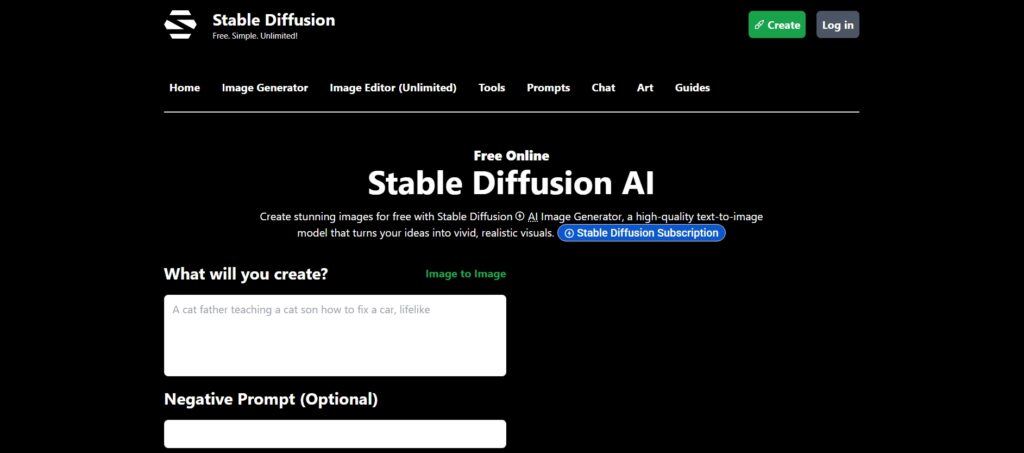
Key Features of Stable Diffusion
Stable Diffusion’s feature set, when fully configured, is the most comprehensive available in AI image generation: text-to-image and image-to-image across any checkpoint model, inpainting and outpainting with pixel-level precision, ControlNet for structural guidance (pose, depth, edges, segmentation), LoRA and fine-tuning for any visual style or subject, CFG scale and sampler control for output variation, regional prompting for multi-subject scenes, img2img variations, upscaling via ESRGAN and other models, and the entire CivitAI model ecosystem with thousands of community-trained specialisations. The key limitation is that accessing all of this requires setting up, maintaining, and understanding a complex local environment — which takes significant time investment.
Feature-by-Feature Comparison
| Feature | Leonardo AI | Stable Diffusion |
|---|---|---|
| Ease of Use | ⭐⭐⭐⭐⭐ — browser, no setup | ⭐⭐ — complex local setup required |
| Open Source | ❌ Proprietary platform | ✅ Fully open-source |
| Custom Models | Limited — curated in-platform | Extensive — full CivitAI ecosystem |
| Cloud-Based | ✅ Always | Optional — local preferred for full control |
| Installation Needed | ❌ None | ✅ Yes (local) — significant setup |
| ControlNet Support | Limited | ✅ Full — pose, depth, edges, more |
| LoRA Training | ✅ In-platform (1–50 slots per plan) | ✅ Unlimited — any custom style |
| Beginner Friendly | Very High | Low |
| Offline Generation | ❌ | ✅ Once installed locally |
| Commercial Use | ✅ Paid plans — full IP ownership | ✅ Per model licence — usually allowed |
Image Quality: What 100+ Generations Actually Showed
Leonardo AI Image Quality
Across 100+ test generations, Leonardo AI’s output quality was consistently strong on first generation — even with relatively simple prompts. The PhotoReal v2 model produced genuinely photorealistic portraits and product mockups that required minimal post-generation editing. Phoenix, Leonardo’s general-purpose model, handled a wide range of styles (cinematic, illustration, concept art) with polished output. For game asset generation — character sprites, weapon designs, environment backgrounds — Leonardo’s curated models were the fastest path from idea to usable asset I’ve found in any cloud-based tool.
The key advantage in testing was consistency. The same prompt run three times produced visually coherent variations rather than wildly different outputs — which matters enormously for creators who need visual identity to hold across a project. With LoRA training applied, the consistency improved further, making Leonardo the more practical tool for any project requiring multiple images of the same character or style.
Stable Diffusion Image Quality
Stable Diffusion’s quality ceiling is higher than Leonardo’s — but reaching it requires significantly more work. With the right checkpoint model, carefully crafted positive and negative prompts, ControlNet guidance, and appropriate sampler settings, Stable Diffusion produced images in my testing that outperformed Leonardo on specific tasks, particularly highly specific compositions (specific pose + specific lighting + specific background) where ControlNet’s structural guidance gives precise control that prompt engineering alone can’t achieve.
The honest reality from 100+ generations: Stable Diffusion’s average output without careful configuration is lower quality than Leonardo’s average output. The best Stable Diffusion results required 5–10 iterations and parameter adjustments to achieve what Leonardo produced on the first or second generation. For users willing to invest that time and develop the technical knowledge, the ceiling is genuinely higher. For everyone else, the floor difference is significant.
Quality verdict from testing: Leonardo AI for consistent, fast, professional results with minimal effort. Stable Diffusion for maximum quality ceiling on specific compositions when you’re willing to invest the configuration time.
Ease of Use and Learning Curve
Leonardo AI
Leonardo AI is genuinely accessible from the first session. You sign up, the free plan gives you 150 tokens per day, and you can generate your first image within two minutes of registering — no installation, no GPU, no configuration. The interface is well-designed with progressive complexity: beginners use the simple prompt input and style presets; advanced users access the full settings (negative prompts, guidance scale, model selection, LoRA stacking, seed control). The platform’s community feed and available prompts are also a practical learning resource — you can reverse-engineer the prompts behind images you admire and understand what parameters produced them.
Stable Diffusion
Getting Stable Diffusion running locally takes most people 2–4 hours on the first attempt — installing Python, Git, and the relevant UI (AUTOMATIC1111 or ComfyUI), downloading the base model weights (several gigabytes), configuring the environment, and troubleshooting the inevitable dependency conflicts. This is a real upfront cost that puts the tool out of reach for a significant proportion of potential users. Once running, the learning curve for producing consistently good outputs takes weeks, not hours. You need to understand models and checkpoints (what each produces), samplers (Euler a vs DPM++ 2M Karras and what each does to output quality), CFG scale (how closely the model follows the prompt), step count (generation quality vs speed trade-off), and negative prompts (how to prevent common artefacts). Each of these is a meaningful variable that requires experimentation to understand in practice.
Once you’ve invested that learning time, Stable Diffusion rewards it significantly. The control you have over every generation parameter is genuinely unmatched. But the investment is real — it’s more comparable to learning a new software application than using a consumer tool.
Pricing and Accessibility
Leonardo AI Pricing (2026 — Accurate)
Leonardo uses a token-based pricing model. Tokens are consumed per generation based on resolution, model, and features. Annual billing saves approximately 17–20%.
| Plan | Monthly Price | Annual Price | Monthly Tokens | Key Inclusions |
|---|---|---|---|---|
| Free | $0 | $0 | 150/day (daily reset) | Public generations, community models, basic features |
| Apprentice | $12/mo | $10/mo | 8,500 | Private generations, Alchemy, 1 LoRA/month, faster speed |
| Artisan | $30/mo | $24/mo | 25,000 | PhotoReal v2, 20 model slots, API access, relax mode — best value |
| Maestro | $60/mo | $48/mo | 60,000 | 50 model slots, max priority queue, highest speed |
Important token consumption notes: a standard generation costs 4–6 tokens; Alchemy Refiner costs 10–15 tokens (2.5× more); video generation via Veo 3 costs 2,500 tokens for a 5-second clip. Tokens do not roll over between months. For most content creators, Artisan at $24/month (annual) is the right tier — 25,000 tokens covers approximately 4,000–6,000 standard images per month.
Stable Diffusion Pricing
The Stable Diffusion model weights are completely free — you download them from Hugging Face or the official GitHub repository and use them without any licence cost. The actual cost of using Stable Diffusion depends on how you run it:
| Setup Method | Cost | Best For | Limitation |
|---|---|---|---|
| Local (own GPU) | $0/month (hardware already owned) or $200–$800+ (GPU purchase) | Heavy users, developers, maximum control | Upfront hardware cost, technical setup, VRAM limitations |
| Google Colab | $0–$10/month (Colab Pro) | Casual users, no local GPU | Session time limits, slower than local, setup each session |
| Cloud GPU (RunPod, Vast.ai) | $0.10–$0.40/hour | Occasional heavy use without hardware | Per-hour cost compounds, requires technical setup |
| DreamStudio (Stability AI) | $10 for ~500 credits (~500 images) | Users who want web access without setup | Limited to official models, less control than local |
| Replicate API | ~$0.0055–$0.03 per image | Developers integrating into applications | API knowledge required |
The true cost comparison: for a content creator generating 500 images per month, Leonardo AI Artisan at $24/month (annual) provides a clear, predictable cost. Running Stable Diffusion locally requires either owning a GPU (minimum RTX 3060 with 12GB VRAM for comfortable use — approximately $350–$450 used) or paying cloud GPU costs that, for 500 images, might run $5–$15/month but with significant setup and maintenance overhead. The time cost of setup and maintenance is the hidden expense most Stable Diffusion cost comparisons don’t account for.
Who Should Use Each Tool
Use Leonardo AI If You:
You want professional-quality AI images without a multi-hour setup process. You’re a blogger, marketer, content creator, or small business owner who needs reliable visual output for regular content production. You create game assets, concept art, or social media visuals at volume and need consistent style across multiple images. You need commercial rights with clear IP ownership (available on all paid plans). You want a tool that’s updated, maintained, and doesn’t require you to manage a local environment. You have no existing GPU hardware and don’t want to invest in it.
Use Stable Diffusion If You:
You’re a developer, AI researcher, or technically advanced digital artist who values unlimited customisation over convenience. You want to train on completely custom datasets with no platform restrictions. You need offline generation capability for privacy or connectivity reasons. You want access to the full CivitAI model ecosystem with thousands of community-trained specialisations. You’re building AI image generation into an application and need API access or local inference. You have an existing GPU setup and enjoy the exploration of model parameters and custom workflows. You’re interested in AI image generation as a technical craft, not just a content production tool.
Pros and Cons
Leonardo AI Pros
- Functional from first login — no installation, no GPU, no technical knowledge required
- Consistently strong first-generation output — lower average-to-best gap than Stable Diffusion
- LoRA training built into the platform — style and character consistency without local setup
- Clear commercial licensing — paid plans include full IP ownership of private generations
- Generous free tier — 150 tokens/day is sufficient for casual evaluation
- Active model development — new foundational models added regularly
Leonardo AI Cons
- Token-based limits — active users can exhaust monthly allocation, particularly with Alchemy Refiner or video generation
- Closed ecosystem — you cannot access the full CivitAI model library or run custom community checkpoints
- Less ControlNet depth than local Stable Diffusion — structural guidance is less precise
- Tokens don’t roll over — unused monthly tokens expire
Stable Diffusion Pros
- Completely free model — no subscription or per-image cost once set up locally
- Unlimited customisation — every generation parameter is accessible and adjustable
- Full CivitAI ecosystem — thousands of community-trained specialisations for any style or subject
- ControlNet support — structural guidance (pose, depth, edges) for precise compositional control
- Offline capability — works without internet once installed locally
- Privacy — your generations never touch an external server when running locally
Stable Diffusion Cons
- Significant setup time — 2–4 hours to get running for most users, more for troubleshooting
- Steep learning curve — weeks to produce consistently good results across model parameters
- Hardware dependent — quality generation requires a GPU with 8GB+ VRAM
- Ongoing maintenance — models, extensions, and UIs require regular updates and occasional troubleshooting
- No built-in editing suite — background removal, upscaling, and inpainting require separate extensions or external tools
Final Verdict: Leonardo AI vs Stable Diffusion (2026)
After 100+ test generations across both platforms, the honest verdict is not that one tool is better — it’s that they serve genuinely different users, and the right choice is clear once you’re honest about which category you fall into.
If you are a content creator, blogger, marketer, game developer, or anyone who wants excellent AI-generated images as a tool in their creative workflow rather than as the workflow itself — Leonardo AI is the right choice. The time you save on setup, configuration, and troubleshooting pays back the subscription cost many times over. The consistency of output, the LoRA training capability, and the clean commercial licensing make it a professional production tool rather than a hobbyist experiment.
If you are a developer, technical artist, or AI enthusiast who values the exploration of parameters and the community-driven model ecosystem as much as the images themselves — Stable Diffusion is the right choice. The ceiling is genuinely higher for specific use cases, the community is extraordinarily active, and the absence of any per-image cost matters significantly at high generation volumes. The investment of setup time and ongoing learning is the trade — but for users who find that investment inherently interesting rather than burdensome, Stable Diffusion is remarkable.
The surprising finding from 100+ test images: Leonardo’s first-generation quality advantage is more significant than I expected going in. The difference between an average Leonardo output and an average Stable Diffusion output (without careful configuration) is immediately visible. The difference between Leonardo’s best and Stable Diffusion’s best (with careful configuration) is narrower than the marketing on both sides suggests.
Conclusion
Leonardo AI and Stable Diffusion represent two different answers to the same question: how do you harness the power of AI image generation? Leonardo’s answer is accessibility, consistency, and a managed workflow that produces results immediately. Stable Diffusion’s answer is openness, unlimited customisation, and a community-driven model ecosystem that rewards technical investment. Neither answer is wrong — they’re designed for different people with different priorities.
Start with Leonardo AI’s free tier (150 tokens/day, no credit card) if you want to evaluate AI image generation without any setup commitment. Download and run Stable Diffusion locally if you have an existing GPU, enjoy technical exploration, or need the specific capabilities that only fully local open-source inference provides. Most serious creators end up trying both eventually — and many settle on Leonardo for production work while keeping Stable Diffusion available for specific technical use cases where its unique capabilities justify the overhead.
Is Leonardo AI better than Stable Diffusion?
It depends entirely on what you’re optimising for. Leonardo AI produces more consistent, polished results faster — even simple prompts generate usable output on the first try, with no setup required. Stable Diffusion has a higher quality ceiling for specific, technically configured use cases, particularly with ControlNet structural guidance and custom community checkpoints. After 100+ test generations, Leonardo’s average output quality was noticeably higher than Stable Diffusion’s average without careful configuration. Stable Diffusion’s best results, with proper setup, matched or exceeded Leonardo in specific categories.
Is Stable Diffusion completely free?
The model itself is free and open-source — you can download it without any licence cost. The real cost depends on how you run it. Local generation requires a GPU (minimum 8GB VRAM, an RTX 3060 costs approximately $350–$450 used). Cloud GPU services like RunPod cost $0.10–$0.40/hour. Google Colab offers limited free access with Pro at $10/month. For a creator generating 500 images per month, the total cost of Stable Diffusion (hardware amortised + electricity + time) often compares unfavourably to Leonardo’s $24/month Artisan plan once you account for setup and maintenance time.
Can I use Leonardo AI for commercial projects?
Yes — all Leonardo AI paid plans (Apprentice, Artisan, Maestro) include commercial rights and full IP ownership of private generations. Free plan generations are public and Leonardo AI can use them to improve its models, which makes the free tier unsuitable for commercial or client work where content privacy matters. On paid plans, private generations are yours completely. Artisan at $24/month (annual) is the minimum practical tier for commercial work, as it includes private mode and 25,000 monthly tokens.
Does Stable Diffusion require coding skills?
Not coding in the traditional sense, but it requires significant technical knowledge. Getting Stable Diffusion running locally involves installing Python, Git, and the chosen interface (AUTOMATIC1111 or ComfyUI), downloading multi-gigabyte model files, and troubleshooting environment dependencies. Using it effectively requires understanding checkpoints, samplers, CFG scale, step count, negative prompts, and ControlNet. Users without technical background typically spend 2–4 hours on initial setup and several weeks developing the knowledge to produce consistently good outputs. Web-based options like DreamStudio reduce the barrier but also reduce capability.
Which AI tool is best for beginners?
Leonardo AI, clearly and without qualification. You can generate your first image within two minutes of creating a free account — no installation, no configuration, no technical knowledge. The interface provides style presets that handle the model selection complexity, and the community feed provides prompt examples to learn from. The free plan’s 150 daily tokens plus unlimited Relax Mode gives beginners enough capacity to explore meaningfully before deciding whether a paid plan makes sense. Stable Diffusion’s 2–4 hour setup and multi-week learning curve makes it inappropriate as a first AI image generation tool.
Can Stable Diffusion run offline?
Yes — this is one of Stable Diffusion’s most significant practical advantages. Once installed locally on a machine with a compatible GPU, it operates entirely offline. No internet connection is required after the initial model download. This matters for users with privacy concerns (generations never touch an external server), those working in environments with restricted internet access, or those who simply want no dependency on a third-party cloud service’s uptime. Leonardo AI requires an active internet connection for all generation — it’s cloud-based by design.
Which tool gives more creative control?
Stable Diffusion, significantly. The accessible parameters in a fully configured AUTOMATIC1111 or ComfyUI setup include sampler selection, step count, CFG scale, seed control, regional prompting, ControlNet structural guidance (pose, depth, edges, segmentation maps), img2img strength, inpainting mask precision, and the ability to load any community checkpoint or LoRA model from the CivitAI ecosystem. Leonardo provides good control within its platform but deliberately abstracts away the lower-level parameters that define Stable Diffusion’s precision. For users who want to control every aspect of the generation, Stable Diffusion is unmatched.
Is Leonardo AI good for blogging and social media images?
Yes — this is one of Leonardo AI’s strongest use cases. Bloggers need consistent, custom featured images that match specific article topics without the generic look of stock photos. Social media creators need platform-appropriate visuals at volume across multiple dimensions and formats. Leonardo AI handles both exceptionally well: simple prompts generate usable featured images quickly, the Artisan plan’s 25,000 monthly tokens cover substantial content production volume, and the LoRA training lets you maintain a consistent visual style across all your content. The commercial licensing on paid plans means images can be published commercially without licence concerns.





I am Ashish Yadav a software engineer and AI tools researcher with over five years of practical experience working with real-world systems and automation. I am founder of CognifyFuture, where I analyzes, tests, and breaks down AI tools with a focus on what actually works—not what’s trending.
My content is built on hands-on usage, not theory. Instead of generic advice, I focuses on real implementation—how AI tools can be used to automate tasks, improve efficiency, and solve any specific business or individual problems.
Through CognifyFuture, My aims is to eliminate confusion around AI by delivering clear, honest, and actionable insights that help users make smarter technology decisions.







