
What’s actually the difference between sending an email and running email marketing automation?
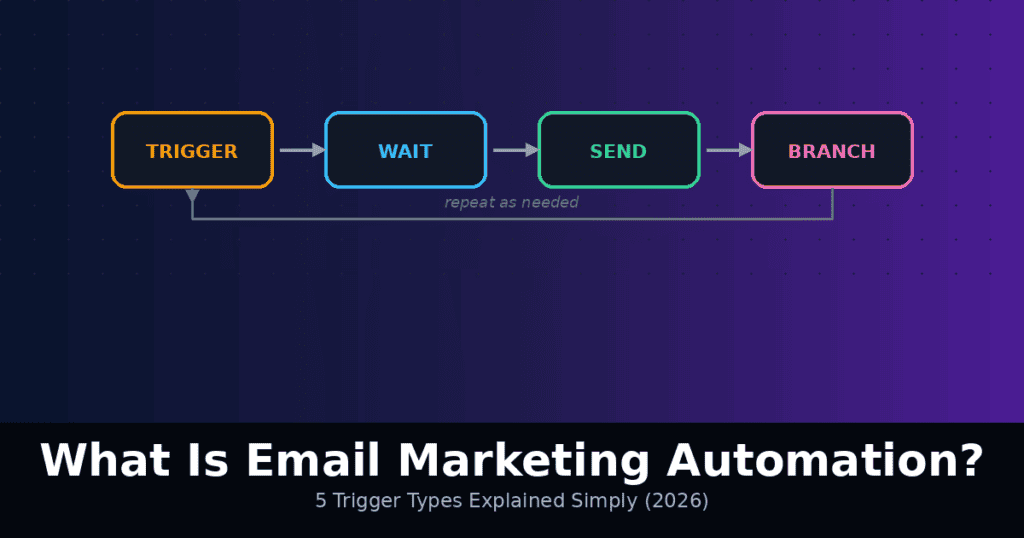
The simplest way to think about it: a regular campaign is something you send once, manually, to a list at a moment you choose. Automation is something you build once, that then sends itself, triggered by a specific action or point in time, without you doing anything after the initial setup. That distinction is the entire concept, and once it clicks, every specific automation type (welcome sequences, abandoned cart flows, re-engagement campaigns) is just a variation on the same underlying idea: trigger, wait, send, repeat as needed.
I went through how automation actually works under the hood and which types matter most, to answer the questions that come up when this concept is genuinely new:
- What exactly triggers an automated email to send?
- What are the most common, highest-impact automation types?
- Do you need a big list or sophisticated tools to start automating?
- What’s the difference between automation and just scheduling an email in advance?
Read Our Guide for Best Email Marketing and Automation Tools for 2026 – Top 10 Platforms Tested
Short answer: automation is triggered by an action (a signup, a purchase, an abandoned cart, a specific date) or a behavior pattern (inactivity for X days), not just a fixed calendar date. Almost any email platform, even free tiers, supports at least basic automation today. Start with a welcome sequence, since it’s the simplest to build and almost universally the highest-impact automation available to any sender. Below, I’ll break down how this actually works and where to start.
Automation vs Scheduling: A Common Point of Confusion
Scheduling an email to go out at 9 AM next Tuesday isn’t automation it’s just a regular campaign with a delayed send time. The defining feature of automation is that it’s triggered by something specific to each individual subscriber, not a single fixed calendar moment shared by your whole list.
A welcome email is automation because it triggers individually, whenever a specific person signs up subscriber A might receive theirs on Monday and subscriber B on Thursday, each relative to their own signup moment, not a shared calendar date. This individual, action-based triggering is what separates true automation from a scheduled broadcast.
How a Trigger Actually Works
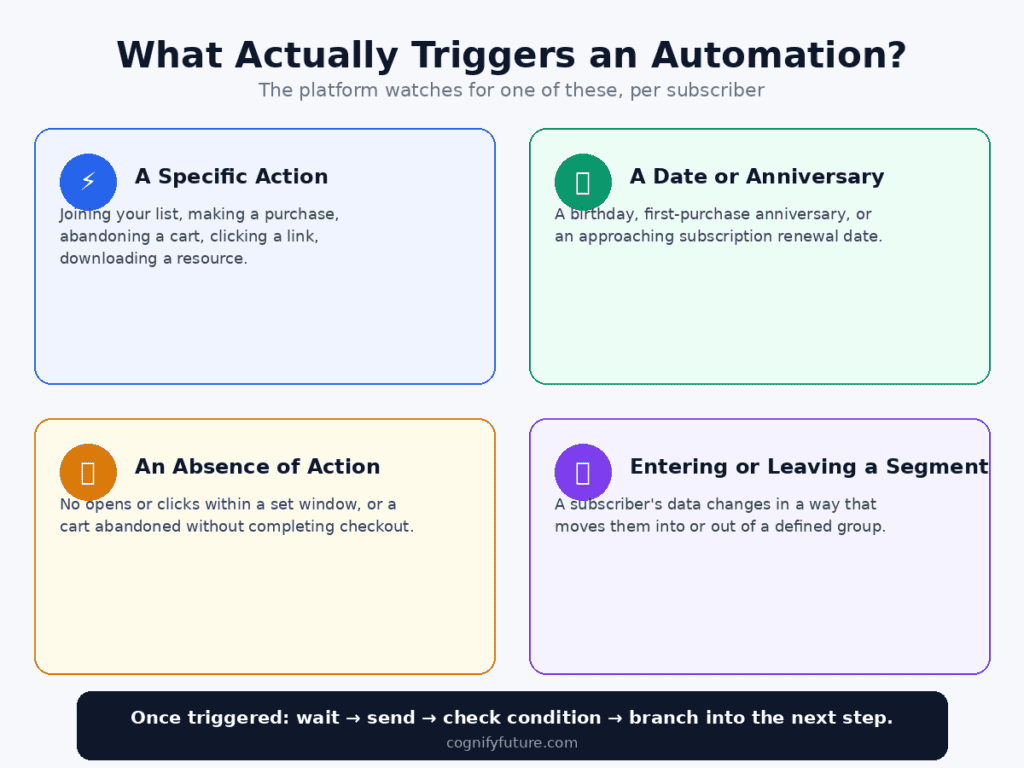
Every automation starts with a trigger an event or condition that the platform watches for on a per-subscriber basis. Common trigger types include:
- A specific action: joining your list, making a purchase, abandoning a cart, clicking a specific link, downloading a resource
- A date or anniversary: a birthday, the anniversary of someone’s first purchase, a subscription renewal date approaching
- An absence of action: no opens or clicks within a set window (inactivity), or a cart abandoned without completing checkout within a set time
- Entering or leaving a segment: a subscriber’s data changing in a way that moves them into or out of a defined group
Once triggered, the automation typically follows a sequence: wait a defined period, send an email, optionally check a condition (did they open? did they click? did they purchase?), and branch into different next steps depending on the answer. This branching logic is what allows automations to feel responsive to individual behavior rather than rigidly identical for everyone who enters the flow.
The Highest-Impact Automation Types, Ranked by Where to Start
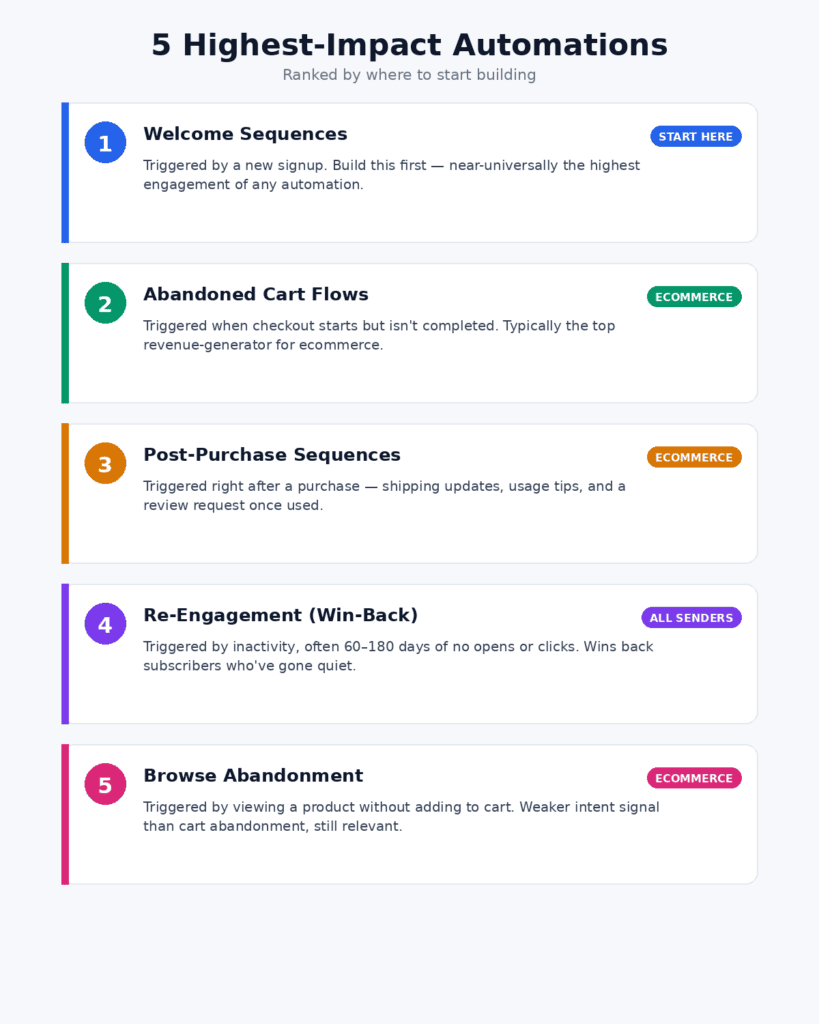
1. Welcome Sequences
Triggered by a new signup, this is almost universally the highest-impact automation to build first, since welcome emails consistently see dramatically higher engagement than regular campaigns subscribers are most interested in your brand right at the moment they’ve just joined.
See our Best Welcome Email Sequences 2026 guide for a full framework on structuring this specific automation.
2. Abandoned Cart Flows (Ecommerce)
Triggered when someone adds an item to cart and begins checkout but doesn’t complete the purchase within a set time window. This is typically the highest revenue-generating automation for any ecommerce business, since it targets people who’ve already demonstrated direct purchase intent.
See our Abandoned Cart Email Flow Guide 2026 for the full timing and structure framework.
3. Post-Purchase Sequences
Triggered immediately after a purchase, separate from a basic order confirmation. These typically cover shipping updates, usage tips for what was purchased, and a request for a review or feedback after enough time has passed for the customer to have actually used the product.
4. Re-Engagement (Win-Back) Campaigns
Triggered by inactivity typically no opens or clicks within a defined window, often 60-180 days depending on your normal sending frequency. This automation specifically targets subscribers who’ve gone quiet, often with a distinct message (“we miss you,” a special offer, or simply asking if they still want to hear from you) rather than your standard content.
5. Browse Abandonment
Triggered when someone views a specific product or page without adding it to cart at all a step earlier in the funnel than abandoned cart. Typically lower-converting than cart abandonment since the intent signal is weaker, but still meaningfully more relevant than a generic broadcast, since it’s based on demonstrated specific interest.
Do You Need a Big List to Start Automating?
No this is a common misconception that delays people from building automation they’d benefit from immediately. A welcome sequence is just as valuable, proportionally, whether you have 50 subscribers or 50,000, since it’s triggered by an individual action regardless of total list size. The setup effort is the same either way, but the automation starts generating value immediately for every new subscriber from the moment it’s live, rather than requiring a large list to be worthwhile.
Most platforms, including many free tiers, support at least basic single-step or simple multi-step automation today, so the barrier to starting is genuinely low. The bigger limiting factor is usually time and clarity on what to actually put in each automated email, not list size or platform sophistication.
Automation vs Segmentation: How They Work Together
Automation and segmentation are closely related but distinct concepts. Segmentation is about grouping subscribers; automation is about triggering sends based on actions or conditions. In practice, they overlap constantly an automation flow often branches based on a subscriber’s segment (a welcome sequence for a Shopify-checkout signup might differ from one for a homepage popup signup, which is itself a segmentation distinction applied within an automated flow).
Read Guide for Best Email Marketing and Automation Tools for 2026 – Top 10 Platforms Tested
Practical Use Case: Your First Automation Build
If you’ve never built an automation before, start with the absolute simplest version: a single welcome email triggered by signup. Don’t worry about multi-step sequences, conditional branching, or sophisticated segmentation yet get one automated email reliably firing on signup, confirm it’s actually working by testing a signup yourself, and only then consider expanding it into a multi-email sequence or adding a second automation type.
This incremental approach avoids a common stalling point: trying to design a sophisticated, multi-branch automation system before you’ve successfully shipped even the simplest version, which often results in nothing going live at all while the perfect version remains unfinished.
What to Build Next, Once Your First Automation Is Live
Once a basic welcome automation is running reliably, the natural next additions depend on your business type. Ecommerce businesses should prioritize abandoned cart next, given its typically outsized revenue impact relative to setup effort. Content-driven businesses or newsletters might prioritize expanding the welcome sequence into multiple emails before adding an entirely new automation type. SaaS businesses often benefit from a trial-related automation (reminding users of a trial ending, or nudging toward a specific in-product action) as their second build.
Final Verdict
Email marketing automation is fundamentally simple once you see past the terminology: it’s an email (or sequence of emails) triggered by an individual subscriber’s action or behavior, rather than a single broadcast sent to everyone at once on a shared schedule. The trigger-wait-send-branch structure underlying every automation type is the same regardless of whether you’re building a welcome sequence, an abandoned cart flow, or a re-engagement campaign.
You don’t need a large list, sophisticated tools, or a perfect multi-step design to start. Build the simplest possible version of a welcome automation first, confirm it works, and expand from there based on what your specific business actually needs next abandoned cart for ecommerce, an expanded welcome sequence for content businesses, or a trial-related flow for SaaS.
1. What is the difference between email marketing automation and a regular campaign?
A regular campaign is sent once, manually, to a list at a shared calendar moment you choose. Automation is built once and then triggers individually for each subscriber based on an action or condition specific to them, like signing up or abandoning a cart, without requiring you to send anything manually afterward.
2. Is scheduling an email in advance considered automation?
No. Scheduling is still a single broadcast sent to your whole list at a fixed calendar time. True automation triggers individually per subscriber based on their own action or timing, such as their personal signup date, not a shared date for everyone.
3. What triggers an automated email to send?
Common triggers include a specific action (signup, purchase, cart abandonment, link click), a date or anniversary (birthday, renewal date), an absence of action (inactivity for a set period), or a subscriber entering or leaving a defined segment.
4. What automation should I build first?
A welcome sequence triggered by signup is almost universally the best starting point, since it’s simple to build and welcome emails consistently see notably higher engagement than regular campaigns, regardless of list size or business type.
5. Do I need a large email list to benefit from automation?
No. A welcome sequence delivers proportionally similar value whether you have 50 subscribers or 50,000, since it’s triggered individually per signup. Most platforms, including many free tiers, support at least basic automation, so list size isn’t a meaningful barrier to starting.
6. What is the highest revenue-generating automation for ecommerce?
Abandoned cart flows are typically the highest revenue-generating automation for ecommerce businesses, since they target shoppers who already demonstrated direct purchase intent by starting checkout before leaving without completing it.
7. How does automation relate to segmentation?
Segmentation groups subscribers by shared traits or behavior, while automation triggers sends based on actions or conditions. They frequently work together, since an automation flow often branches based on which segment a subscriber falls into.
8. What automation should I build after my welcome sequence?
It depends on your business type. Ecommerce businesses typically benefit most from abandoned cart next. Content businesses or newsletters often benefit from expanding the welcome sequence into more emails first. SaaS businesses commonly add a trial-related automation as their second build.





I am Ashish Yadav a software engineer and AI tools researcher with over five years of practical experience working with real-world systems and automation. I am founder of CognifyFuture, where I analyzes, tests, and breaks down AI tools with a focus on what actually works—not what’s trending.
My content is built on hands-on usage, not theory. Instead of generic advice, I focuses on real implementation—how AI tools can be used to automate tasks, improve efficiency, and solve any specific business or individual problems.
Through CognifyFuture, My aims is to eliminate confusion around AI by delivering clear, honest, and actionable insights that help users make smarter technology decisions.







