
Affiliate Disclosure: This Freepik AI review may contain affiliate links. If you sign up through them, I may earn a small commission at no extra cost to you. I only recommend tools I have personally evaluated, and this never influences my honest assessment.
Most content creators, bloggers, and marketers face the same visual content problem: they need professional-quality images, illustrations, and marketing graphics every week, but they can’t afford a designer, don’t have hours to spend in Canva, and don’t want to pay for generic stock photos that look like every competitor’s website. The question is whether an AI image platform can genuinely close that gap — producing real, usable, commercial-quality visuals quickly and affordably.
Freepik AI — now rebranded as Magnific as of April 2026 — is one of the most comprehensive answers to that problem available today. It combines text-to-image generation, video generation, AI editing tools, and access to one of the world’s largest stock asset libraries in a single platform, at pricing that’s significantly more accessible than most competitors. This review covers what it actually does well, where it falls short, the accurate 2026 pricing (including the rebrand and the unlimited-credits controversy), and an honest comparison against Midjourney and Canva AI.
What Is Freepik AI?
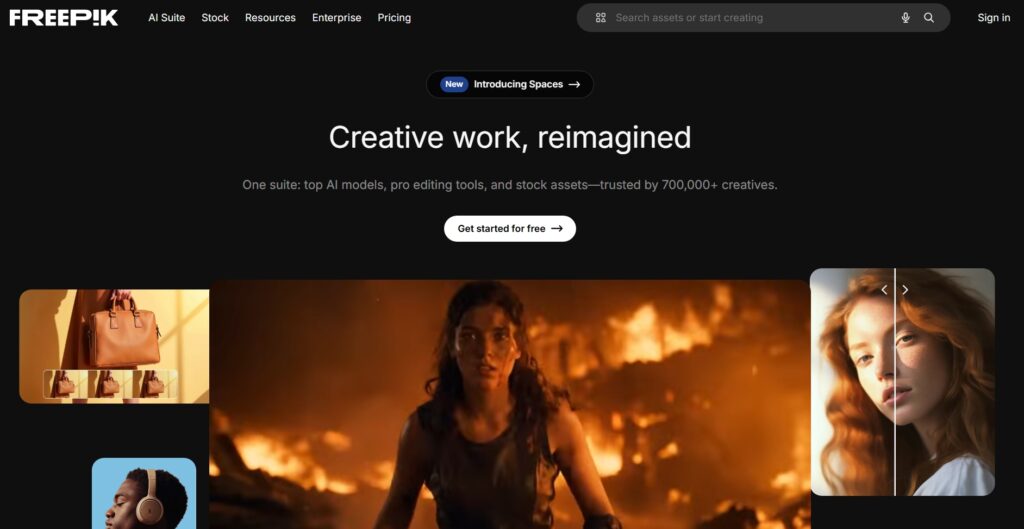
Freepik AI is the AI creative suite built into Freepik’s platform — one of the world’s largest stock asset libraries with over 100 million monthly visitors and 1 million+ paying subscribers. What makes it distinct from standalone AI image generators like Midjourney or Leonardo AI is the combination: you’re not just getting AI generation, you’re getting AI generation integrated with a massive library of vectors, icons, stock photos, PSDs, and templates — all accessible from the same dashboard.
In April 2026, Freepik rebranded its AI tools entirely to Magnific, moving all subscriptions and AI features to a new domain (magnific.com). The Freepik name continues to represent the stock asset library side of the business, but if you’ve recently searched for Freepik’s AI pricing page and hit a 404 error, that’s why — the pricing now lives at Magnific. Existing subscribers were migrated automatically. For new users, the subscription is now purchased through Magnific, though the underlying tools and asset library remain the same product.
Read Best 10 AI Tools for Image Generation in 2026 Click Here
Key Features of Freepik AI
1. AI Image Generator (30+ Models)
Freepik AI’s image generator is one of the most model-diverse platforms available in 2026. Rather than running a single proprietary model, it offers access to 30+ AI models including Google Imagen, Flux Schnell, Flux Pro, Flux Dev, Black Forest Labs’ Hyperflux, ByteDance Seedream 4.0, and Freepik’s own Mystic model. Each model produces different aesthetic results — some optimised for photorealistic output, others for illustration styles, others for fast iteration. This model diversity means you’re not locked into a single visual aesthetic the way you are with a single-model platform.
In practice, the workflow is straightforward: write a text prompt, choose a model (or let the platform recommend one), select your aspect ratio and style parameters, and generate. For a content creator who needs a featured image for a blog post, a product mockup, or a social media visual, the output quality across most models is genuinely usable without significant post-processing. The more specific your prompt — describing lighting, composition, colour palette, and subject detail — the better the output quality, which is consistent across all AI image platforms.
2. Style & Customisation Control
Beyond basic text-to-image generation, Freepik AI includes a range of style control features that help maintain visual consistency across a brand’s content. Aspect ratio selection covers all standard formats — square (1:1) for Instagram, landscape (16:9) for YouTube thumbnails and blog headers, portrait (9:16) for Stories and Reels, and custom ratios for specific use cases. Style presets let you shift output toward photorealistic, illustration, 3D render, flat design, or other aesthetic directions without having to encode that instruction in the prompt manually.
For businesses and creators who produce visual content at volume and need it to look consistent — the same general colour palette, the same illustration style, the same compositional approach — the Brand Kit feature (available from Premium+ upward) stores your brand preferences and applies them automatically across generations. This is a meaningful time-saver for anyone creating content for a single brand consistently, and something that distinguishes Freepik from tools like Midjourney, which have no brand memory between sessions.
3. Integration with Freepik’s Asset Library
This is the feature that most directly separates Freepik AI from every standalone AI image generator. When you generate an image, you’re not limited to the AI output — you can immediately browse and combine the generated image with Freepik’s library of 100M+ stock assets: icons, vectors, PSDs, stock photography, templates, and illustrations. For a designer who typically generates an AI background and then manually sources icons and UI elements from separate tools, having both in the same environment significantly reduces the workflow friction.
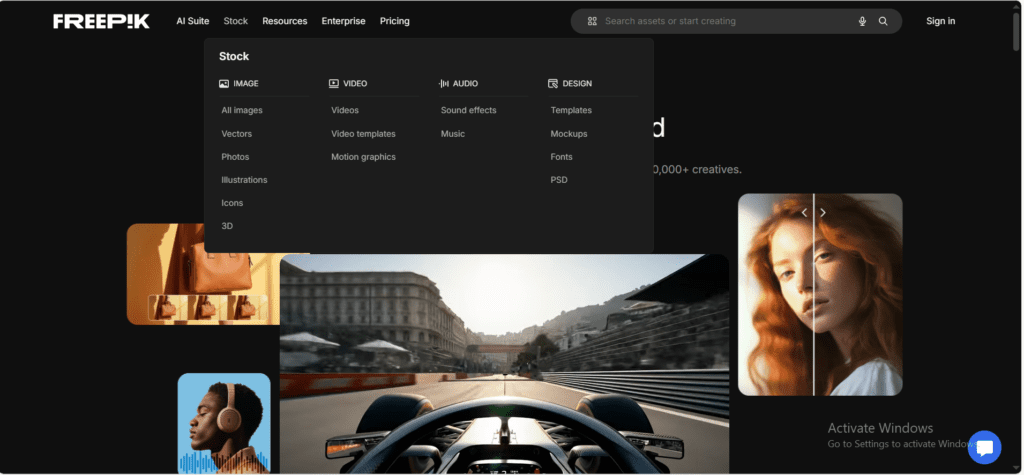
The integration also extends to AI editing tools — you can use Freepik’s AI upscaler to increase resolution to 4K (Premium and above), use the AI background remover, use inpainting to modify specific areas of a generated image, or use the AI video tools to animate a still image or generate short video clips from prompts. These editing capabilities sit within the same credit system as image generation, meaning your subscription covers the entire workflow rather than requiring separate tools for each step.
4. Commercial Usage Rights & Licensing
Commercial rights are one of the most practically important differences between free and paid tiers on Freepik. The free plan technically permits commercial use of stock assets but requires visible attribution — “Designed by Freepik” with a link — on every piece of content. For most client-facing commercial work, that attribution requirement is a dealbreaker, which is why the free tier is realistically only suitable for personal projects or testing the platform. All paid plans from Essential upward include commercial rights without attribution. Premium+ and Pro plans include explicit commercial indemnification — a legal protection layer that matters when you’re using AI-generated content in client contracts, advertising campaigns, or published products where copyright disputes could arise.
5. AI Video Generation
Freepik AI includes access to video generation models — Kling, Veo, Runway, Hailuo, and Pika — within the same credit-based system as image generation. You can generate short video clips from text prompts, animate existing images, or create video variations of generated visuals. For content creators who produce video content for social media and currently rely on separate subscriptions for AI video (Runway alone starts at $15/month), having video generation included in a Freepik subscription changes the value calculation significantly. The honest caveat is that video generation is significantly more credit-intensive than image generation — video clips can burn through credits in a fraction of the time that images would, which is particularly relevant for users on Essential or Premium plans.
Freepik AI (Magnific) Pricing Plans — 2026 Accurate
Following the April 2026 rebrand to Magnific, all Freepik AI subscription pricing now lives at magnific.com. The plan structure remains similar to pre-rebrand Freepik, but with updated credit allocations and model access tiers. All prices below are annual billing rates — monthly billing costs approximately 25% more. The free tier remains available for evaluation and personal use.
| Plan | Annual Price (per month) | Monthly Credits | Key Features | Best For |
|---|---|---|---|---|
| Free | $0 | ~20 image generations/day | Personal use only, attribution required, basic models | Testing and evaluation |
| Essential | ~$5.42/mo | 8,000 credits | Commercial rights, premium templates, no stock photos/vectors | Hobbyists, side projects |
| Premium | ~$10.83/mo | More credits + premium models | No attribution, full stock access, commercial licence, AI upscaling to 4K | Content creators, bloggers — practical minimum for commercial work |
| Premium+ | ~$24.33/mo | 600K+ credits (~unlimited on 10 models) | Brand Kit, commercial indemnification, unlimited on select models, video generation | Agencies, heavy users — best value tier |
| Pro | ~$141.67/mo | 4M credits | Full API access, priority support, everything in Premium+ | Studios, developers, API integrations |
| Business | $55/seat/mo | Shared pool | Multi-seat workspace, team credits, collaboration features | Internal team workflows |
A few important notes on Freepik’s pricing that most reviews miss. First, the “unlimited” generation that was announced in July 2025 has been partially walked back — just before the Magnific rebrand in April 2026, credits were reintroduced for premium models, and true unlimited generation now applies to only approximately 10 specific image models on Premium+ and Pro. Heavy video users should particularly note that even Premium+ credits can be exhausted in under 40 days with daily video generation workflows. If you locked in an annual plan based on the unlimited announcement, it’s worth checking exactly which models remain credit-free on your plan. Second, Premium at ~$10.83/month is the practical minimum for most client-facing commercial work — Essential lacks access to premium stock photos and vectors, which is where much of Freepik’s value comes from. Third, monthly billing costs approximately 25% more than the annual rates shown above — for anyone planning to use the platform regularly, annual billing is worth the commitment.
Real Use Cases of Freepik AI
Bloggers & Content Creators
For bloggers, the most immediate value from Freepik AI is eliminating the stock photo problem. Finding a non-generic, commercially safe featured image that actually matches an article’s specific topic is genuinely time-consuming — particularly for niche topics where stock libraries have thin coverage. Freepik AI solves this by generating exactly the image you describe, in the right aspect ratio, with the right visual tone. A technology blogger can generate a “futuristic AI neural network visualization in dark blue tones for a 16:9 banner” in under a minute. Combined with access to Freepik’s icon and vector library for infographics, and the AI background remover for product imagery, the platform covers most of a blogger’s visual content needs in one subscription.
Social Media Marketers
Social media content production is one of the highest-volume visual tasks in modern marketing — multiple posts per week, each needing platform-appropriate dimensions, brand-consistent styling, and attention-grabbing visual quality. Freepik AI’s combination of text-to-image generation and style control means a marketer can generate Instagram carousel graphics, LinkedIn banner images, Twitter/X header visuals, and YouTube thumbnails from a single session, using brand-consistent prompts and style presets rather than starting from scratch for each format. The time saving compared to building each visual manually in Canva — even with templates — is significant at scale. For social media managers producing 10–20 pieces of visual content per week, the platform reduces what might be 8–10 hours of design time to 2–3 hours of generation and light editing.
Small Businesses & Startups
Small businesses that can’t justify a full-time designer — but need consistent, professional visual content for their website, ads, social media, and printed materials — find Freepik AI a practical middle ground between free Canva templates (which everyone uses) and expensive agency design. For product-based businesses, the ability to generate marketing visuals and lifestyle imagery around their products without a professional photography setup is particularly valuable. For service businesses, the platform covers website illustrations, presentation graphics, and ad creatives at a cost that’s a small fraction of freelance design rates. The Brand Kit feature on Premium+ makes consistency achievable even without design expertise, by storing and applying brand colours and style preferences automatically.
Pros and Cons of Freepik AI
Pros
- 30+ AI models in one platform — more model diversity than any single-model competitor
- Integrated stock asset library (100M+ assets) alongside AI generation — unique differentiator
- Commercial rights included on all paid plans, with indemnification on Premium+ and Pro
- AI video generation (Kling, Veo, Runway, Pika) included in the same credit system
- Premium at ~$10.83/month is genuinely affordable for the capabilities it provides
- Brand Kit feature maintains visual consistency without design expertise
- Freepik’s platform has 100M+ monthly users — well-established, not a startup risk
Cons
- The “unlimited” generation promise was walked back post-rebrand — credits now apply to most premium models even on Premium+
- Video generation is credit-intensive — active video creators can exhaust Premium+ credits in under 40 days
- Free tier requires attribution on all content — not practically usable for commercial work
- Image aesthetic control is less refined than Midjourney for users who need high-end artistic output
- The April 2026 Magnific rebrand creates some confusion — pricing and subscriptions now live on a different domain than the stock library
- Pro plan at ~$141.67/month is a significant price jump from Premium+ — there’s no mid-tier between $24 and $141
Freepik AI vs Midjourney vs Canva AI
The most useful comparison isn’t a star-rating table but an honest account of which tool wins for which specific use case. Here’s how the three main competitors stack up:
| Factor | Freepik AI (Magnific) | Midjourney | Canva AI |
|---|---|---|---|
| Starting price | Free / ~$5.42/mo (Essential) | $10/mo (Basic) | Free / $15/mo (Pro) |
| Image quality | High — 30+ models, varies by model | Highest — best aesthetic output | Good — sufficient for most marketing |
| Model variety | 30+ models — widest selection | 1 proprietary model | Limited — mainly Magic Media |
| Stock asset library | 100M+ assets integrated | None | Strong — templates, stock photos |
| Video generation | Yes — multiple video models | No | Limited |
| Commercial rights | All paid plans (Attribution free on Premium+) | All paid plans | All paid plans |
| Brand consistency | Brand Kit (Premium+) | None | Excellent — full brand kits |
| Best for | Content creators, marketers, variety seekers | Artists, premium image quality | Non-designers, template-based design |
Read detailed honest comparison of Leonardo AI vs Midjourney Click Here
Freepik AI vs Midjourney
Midjourney produces the highest-quality, most aesthetically refined AI images available in 2026 — its single proprietary model has a distinctive visual signature that consistently outperforms on artistic quality benchmarks. If your primary need is exceptional image quality with a particular aesthetic style, Midjourney is the stronger choice. But Midjourney has no stock library, no video generation, no integrated editing tools, no Brand Kit, and operates through Discord rather than a standard web interface — which creates friction for non-technical users. For content creators who need a broader range of visual outputs (images, videos, edited assets) in an accessible workflow, Freepik AI covers significantly more ground at a comparable or lower price.
Freepik AI vs Canva AI
Canva is the dominant tool for non-designers building marketing materials, and its AI integration (Magic Media, Magic Design) is genuinely good for the template-first design workflow it supports. Where Freepik AI outperforms Canva is in raw generation quality and model variety — Canva’s AI image generation is useful but not at the same quality level as Freepik’s best models. Where Canva wins is in the design composition layer: templates, drag-and-drop layout, presentations, documents, and print materials are all significantly better in Canva than in Freepik. For creators who need both AI-generated visuals and polished designed layouts, many use both — generating in Freepik, designing in Canva.
Is Freepik AI Worth It in 2026?
For content creators, bloggers, social media marketers, and small businesses who need a steady supply of professional visual content without a designer’s budget, Freepik AI is one of the best-value subscriptions available in 2026. The combination of 30+ generation models, integrated stock assets, video generation, AI editing tools, and commercial licensing in a single subscription — starting at ~$10.83/month for serious commercial use — is genuinely competitive with any alternative in the market. No other single platform offers that breadth at a comparable price.
The honest caveats worth knowing before subscribing: the unlimited generation promise from 2025 has been scaled back, so check current model credit requirements before choosing a plan; video generation burns credits significantly faster than image generation, which matters if video is a primary use case; and the April 2026 rebrand to Magnific means your subscription now lives at a different domain, which initially confuses some existing users. None of these are dealbreakers — they’re just worth understanding before you commit to a plan. Start with the free tier to explore the interface, then evaluate whether Essential or Premium covers your specific workflow before jumping to Premium+.
Is Freepik AI free to use?
Freepik AI has a free tier that provides approximately 20 image generations per day using basic models. However, the free tier is restricted to personal use only and requires visible attribution (‘Designed by Freepik’) on all commercial content — which makes it unsuitable for most professional or client-facing work. The Essential plan at ~$5.42/month removes some limitations; Premium at ~$10.83/month is the practical minimum for unrestricted commercial use without attribution requirements.
Can I use Freepik AI images commercially?
Yes — all paid plans from Essential upward include commercial usage rights. Essential and Premium include commercial rights without attribution. Premium+ and Pro add explicit commercial indemnification, which provides a legal protection layer for content used in client contracts, advertising campaigns, or published products. The free tier permits commercial use but requires visible Freepik attribution on every asset, which is a practical constraint for most business use cases.
Is Freepik AI better than Midjourney?
It depends on what you need. Midjourney produces higher-quality, more aesthetically refined images with its single proprietary model — it’s the top choice for artistic quality. Freepik AI offers 30+ models, integrated stock assets (100M+), video generation, AI editing tools, and a Brand Kit — significantly more breadth at a comparable price. For content creators who need variety across image, video, and editing workflows, Freepik AI covers more ground. For users who need maximum image quality with a specific aesthetic style, Midjourney is stronger.
Who should use Freepik AI?
Freepik AI is best suited for bloggers and content creators who need regular custom visuals for articles and social media, social media marketers producing high-volume visual content across multiple platforms, small businesses that need professional marketing graphics without a dedicated designer, and freelancers creating content for multiple clients who benefit from the commercial licence and indemnification. It’s less suited for fine artists who need maximum aesthetic control (Midjourney is better), or for pure document and presentation design (Canva is better).
What happened with the Freepik to Magnific rebrand?
In April 2026, Freepik rebranded its AI tools and subscription platform entirely to Magnific, moving all pricing and subscriptions to magnific.com. The Freepik brand continues to represent the stock asset library side of the business. Existing subscribers were migrated automatically. New subscriptions are purchased through Magnific. The underlying tools, models, and asset library remain the same product — only the branding and domain changed. If you’ve recently searched for Freepik’s pricing page and hit a 404, the pricing is now at magnific.com/pricing.
Does Freepik AI include video generation?
Yes. Freepik AI (Magnific) includes access to multiple AI video generation models — Kling, Veo, Runway, Hailuo, and Pika — within the same credit system as image generation. You can generate short video clips from text prompts, animate existing images, or create video variations of generated visuals. The important caveat is that video generation is significantly more credit-intensive than image generation, and active video users can exhaust even Premium+ credits in under 40 days with daily generation workflows. If video is a primary use case, factor credit consumption carefully when choosing a plan.
What is the best Freepik AI plan for bloggers?
For most bloggers, the Premium plan at approximately $10.83/month (annual billing) is the right starting point. It includes commercial rights without attribution, full access to Freepik’s stock asset library (icons, vectors, photos, PSDs), access to premium AI models including upscaling to 4K, and no watermarks. Essential at $5.42/month lacks access to premium stock photos and vectors — which is where much of Freepik’s value comes from for bloggers who use both AI generation and stock assets. Premium+ at $24.33/month is worth considering if you produce video content or need the Brand Kit for visual consistency.
Is Freepik AI better than Canva?
They solve different problems. Freepik AI is stronger for pure AI image generation quality, model variety, and access to a large stock asset library. Canva is stronger for designed layouts, templates, presentations, documents, and print materials — the composition and design layer on top of raw visual assets. Many creators use both: generating custom AI images in Freepik, then incorporating them into designed templates and layouts in Canva. For pure AI generation breadth and stock asset integration, Freepik wins. For end-to-end designed marketing materials, Canva’s workflow is more complete.





I am Ashish Yadav a software engineer and AI tools researcher with over five years of practical experience working with real-world systems and automation. I am founder of CognifyFuture, where I analyzes, tests, and breaks down AI tools with a focus on what actually works—not what’s trending.
My content is built on hands-on usage, not theory. Instead of generic advice, I focuses on real implementation—how AI tools can be used to automate tasks, improve efficiency, and solve any specific business or individual problems.
Through CognifyFuture, My aims is to eliminate confusion around AI by delivering clear, honest, and actionable insights that help users make smarter technology decisions.







