
Disclosure: This guide may contain affiliate links. If you sign up through them, I may earn a small commission at no extra cost to you. All tools were evaluated based on real-world usage and publicly verified pricing.
Are you still managing leads in spreadsheets or struggling to track customer conversations across emails and calls? In today’s competitive market, businesses that win are those that build strong customer relationships — not just close deals.
That’s where CRM (Customer Relationship Management) tools come in. But with dozens of options available, choosing the wrong CRM costs more than just money — it costs the adoption time, data migration effort, and workflow disruption required to switch later. This guide breaks down the four most widely deployed CRMs in 2026 — Salesforce, HubSpot, Zoho CRM, and Pipedrive — with verified pricing, honest assessments of who each tool is actually built for, and a clear decision framework for choosing the right one.
What Is a CRM Tool and Why It Matters?
A CRM tool is a centralised system that tracks every interaction between your business and your customers — from the first lead capture through the full customer lifecycle. At its core it manages leads and contacts, sales pipelines, customer communication history, marketing automation, and support interactions. What this means practically: your sales team knows what was said on the last call, your marketing team can segment contacts by behaviour, and your support team sees the complete customer history without anyone asking anyone else for it.
Why CRM Tools Are Critical in 2026
Companies using a properly configured CRM see up to 29% higher sales productivity — primarily because salespeople spend less time on administrative tracking and more time on selling. Automation reduces manual data entry and follow-up work by 30–40%, which at a team of 10 represents the equivalent of 3–4 person-weeks per month redirected to productive activity. Perhaps most importantly, CRM data enables personalisation at scale: knowing a customer’s purchase history, support tickets, and communication preferences means every interaction can be relevant rather than generic, which directly affects retention and lifetime value. In 2026, a CRM is not a nice-to-have — it is the operational backbone of any team managing more than a handful of customer relationships.
Quick Comparison: Top 4 CRM Tool Overview
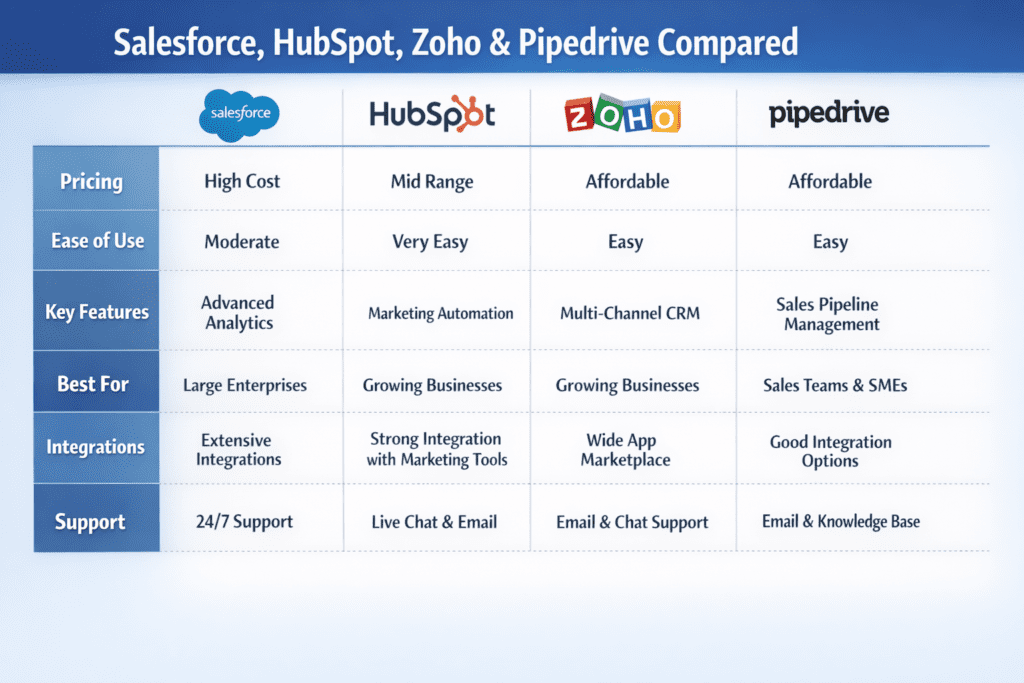
| CRM Tool | Best For | Starting Price | Free Plan | Key Strength |
|---|---|---|---|---|
| Salesforce | Enterprises | $25/user/month | No (30-day trial) | Customisation & scale |
| HubSpot CRM | Marketing + Sales | Free / $20/month | Yes — unlimited users | Ease of use & all-in-one |
| Zoho CRM | SMBs & startups | Free / $14/user/month | Yes — up to 3 users | Best features per dollar |
| Pipedrive | Sales-focused teams | $14/user/month | No (14-day trial) | Visual pipeline clarity |
1. Salesforce CRM – Enterprise Powerhouse
About Salesforce CRM
Salesforce is the world’s most widely deployed CRM — holding approximately 22% global market share — and consistently ranked the enterprise standard for large-scale customer relationship management. It’s designed for organisations that need deep customisation, complex automation, multi-department workflows, and the ability to integrate CRM data with every other business system. Salesforce is not a simple tool. It is a platform that, when properly implemented, becomes the operational nervous system of an enterprise. The trade-off is significant: implementation typically requires dedicated Salesforce administrators or consultants, and the time-to-value is measured in months rather than days.
Key Features
Advanced sales pipeline management with multi-stage deal tracking and custom sales processes. AI-powered insights via Salesforce Einstein — lead scoring, opportunity health, churn prediction, and next-best-action recommendations built into the workflow. Workflow and process automation through Flow Builder, enabling complex multi-step automations without code. Integration with 3,000+ third-party apps through the Salesforce AppExchange marketplace. Custom objects and fields for building CRM data structures specific to your industry and sales model. Territory management and account hierarchies for large sales organisations. Native forecasting with revenue intelligence dashboards.
Real-World Use Case
Companies like Amazon Web Services, Adidas, and Toyota deploy Salesforce to manage millions of customer interactions across global sales teams. The typical enterprise use case: a B2B technology company with a 200-person sales team uses Salesforce to manage complex multi-stakeholder deals, automate territory assignment, generate real-time sales forecasts for board reporting, and connect CRM data with their ERP for revenue recognition. The same configuration would be impractical to build in any other tool on this list — but it’s also unnecessary for 95% of businesses.
Salesforce Pricing (2026)
| Plan | Price (Annual) | Key Inclusions |
|---|---|---|
| Starter Suite | $25/user/month | Basic CRM, email integration, reports, limited to 10 users |
| Pro Suite | $100/user/month | Full pipeline management, quoting, forecasting, API access |
| Enterprise | $165/user/month | Advanced customisation, workflow automation, territories |
| Unlimited | $330/user/month | Full feature access, AI capabilities, premium support |
| Agentforce 1 | $500/user/month | Autonomous AI agent capabilities, highest limits |
Important pricing notes: all Salesforce plans require annual billing — there is no monthly option. The $25/month Starter Suite is capped at 10 users and is a genuinely limited entry tier; most businesses that choose Salesforce for its core capabilities end up on Pro Suite ($100/user/month) or Enterprise. Implementation and training costs are additional and significant — Salesforce’s own onboarding starts from $25,000. Total cost of ownership for Salesforce is typically 2–3× the licence cost when administration, customisation, and training are factored in.
Pros
- Most customisable CRM available — any sales process can be modelled
- Best-in-class reporting and forecasting depth
- Enterprise-grade security, compliance, and audit capabilities
- Largest app marketplace (3,000+ integrations)
Cons
- Steep learning curve — requires dedicated admin or consultant investment
- Expensive at scale — true cost with implementation typically exceeds $200/user/month for most deployments
- Overkill for teams under 50 people in most industries
Best for: Large businesses and enterprises with complex multi-department sales operations, high customisation requirements, and dedicated CRM administration resources.
2. HubSpot CRM – Best All-in-One CRM
About HubSpot CRM
HubSpot CRM is built around a single philosophy: CRM, marketing, sales, and customer service should live in one connected platform rather than being integrated from separate tools. Its free plan is one of the most genuinely useful free CRM offerings available — unlimited users, contact management, deal pipelines, email tracking, and meeting scheduling with no time limit. HubSpot’s strength is that it grows with you: start on the free plan, add paid functionality as your team scales, and never need to migrate to a different platform. The trade-off is pricing at the higher tiers, which escalates significantly once you need marketing automation and advanced features.
Key Features
Free CRM with unlimited users and unlimited contacts — no card required, no time limit. Email tracking with real-time open and click notifications. Meeting scheduling with calendar integration. Marketing automation including email sequences, lead nurturing workflows, and landing pages. Built-in analytics dashboards covering website traffic, lead sources, deal velocity, and revenue attribution. Native integration with Gmail, Outlook, Slack, Salesforce, Shopify, and 1,000+ other tools. AI-powered content generation and deal scoring on paid plans.
Real-World Context
HubSpot serves over 216,000 customers across 135 countries. Businesses using HubSpot’s full suite report up to 50% increase in lead conversion rates, primarily because marketing and sales data are unified in one system — eliminating the lead hand-off gap where most B2B leads are lost. The free CRM has been the entry point for millions of startups and SMBs that grow into the paid tiers over time.
HubSpot Pricing (2026)
| Plan | Price | Key Inclusions |
|---|---|---|
| Free | $0 forever | Unlimited users, contact management, pipelines, email tracking, meeting scheduling |
| Starter | $20/month (2 users, annual) | Ad management, email automation, forms, live chat, basic reporting |
| Professional | $890/month (5 users, annual) | Marketing automation, custom reports, SEO tools, social media, A/B testing |
| Enterprise | $3,600/month (10 users, annual) | Advanced customisation, revenue attribution, predictive lead scoring, teams |
Critical pricing context: HubSpot’s free plan is genuinely useful and not a crippled trial. The Starter at $20/month covers most small business CRM needs. The jump from Starter to Professional ($890/month) is dramatic — this is where HubSpot becomes expensive for SMBs who need the marketing automation features. The Professional and Enterprise pricing makes HubSpot one of the most expensive CRM options at scale, despite its SMB positioning. Annual billing is required for the advertised prices; monthly billing adds 20–25%. The Starter plan scales by seat beyond the initial 2 users at $10/user/month additional.
Pros
- Best free CRM plan available — unlimited users, genuinely functional
- Marketing, sales, and service in one platform — eliminates integration overhead
- Fastest time-to-value of any CRM on this list
- Excellent onboarding resources and community
Cons
- Steep price jump at Professional ($890/month) — the free-to-paid cliff is significant
- Limited customisation compared to Salesforce — complex sales processes may require workarounds
- Reporting depth is weaker than Salesforce at equivalent tiers
Best for: Startups, content-driven businesses, and marketing-first teams that want CRM and marketing in one platform. The free plan is the right starting point for almost any team under 50 people — upgrade to paid only when specific paid features are needed.
3. Zoho CRM – Best Value for Money
About Zoho CRM
Zoho CRM delivers the most features per dollar of any CRM in its price range — significantly outperforming both HubSpot and Salesforce on feature-to-price ratio at equivalent tiers. It’s part of the broader Zoho ecosystem of 45+ business apps (email, accounting, HR, project management, helpdesk), which means businesses that adopt Zoho CRM gain access to a deeply integrated business operations platform rather than a standalone CRM. The Professional plan at $23/user/month includes capabilities that cost $75–$100/user/month on Salesforce.
Read the full Zoho CRM Review with detailed pricing breakdown Click Here
Key Features
Sales automation including lead assignment rules, workflow automations, and follow-up sequences. AI assistant Zia — lead scoring, email sentiment analysis, anomaly detection, and next-best-action recommendations. Multichannel communication management covering email, phone, live chat, social media, and WhatsApp from a single interface. Custom modules and fields for building CRM data structures specific to your business. Inventory management and quoting (available from Professional tier). Blueprint — a visual sales process builder for enforcing specific workflow steps. Canvas — a drag-and-drop CRM interface designer that lets you customise what your team sees without developer involvement.
Real Use Case
A manufacturing SMB with 50 employees switches from Salesforce to Zoho CRM Professional at $23/user/month — saving $52/user/month (approximately $31,200/year for their team) while retaining the automation, custom pipeline, and reporting capabilities they actually use. The Zoho One bundle at $45/user/month extends this further: the same team gets CRM, email, project management, accounting, and HR in one subscription — replacing four separate software tools and consolidating their tech stack.
Zoho CRM Pricing (2026)
| Plan | Annual Price | Key Inclusions |
|---|---|---|
| Free | $0 (up to 3 users, forever) | Lead management, contacts, basic pipelines, basic reports |
| Standard | $14/user/month | Workflow rules, email templates, custom fields, reports, scoring rules |
| Professional | $23/user/month | Sales automation, multiple pipelines, inventory, Blueprint, SalesSignals |
| Enterprise | $40/user/month | Zia AI, Canvas designer, multi-user portals, advanced analytics |
| Ultimate | $52/user/month | Enhanced AI, advanced BI, premium support, highest limits |
| Zoho One | $45/user/month | All 45+ Zoho apps including CRM, email, projects, accounting, HR |
All prices are annual billing; monthly billing adds approximately 20%. The free plan (up to 3 users) is a permanent free tier, not a trial — genuinely useful for very small teams getting started. For most SMBs, Standard at $14/user/month or Professional at $23/user/month delivers the best value in the CRM market. Zoho One at $45/user/month is worth serious consideration for any business currently paying separately for CRM + email + project management + accounting tools.
Pros
- Best feature-to-price ratio in the CRM category — significantly outperforms competitors at equivalent tiers
- Free plan for up to 3 users is permanent and functional
- Zoho ecosystem integration — CRM connects natively with 45+ Zoho business apps
- Zoho One bundle delivers entire business software stack at $45/user/month
Cons
- Interface complexity — the breadth of features can feel overwhelming during initial setup
- Third-party marketplace is smaller than Salesforce’s — some niche integrations may be missing
- Support quality can be inconsistent compared to Salesforce or HubSpot at equivalent tiers
Best for: Budget-conscious SMBs, startups scaling their sales operations, and any team already using other Zoho products where ecosystem integration compounds the value.
4. Pipedrive – Sales-Focused CRM
About Pipedrive CRM
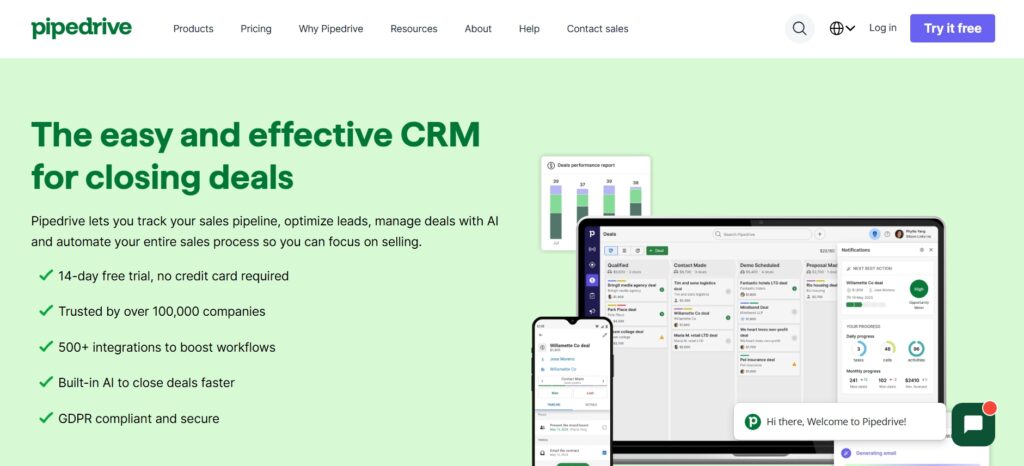
Pipedrive was built by salespeople who were frustrated with CRMs that prioritised data entry over selling. Its core philosophy: a CRM should show salespeople exactly what to do next to move deals forward, not require them to maintain complex records. The result is the most visually intuitive pipeline management experience available, with activity-based selling at its centre — every task, call, and email is connected to a specific deal in a visual drag-and-drop pipeline. Pipedrive’s deliberate simplicity is both its greatest strength and its primary limitation: it is excellent at the sales workflow it was designed for and limited outside of it.
Key Features
Drag-and-drop visual sales pipelines — the clearest deal-stage visualisation of any CRM. Activity-based selling system that schedules calls, emails, and meetings directly against specific deals and alerts salespeople when actions are due. Sales forecasting with deal probability weighting and revenue projection. Email and call tracking with two-way email sync and automatic activity logging. AI sales assistant providing deal health alerts, performance insights, and next-step suggestions. Automation builder for repetitive tasks including follow-up reminders, deal stage transitions, and pipeline notifications. Lead generation tools (LeadBooster add-on).
Read the full Pipedrive CRM Review with detailed pricing Click Here
Real-World Context
Pipedrive serves over 100,000 companies in 170+ countries, with particularly strong adoption among B2B sales teams of 5–50 people. Sales teams using Pipedrive report up to 28% faster deal closures — primarily because the activity-based workflow ensures nothing falls through the cracks and follow-ups happen consistently. Pipedrive does not have a free plan; the minimum commitment is $14/user/month (annual), which is the lowest paid entry point of the four tools on this list alongside Zoho’s Standard tier.
Pipedrive Pricing (2026)
| Plan | Annual Price | Key Inclusions |
|---|---|---|
| Essential | $14/user/month | Pipelines, contacts, activities, AI sales assistant, basic automation, 400+ integrations |
| Advanced | $39/user/month | Full email sync, email sequences, automation builder, meeting scheduler, live chat support |
| Professional | $49/user/month | Revenue forecasting, custom reports, contract management, e-signatures |
| Power | $64/user/month | Project planning, enhanced collaboration, implementation support, phone support |
| Enterprise | $99/user/month | Unlimited permissions, highest usage limits, premium support, unlimited custom fields |
Annual billing is required for the advertised prices; monthly billing increases costs by approximately 71% on the Essential plan ($24/month vs $14/month annually). There is no free plan — a 14-day trial is available. The Essential plan is functional for basic pipeline management but most active sales teams upgrade to Advanced ($39/user/month) for the email automation and sequencing features. LeadBooster (lead generation add-on) costs an additional $32.50/month. Unlike HubSpot, Pipedrive does not include marketing automation at any tier — it is purely a sales tool.
Pros
- Most intuitive pipeline visualisation available — salespeople understand it immediately
- Activity-based selling keeps follow-ups from falling through the cracks
- Fastest CRM to deploy for a sales team — up and running within hours
- Affordable entry tier ($14/user/month) with meaningful free trial
Cons
- No marketing automation — not a replacement for HubSpot for marketing-driven teams
- No free plan — $14/user/month minimum commitment before any testing
- Not suitable for large enterprise deployments requiring complex customisation
- Monthly billing significantly more expensive than annual (71% premium on Essential)
Best for: Small and mid-size B2B sales teams (5–50 people) who want a focused, intuitive sales tool without the complexity or cost of an all-in-one platform. Particularly strong for teams where the primary bottleneck is pipeline visibility and follow-up consistency rather than marketing automation.
How to Choose the Right CRM Tool
The right CRM for your business is almost never the most popular one — it’s the one that matches your actual workflow, team size, and budget. Before evaluating specific tools, answer four questions honestly.
1. Do you need marketing automation alongside CRM? If yes, HubSpot is the most integrated option. If no (pure sales focus), Pipedrive or Zoho is more cost-effective. 2. What is your team size? Under 10 people: HubSpot free or Zoho Standard ($14/user). 10–100 people: Zoho Professional ($23/user) or HubSpot Starter. 100+ people: Salesforce or HubSpot Professional. 3. How much customisation do you need? Standard sales pipeline: Pipedrive or HubSpot. Complex multi-stage custom process: Zoho or Salesforce. Enterprise-grade custom objects: Salesforce only. 4. What is your monthly CRM budget per user? Under $15: Zoho Standard or Pipedrive Essential. $15–$50: Zoho Professional or Pipedrive Advanced. $50–$100: Salesforce Starter or HubSpot Starter bundle. $100+: Salesforce Pro Suite or HubSpot Professional.
Quick Recommendation Summary
| If You Are… | Choose | Starting Point |
|---|---|---|
| Enterprise with complex workflows | Salesforce | Pro Suite $100/user/month |
| Marketing-driven startup or SMB | HubSpot | Free CRM (upgrade when needed) |
| Budget-conscious SMB needing features | Zoho CRM | Standard $14/user/month |
| Sales-focused team wanting simplicity | Pipedrive | Essential $14/user/month |
| Bootstrapped startup (0–3 people) | Zoho CRM | Free plan (up to 3 users) |
Conclusion
Choosing the right CRM is not about picking the most popular option — it’s about selecting the tool that fits your business size, sales process, and budget with the least friction. Each of the four tools on this list excels in its specific context. Salesforce is the undisputed enterprise standard but overkill for most businesses. HubSpot is the best all-in-one platform for teams that want marketing and CRM unified, with the most generous free tier in the category. Zoho CRM delivers the best features per dollar of any paid CRM, making it the default recommendation for most SMBs evaluating their options honestly. Pipedrive is the right choice when your priority is getting salespeople to adopt the tool and use it daily — its simplicity and pipeline clarity drive higher adoption rates than more complex systems.
Start with the free plan where available (HubSpot or Zoho) to validate fit before committing to an annual subscription. Migration between CRM systems is painful — getting the initial choice right saves significantly more than any monthly subscription cost.
What is the best CRM tool in 2026?
There is no single best CRM — the right choice depends on your use case. Salesforce is the enterprise standard for large organisations needing deep customisation and complex workflows. HubSpot CRM is the best all-in-one for teams that want marketing and sales unified, with the most generous free plan available. Zoho CRM is the best value for money — delivering the most features per dollar in its price range, with a free plan for up to 3 users. Pipedrive is the best choice for sales-focused teams that want visual pipeline clarity and high adoption without complexity.
Is HubSpot CRM really free?
Yes — HubSpot’s free CRM is permanently free with no time limit and no credit card required. It includes unlimited users, unlimited contact management, deal pipelines, email tracking, meeting scheduling, and basic reporting. The limitations are that advanced features like marketing automation, A/B testing, and custom reporting require the paid Professional tier ($890/month for 5 users). For most small businesses and startups, the free plan covers core CRM needs for 1–2 years of growth before the paid upgrade is justified.
Which CRM is best for small businesses?
Zoho CRM Standard at $14/user/month is the strongest choice for most small businesses — it delivers enterprise-level automation, multichannel communication, and custom workflows at an SMB price point that Salesforce and HubSpot can’t match. Pipedrive Essential at $14/user/month is the better choice if the team is primarily sales-focused and wants the simplest possible pipeline management. HubSpot’s free plan is the right starting point for very early-stage businesses with limited budget. For businesses with 3 or fewer users, Zoho CRM’s permanent free plan is available.
Is Salesforce worth the cost?
For large organisations with complex sales operations, dedicated CRM administration, and the budget for proper implementation, yes — Salesforce’s customisation depth, reporting capability, and enterprise security justify the cost. For most businesses under 100 people, no — the implementation complexity and true total cost (licence + admin + training) typically 2–3× the sticker price, and the resulting capability is more than actually needed. The honest assessment: Zoho CRM Enterprise at $40/user/month delivers 80% of Salesforce’s core CRM functionality at approximately 25% of the typical Salesforce deployment cost.
Can CRM tools increase sales?
Yes, and the evidence is consistent. Businesses using a properly configured CRM see 25–30% improvement in sales productivity, primarily from three sources: reduced time on administrative tasks (CRM automation handles follow-up scheduling, data entry, and activity logging), improved pipeline visibility (salespeople focus on the right deals at the right stage), and better lead qualification (CRM data enables smarter prioritisation of which leads to pursue). The caveat is that CRM tools increase sales only when adopted consistently — a CRM that salespeople log into reluctantly or sporadically produces minimal benefit.
Which CRM is easiest to use?
Pipedrive is consistently rated the most intuitive CRM for salespeople — its visual pipeline, activity-based workflow, and minimal data entry requirements mean new users are productive within hours. HubSpot is the easiest for marketing and operations teams, with a clean interface and well-designed onboarding flow. Zoho CRM has a higher initial learning curve due to the breadth of its features, though Canvas (its customisable interface designer) allows you to simplify what each user sees. Salesforce is the most complex to configure and use, requiring dedicated training.
Can I switch CRM tools later?
Yes, but switching is painful and disruptive — more so than most businesses anticipate. All four tools on this list support data export (contacts, deals, activities) and most have import tools for their common competitors. The practical challenges are: custom fields and workflow configurations don’t transfer directly between platforms; historical activity data (call notes, email threads) often doesn’t map cleanly; integrations with other tools need to be rebuilt; and the team learning curve restarts. The best way to avoid a painful CRM switch is to choose correctly the first time — test thoroughly on a free plan or trial before committing to an annual subscription.
Do CRM tools support automation?
Yes — all four tools include workflow automation, though at different price points and capability levels. HubSpot includes basic automation on the free plan and full marketing automation from Professional ($890/month). Zoho CRM includes workflow automation from the Standard plan ($14/user/month) — one of the best entry points for automation in the category. Pipedrive includes an automation builder from the Advanced plan ($39/user/month). Salesforce includes automation through Flow Builder, available from the Pro Suite ($100/user/month) with full capability on Enterprise. For teams where automation is a priority, Zoho CRM Standard at $14/user/month offers the best automation access at the lowest price point.





I am Ashish Yadav a software engineer and AI tools researcher with over five years of practical experience working with real-world systems and automation. I am founder of CognifyFuture, where I analyzes, tests, and breaks down AI tools with a focus on what actually works—not what’s trending.
My content is built on hands-on usage, not theory. Instead of generic advice, I focuses on real implementation—how AI tools can be used to automate tasks, improve efficiency, and solve any specific business or individual problems.
Through CognifyFuture, My aims is to eliminate confusion around AI by delivering clear, honest, and actionable insights that help users make smarter technology decisions.







