
Affiliate Disclosure: This Reclaim AI review may contain affiliate links. If you sign up through them, I may earn a small commission at no extra cost to you. I only recommend tools I have personally evaluated, and this never influences my honest opinion.
If you’ve ever ended a workday feeling busy but unproductive — meetings filled the calendar, tasks sat untouched, and the exercise block you promised yourself simply got pushed again — you’ve experienced the exact problem Reclaim AI was built to solve. Traditional calendar apps are passive: they display what you’ve scheduled but do nothing to help you schedule it intelligently. They don’t know your priorities, they don’t protect your focus time, and when a meeting moves, they don’t automatically rebuild the rest of your day.
Reclaim AI is an AI-powered smart scheduling assistant that actively manages your calendar — automatically fitting tasks, habits, and focus time around meetings and adjusting in real time when plans change. In this review I’ll cover how it works, what it genuinely does well, the accurate 2026 pricing (which has changed from what most older reviews show), two significant product updates from 2025 that changed the tool substantially, and an honest comparison against Motion and Clockwise.
The Problem with Traditional Calendars
Most people manage their day with a combination of a calendar and a to-do list — two separate systems that don’t talk to each other. The calendar shows meetings; the to-do list shows tasks; and the person in the middle has to manually figure out when to do the tasks around the meetings. This works fine when you have one meeting a day. It breaks down completely when you have five, when a meeting moves at the last minute, or when you’re trying to protect recurring time for habits like exercise, deep work, or learning.
The specific problems are: conflicting tasks and meetings that overlap because you forgot to check both systems; no protected focus time because meetings fill every gap and tasks get squeezed out; manual prioritisation that requires conscious effort every morning just to understand what to work on first; and habits that consistently get bumped because no one put them in the calendar with enough permanence to survive a day of meeting requests. These aren’t solved by Google Calendar or Outlook — those tools schedule what you tell them to schedule. Reclaim AI decides what to schedule and when, based on your priorities.
What Is Reclaim AI?
Reclaim AI is an AI-powered smart scheduling assistant that integrates with your Google Calendar (and as of August 2025, Microsoft Outlook) to automatically manage the parts of your day that aren’t meetings. It analyses your calendar, understands your task priorities and deadlines, knows your habit commitments, and finds the best available time slots for everything — then books them, defends them against meeting requests, and reschedules automatically when your day changes.
In May 2025, Reclaim AI was acquired by Dropbox, which signals long-term infrastructure backing and a planned integration with Dropbox’s productivity suite (including Dropbox Dash, its universal search tool). The acquisition explains why Reclaim now appears in Dropbox’s product ecosystem and why the roadmap has accelerated — including the long-awaited Outlook integration that shipped in August 2025. For users who were previously frustrated by the Outlook limitation, that barrier is gone.
Key Features That Solve Real Problems
1. Automated Task Scheduling
Reclaim connects directly to your task management tools — Todoist, Asana, ClickUp, Jira, and Linear on paid plans — and automatically schedules tasks on your calendar based on their deadlines, priorities, and estimated durations. You don’t manually drag tasks into time slots; Reclaim finds the best available window given your meetings and blocks it for you. When a task’s deadline changes in ClickUp, Reclaim reschedules the calendar block automatically. For professionals managing five or more tasks per day across different projects, this eliminates the mental load of daily scheduling — which research consistently shows takes 20–30 minutes per day when done manually and is frequently done poorly.
2. Smart Time Blocking for Focus Work
Focus time — uninterrupted blocks for deep, cognitively demanding work — is the first thing that disappears from calendars as meeting density increases. Reclaim defends focus time by automatically scheduling it in the best available slots and protecting those blocks from meeting requests within configurable limits. You set your minimum focus time target per day (e.g., two hours), and Reclaim finds it and books it. If a meeting does take the slot, Reclaim finds the next best time and reschedules. For knowledge workers whose output depends on deep work — engineers, writers, analysts, designers — the protection of this time is where Reclaim delivers its most measurable productivity impact.
3. Habit Scheduling and Protection
Habits are the commitments that consistently lose to urgent meetings — exercise, lunch breaks, learning time, end-of-day reviews. Reclaim treats habits as flexible but persistent calendar blocks: it schedules them at your preferred time when possible, moves them to another available slot when meetings conflict, and tracks your completion rate over time. The Habits dashboard shows your streak, your average completion rate per habit, and where habits are being consistently displaced — giving you data-driven insight into whether your calendar is actually supporting the behaviours you’re trying to build. The Lite free plan supports up to 3 habits; paid plans give you unlimited habits.
4. Real-Time Rescheduling
The most frustrating part of manual calendar management isn’t building the plan — it’s rebuilding it every time something changes. A meeting gets moved, a task takes longer than expected, a new urgent item arrives, and suddenly the carefully constructed day needs to be rebuilt from scratch. Reclaim handles this automatically: when your calendar changes, it re-optimises task blocks, habit times, and focus windows in real time without any manual intervention. For people who previously spent the first 15–20 minutes of each day doing calendar triage, this is where the time saving is most immediately felt.
5. Integrations
Reclaim integrates with Google Calendar (native, two-way sync), Microsoft Outlook (full integration since August 2025), Slack (automatic status updates showing when you’re in focus time or a meeting), Zoom and Google Meet (for meeting links), and task management tools including Todoist, Asana, ClickUp, Jira, and Linear on paid plans. The Slack integration is particularly useful for remote teams: Reclaim updates your Slack status automatically to reflect your current calendar block, so colleagues know whether you’re available or in focus mode without having to check your calendar.
A Real-World Scheduling Example
The difference between manual scheduling and Reclaim is clearest in a concrete scenario. Imagine you have 5 tasks due this week, 3 meetings today, a daily 1-hour exercise habit, and a goal of 2 hours of uninterrupted writing time. Without an AI scheduler, you open your calendar each morning, look at the meeting gaps, try to remember which tasks are most urgent, manually drag blocks around, and frequently sacrifice the exercise or writing when time gets tight. The planning process itself takes 20 minutes, and the result is fragile — one moved meeting breaks it.
With Reclaim, you add your tasks (with priorities and deadlines), define your exercise habit (daily, 1 hour, flexible timing), and set a focus time target (2 hours of deep work per day). Reclaim analyses your calendar, finds the optimal placement for all of these around your meetings, and books the blocks. When your 2pm meeting moves to 3pm, Reclaim reschedules everything automatically. You spend zero time on calendar planning and start the day knowing exactly what’s happening, when, and in what priority order — without the mental overhead of maintaining it yourself.
Reclaim AI Login and Getting Started
How to Access Your Smart Scheduling Dashboard
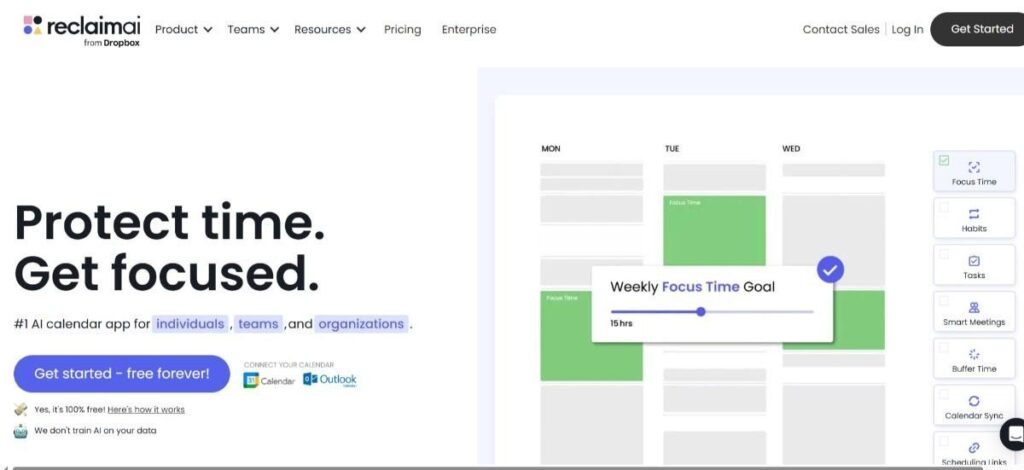
Logging into Reclaim AI is a quick and secure process. Navigate to reclaim.ai and click “Get Started Free” or “Login” at the top right. Reclaim integrates directly with Google Calendar — you sign in with your Google account and grant calendar access permissions. The entire setup from account creation to a configured calendar takes approximately 10–15 minutes. For Outlook users, the same flow applies using your Microsoft account credentials following the August 2025 Outlook integration launch.
How to Log In
- Go to reclaim.ai on your desktop or mobile browser.
- Click “Login” at the top right corner of the homepage.
- Sign in with your Google or Microsoft account — both are supported as of 2026.
- Grant calendar permissions so Reclaim can read your events and create new scheduling blocks.
Trouble Logging In?
If you’re facing login issues, ensure you’re using the same Google or Microsoft account you signed up with, check that calendar permissions were fully granted (incomplete permissions cause syncing to fail silently), clear your browser cache and cookies, or try a different browser. If the problem persists, Reclaim’s Help Center at help.reclaim.ai is well-documented and support is responsive on paid plans.
Mobile Access
Reclaim AI does not offer a dedicated native iOS or Android app — the platform is web-based. However, the web interface is responsive and accessible on mobile browsers, and your Reclaim-managed events appear in your native Google Calendar or Outlook app on mobile since Reclaim writes events directly to your calendar. For most users, managing Reclaim settings from a desktop browser and viewing the resulting schedule in a mobile calendar app is the practical workflow.
Step-by-Step Guide to Using Reclaim AI
Step 1: Connect Your Calendar
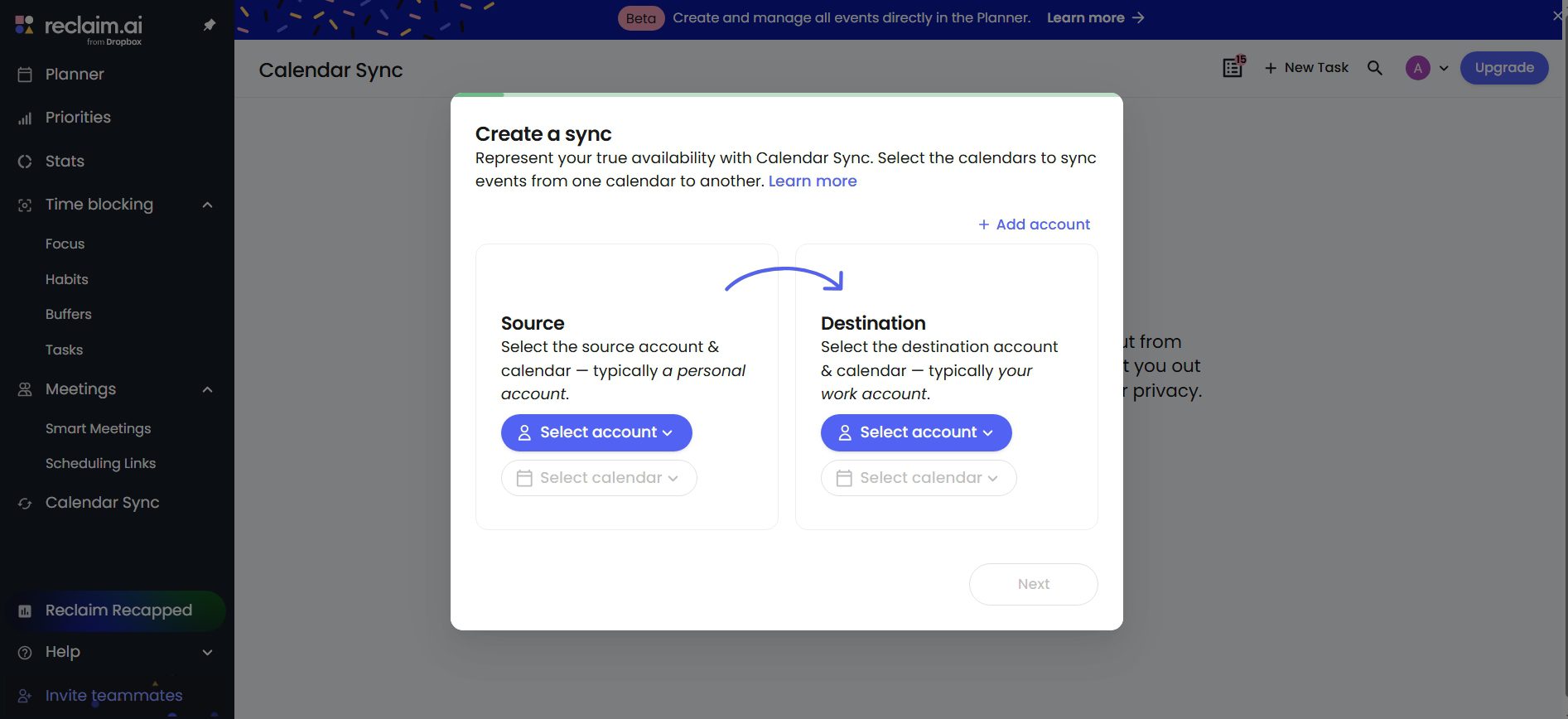
Reclaim syncs directly with Google Calendar or Microsoft Outlook — both are fully supported with two-way sync. Connect your primary work calendar on setup. If you have multiple calendars (work, personal, secondary accounts), Reclaim allows you to sync multiple calendars simultaneously on paid plans, so it has a complete picture of your availability before scheduling anything. The sync is real-time — events added or moved in your calendar appear in Reclaim within seconds.
Step 2: Add Tasks and Priorities
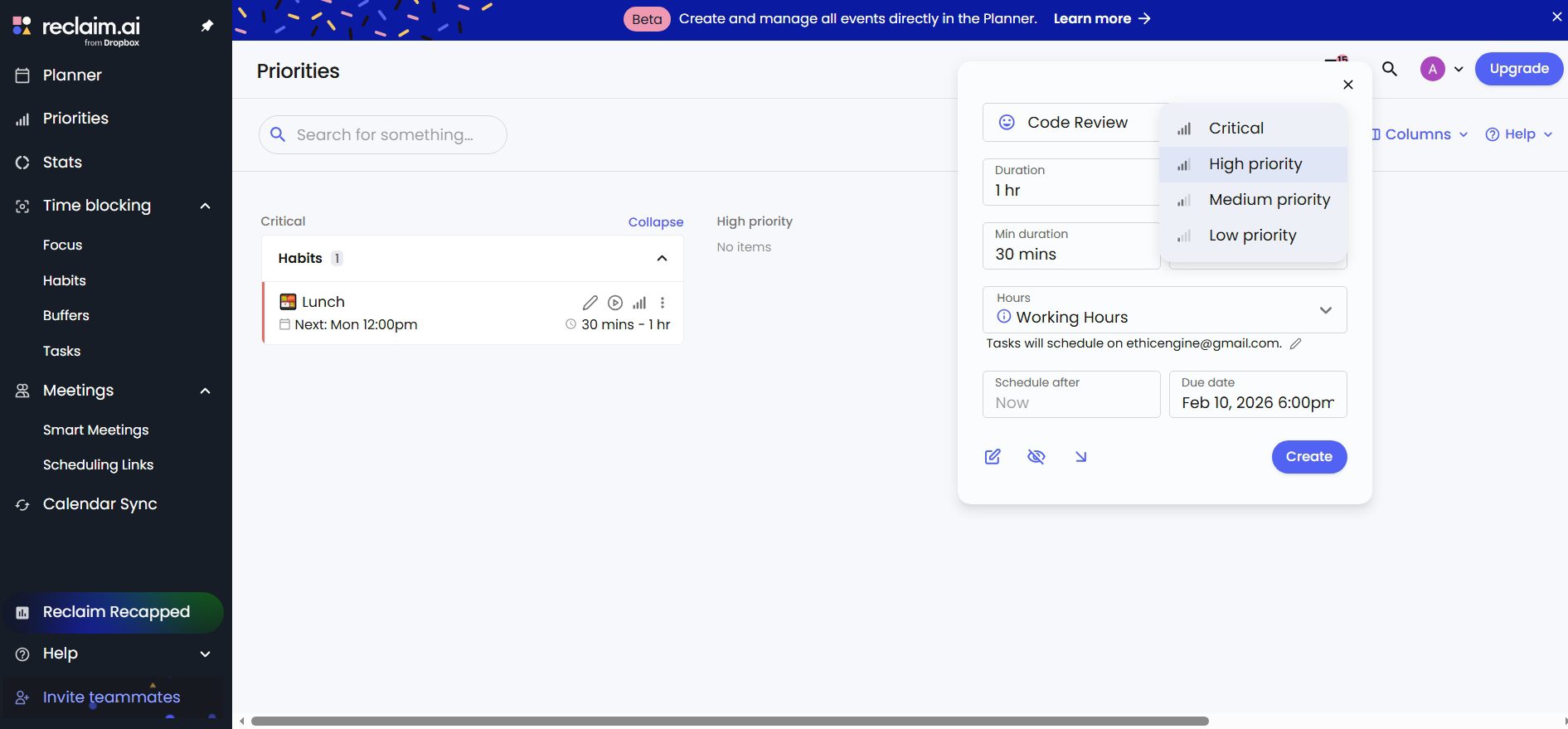
Add your tasks directly in Reclaim or connect your task management app — Todoist, Asana, ClickUp, Jira, or Linear all sync natively on Starter and above. Set each task’s deadline, estimated duration, and priority level (urgent, high, medium, low). Reclaim uses these inputs to determine where to schedule each task in your calendar — urgent tasks with imminent deadlines get scheduled first, lower-priority tasks fill later slots. You can also set time constraints (only schedule this task on mornings, or not before 10am) for tasks that need to happen at specific times of day.
Step 3: Add Habits and Routines
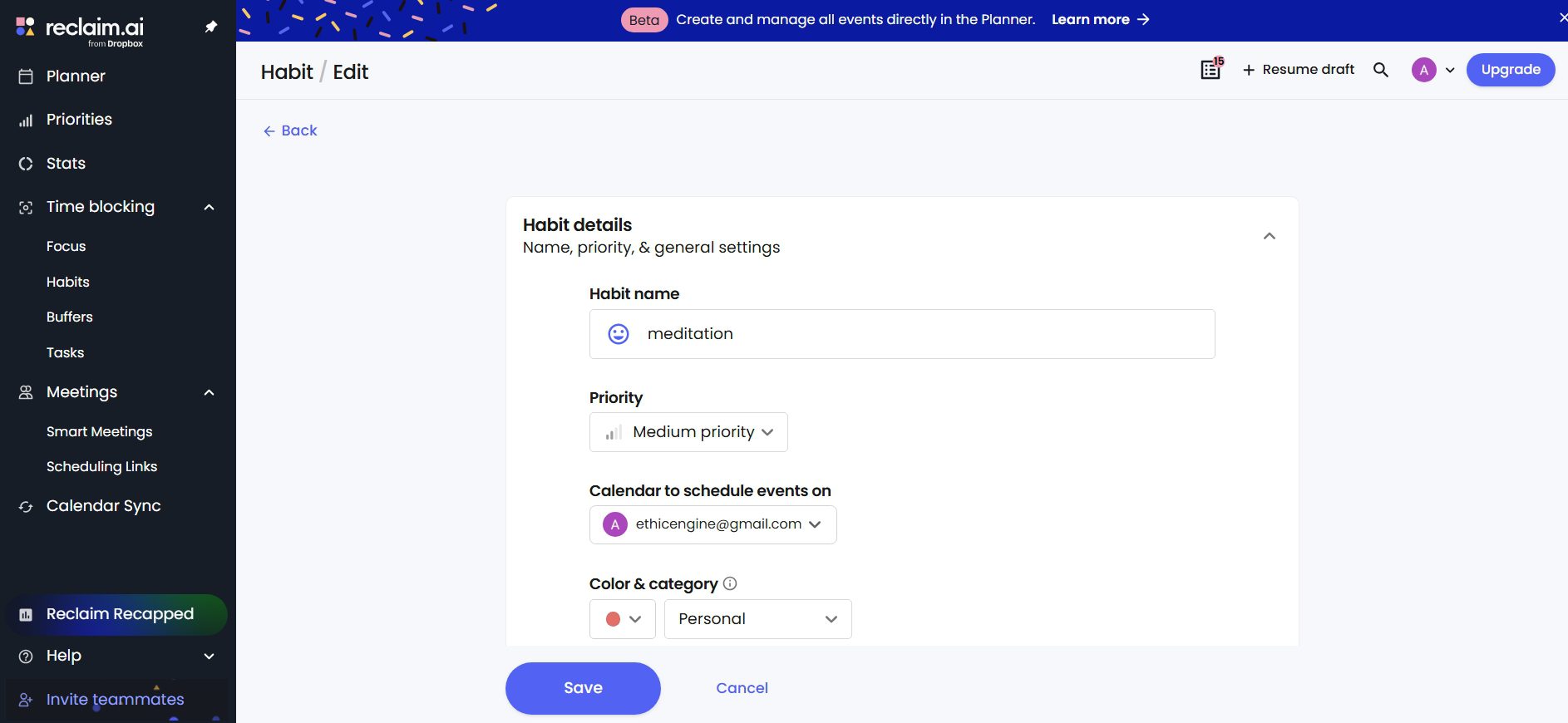
Create your recurring habits — exercise, meditation, lunch breaks, end-of-day reviews, learning sessions, whatever matters to you. For each habit, define the preferred time window (e.g., exercise between 7–9am), the minimum duration, whether it’s flexible or fixed, and how many times per week it should occur. Reclaim will schedule habits in your preferred window when possible and move them to the next best available slot when meetings conflict, rather than simply cancelling them. The Lite free plan supports 3 habits; Starter gives you unlimited.
Step 4: Let Reclaim Optimise Your Calendar
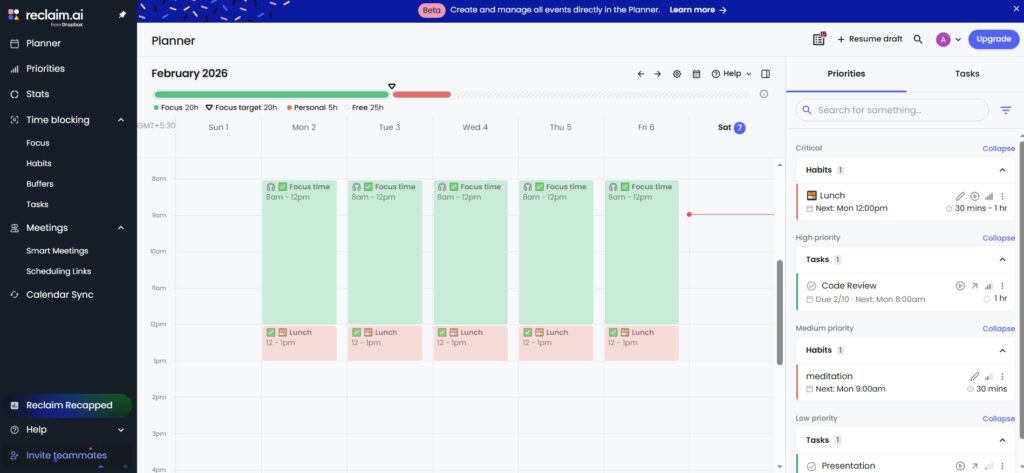
Once your calendar is connected, tasks are added, and habits are configured, Reclaim begins scheduling automatically — you don’t need to press an “optimise” button. Events appear on your Google Calendar or Outlook as Reclaim-managed blocks. You can see in the Reclaim dashboard what’s scheduled when and why, make manual adjustments if needed, and set “do not schedule” windows for times that should remain completely free. The scheduling engine runs continuously in the background, so your calendar stays optimised even as new meetings are added throughout the day.
Step 5: Monitor and Improve
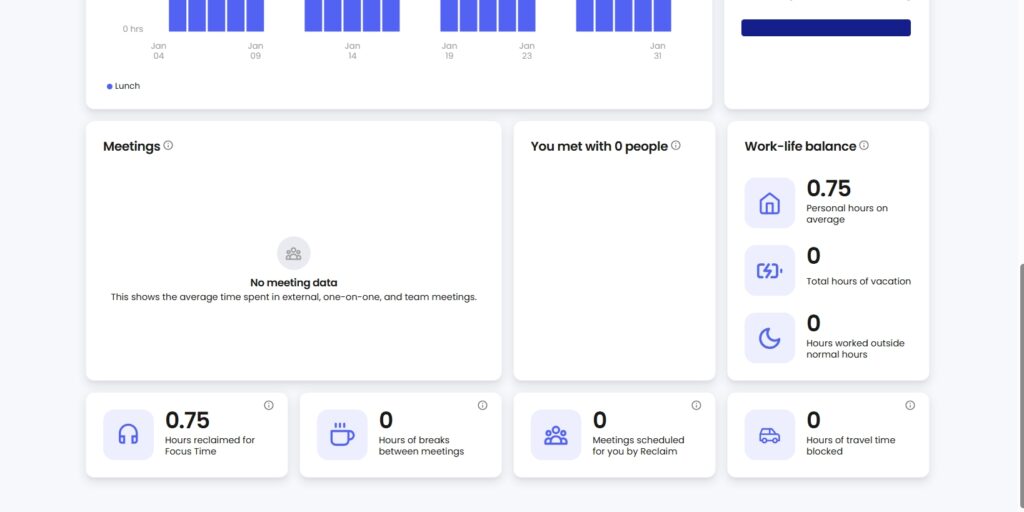
Reclaim’s analytics dashboard shows how your time is actually being spent — meeting time vs focus time vs task work vs habits — and tracks completion rates for habits and tasks over weeks and months. This data is genuinely useful for identifying patterns: are you consistently running out of focus time on Tuesdays? Is exercise getting bumped more on weeks with many afternoon meetings? The analytics give you the information to adjust your Reclaim configuration intelligently rather than guessing. On Business plans, team analytics extend this to the whole organisation — managers can see aggregate calendar health across their team.
Reclaim AI Pricing (2026 — Accurate)
Reclaim AI’s pricing has changed from what older reviews show. The correct 2026 pricing on annual billing is as follows — note that these are per-user rates and annual billing saves approximately 29% compared to monthly billing. Reclaim’s structure is designed primarily for teams, though individual professionals on Starter and Lite get strong value.
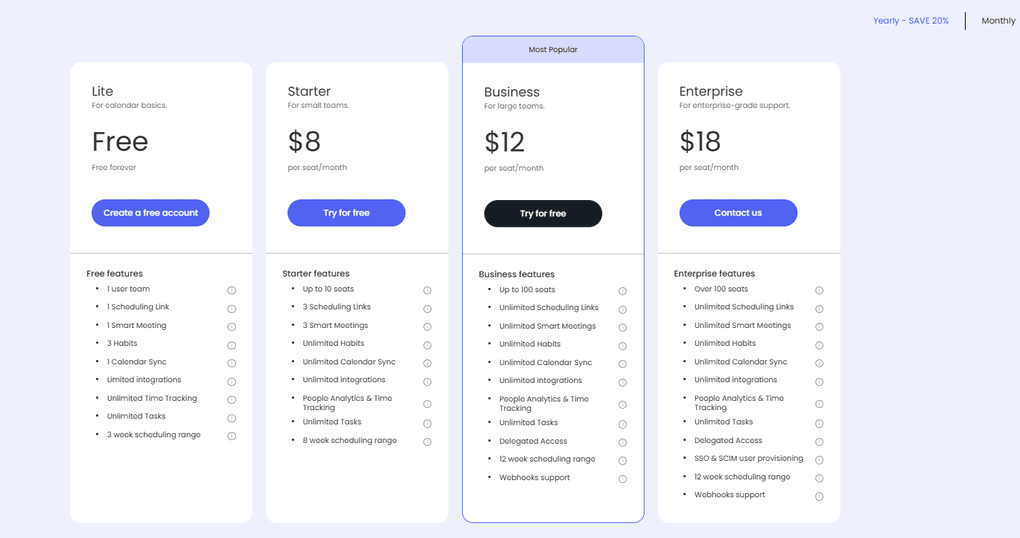
| Plan | Annual Price (per user/mo) | Monthly Price | Key Features | Best For |
|---|---|---|---|---|
| Lite | Free | Free | 2 calendars, 3 habits, 1 scheduling link, 1 smart meeting, 3-week scheduling range, basic analytics | Individuals testing AI scheduling |
| Starter | $8/user/mo | $10/user/mo | Unlimited habits, unlimited task syncs, unlimited calendar syncs, 3 smart meetings, 3 scheduling links, 8-week range, team stats, full integrations (Todoist, Asana, ClickUp, Jira, Linear) | Individual professionals, freelancers, small teams up to 10 |
| Business | $12/user/mo | $15/user/mo | Everything in Starter + team analytics, admin controls, priority support, advanced scheduling policies, teams up to 100 | Growing teams prioritising work-life balance and productivity analytics |
| Enterprise | $22/user/mo | N/A (annual only) | Everything in Business + SSO, SCIM provisioning, compliance controls, dedicated success manager, 100+ users | Large organisations needing enterprise security and support |
Lite Plan (Free)
The Lite plan is genuinely free, permanent, and useful for evaluation — not a crippled trial. It includes smart scheduling for up to 3 habits, 1 scheduling link for external meeting booking, 1 smart meeting with AI optimisation, and a 3-week scheduling horizon. For an individual who wants to test whether AI scheduling changes their daily experience before paying anything, Lite is a meaningful starting point. The primary limitations are the 3-habit cap, the 3-week horizon (not useful for planning more than a few weeks ahead), and the absence of task management integrations.
Starter Plan ($8/month annual)
Starter is where Reclaim becomes genuinely powerful for individual professionals. Unlimited habits, task management integrations with all major tools (Todoist, Asana, ClickUp, Jira, Linear), unlimited calendar syncs, an 8-week scheduling horizon, and team stats make this the plan most individual power users will settle on. At $8/month annually, it’s significantly cheaper than Motion ($19/month) and competitive with Clockwise ($6.75/month on their paid tier) while offering more task integration depth than both. The per-seat pricing is technically designed for teams up to 10, but solo users on Starter pay only their own seat.
Business Plan ($12/month annual)
Business adds the team-level capabilities: analytics across the organisation showing aggregate focus time, meeting load, and work-life balance metrics per person; admin controls for managing team-wide scheduling policies; and priority support. For a manager or team lead who wants visibility into whether their team has sufficient focus time, or for an organisation trying to reduce meeting overload systematically, the $4/month per-seat premium over Starter is well-justified. Scales to 100 users.
Enterprise Plan ($22/month annual)
Enterprise adds SSO (SAML), SCIM provisioning for automatic user management, compliance controls, and a dedicated success manager for onboarding and ongoing support. Designed for organisations above 100 users where IT governance, security certifications, and centralised administration are non-negotiable. Annual billing only. Custom configuration available through the sales team.
Which Reclaim AI Plan Is Right for You?
Start with the Lite plan to understand whether AI scheduling changes your daily workflow — the 3-habit limit is the main constraint but it covers exercise, focus time, and one other habit for most people. Upgrade to Starter ($8/month) when you need task management integration, unlimited habits, or an 8-week scheduling horizon — which for most active Reclaim users happens within the first month. Business makes sense when you’re managing a team and want collective analytics alongside individual scheduling. The old post’s pricing ($5/$12/$18) is outdated — the correct 2026 annual prices are $0/$8/$12/$22.
Pros and Cons of Reclaim AI
Pros
- Fully automated scheduling — tasks, habits, and focus time placed without manual intervention
- Real-time rescheduling when meetings change — the day rebuilds itself automatically
- Full Microsoft Outlook integration now live (August 2025) — the biggest previous limitation is resolved
- Strong task management integrations — ClickUp, Asana, Todoist, Jira, Linear on Starter+
- Habit protection with streak tracking and analytics — turns aspirational commitments into scheduled reality
- Starter at $8/month is competitively priced against Motion ($19) and Sunsama ($16)
- Backed by Dropbox (acquired 2025) — long-term infrastructure stability and roadmap acceleration
Cons
- No native mobile app — web only, though calendar events appear in your native mobile calendar app
- Lite free plan is limited to 3 habits and a 3-week scheduling horizon — most users will need Starter for serious use
- Scheduling is primarily automation-driven — users who prefer to manually approve all calendar changes will find the autonomous model uncomfortable
- Per-seat pricing designed for teams means solo users pay the same rate as team members without team features
- Requires a relatively full calendar to deliver its maximum value — users with light meeting loads get less benefit from AI optimisation
Reclaim AI vs Competitors
| Tool | Starting Price | Strengths | Limitations |
|---|---|---|---|
| Reclaim AI | Free / $8/mo (Starter) | Habit scheduling, task integrations, real-time rescheduling, Slack sync | No native mobile app, autonomous model not for everyone |
| Motion | $19/mo | All-in-one planner with project management built in | Significantly more expensive, steeper learning curve |
| Clockwise | Free / $6.75/mo | Team focus time management, meeting optimisation | Limited personal task automation, less habit focus |
| Sunsama | $16/mo | Intentional daily planning ritual, beautiful interface | Manual planning model — requires daily engagement |
Read the detailed comparison: Reclaim AI vs Motion Click Here
The most practically relevant comparison for most users is Reclaim vs Motion. Motion costs $19/month and includes a broader project management layer alongside its scheduling. Reclaim at $8/month is more focused — it’s a pure scheduling optimiser rather than a project manager — but covers the core scheduling problem more affordably. For individuals who need scheduling automation without a full project management system, Reclaim’s value proposition is stronger. For teams that want scheduling and project management unified, Motion’s higher price may be justified.
Who Should Use Reclaim AI
Reclaim AI delivers the most value for professionals with meeting-heavy schedules who struggle to protect time for deep work and personal commitments — the classic knowledge worker problem where meetings fill the calendar and everything else gets squeezed out. Knowledge workers (engineers, designers, writers, analysts, product managers) who need uninterrupted focus blocks that meetings currently erode benefit most directly. Freelancers juggling multiple client projects and personal development commitments who want their calendar to reflect their actual priorities, not just their meeting schedule. Team managers who want both their own scheduling automated and visibility into their team’s calendar health. Students balancing coursework, part-time work, exercise, and revision who want a structured system without daily manual planning.
Reclaim is less valuable for people with light calendars and few meetings — if you have two meetings a week and a simple daily routine, manual calendar management is sufficient and AI scheduling adds complexity without proportional benefit. It’s also not the right choice if you want to manually approve every scheduling decision — Reclaim’s autonomous model puts it in your calendar automatically, which is its strength but also requires a degree of trust in the system’s judgment.
How Reclaim AI Connects With Your Calendar
Reclaim AI with Microsoft Outlook
The most significant product update in Reclaim’s recent history is the launch of full Microsoft Outlook integration in August 2025. Previously, Reclaim supported only Google Calendar, and Outlook users needed workarounds (syncing Outlook to Google Calendar via third-party tools like SyncGene or Zapier) to get Reclaim’s functionality. That workaround is no longer necessary — Outlook is now a first-class supported calendar in Reclaim with feature parity to the Google Calendar integration. Two-way sync, real-time updates, conflict detection, and all scheduling features work identically with Outlook. Early users report occasional notification quirks with the Outlook integration, but these are being actively addressed. For enterprise teams on Microsoft 365 who were previously excluded from Reclaim’s benefits, this is a meaningful change.
| Feature | Status (2026) |
|---|---|
| Google Calendar Integration | Fully Supported — two-way sync, real-time |
| Outlook Calendar Integration | Fully Supported — launched August 2025 |
| Multiple Calendar Sync | Unlimited on Starter+, 2 calendars on Lite |
| Dropbox Integration (post-acquisition) | In development — deeper Dropbox Dash integration planned |
Reclaim AI and Dropbox
Using Dropbox Alongside Reclaim AI
Reclaim was acquired by Dropbox in May 2025, which has implications for how the two products will integrate going forward. Direct Dropbox file integration into Reclaim’s scheduling features is not yet live (as of mid-2026), but the roadmap points toward integration with Dropbox Dash — Dropbox’s universal search tool — which would allow Reclaim to surface relevant files alongside scheduled tasks. In the meantime, the practical way to use Dropbox files alongside Reclaim is to paste Dropbox share links into task descriptions in Reclaim, so the relevant file is one click away when the task block appears on your calendar. Zapier automations can also trigger calendar event creation based on Dropbox activity (new file uploads, folder changes) for users who want file-based scheduling triggers.
| Feature | Status |
|---|---|
| Direct Dropbox file integration | Not yet live — planned post-acquisition |
| Dropbox Dash integration | In development |
| Add Dropbox links to tasks | Yes — manually via task description |
| Zapier Dropbox triggers | Available with setup |
Reclaim AI and Google Calendar
How the Google Calendar Integration Works
Google Calendar remains Reclaim’s primary and most mature integration. The connection is direct and two-way — Reclaim reads all your existing Google Calendar events to understand your schedule, then writes task blocks, habit events, and focus time directly to Google Calendar with the appropriate labels and colours. Changes you make in Google Calendar (moving an event, deleting it, adding a new meeting) are reflected in Reclaim within seconds. Your Reclaim-managed blocks appear to external people booking meetings through your calendar as “busy” by default, protecting the time that matters without requiring manual do-not-schedule rules.
Benefits of the Google Calendar Integration
The deepest benefit of the Google Calendar integration is that Reclaim’s scheduling decisions are immediately visible everywhere you already view your calendar — on your phone’s native calendar app, in your Google Workspace sidebar, in any tool that reads your Google Calendar. You don’t need to check a separate Reclaim interface to know what’s happening: your Google Calendar reflects the optimised schedule Reclaim has built, and you can manage your day entirely in the interface you already use, with Reclaim managing the optimisation in the background.
Final Verdict: Is Reclaim AI Worth It in 2026?
For professionals with meeting-heavy calendars who consistently struggle to protect focus time and build consistent habits, Reclaim AI is one of the most practically valuable productivity tools available in 2026. The combination of task automation, habit scheduling, real-time rescheduling, and now full Outlook support addresses the core scheduling pain points that manual calendar management can’t solve efficiently. At $8/month for the Starter plan, it’s considerably more affordable than the closest comparable tool (Motion at $19/month) and delivers the scheduling automation that makes the subscription worth paying.
The honest caveats: the autonomous scheduling model requires trusting the system’s judgment — if you prefer to manually review and approve every calendar change, Reclaim will feel uncomfortable. And if your calendar is relatively light (few meetings, simple daily routine), the AI optimisation delivers less value than it does for heavy calendar users. Start with the Lite free plan — it’s permanent, no credit card required, and the 3-habit, 2-calendar configuration is sufficient to understand whether AI scheduling changes your daily experience. Upgrade to Starter when you hit the habit limit or need task management integrations.
Ready to Take Control of Your Schedule?
Stop wasting time juggling tasks, meetings, and habits. Let Reclaim AI automate your calendar, protect your focus time, and help you achieve more in less time.
Try Reclaim AI Free — No Credit Card RequiredAffiliate link — we may earn a small commission at no extra cost to you.
Is Reclaim AI free to use?
Yes. Reclaim AI has a permanent free Lite plan that includes 2 calendar syncs, 3 habits, 1 scheduling link, 1 smart meeting, and a 3-week scheduling horizon — no credit card required. It’s sufficient for evaluating AI scheduling on your real calendar. Most users who commit to Reclaim daily will need the Starter plan at $8/user/month (annual billing) for unlimited habits, task management integrations, and an 8-week scheduling horizon. The post’s earlier reference to paid plans starting at $10 is outdated — the correct annual price is $8/month for Starter.
Can Reclaim AI integrate with other tools?
Yes. Reclaim integrates with Google Calendar (native, two-way), Microsoft Outlook (full integration since August 2025), Slack (automatic status sync), Zoom and Google Meet (meeting links), and task management tools including Todoist, Asana, ClickUp, Jira, and Linear on the Starter plan and above. The ClickUp integration is particularly strong — when a task deadline changes in ClickUp, Reclaim automatically reschedules the calendar block. Zapier integration is also available for tools not natively supported.
What platforms does Reclaim support?
Reclaim AI is a web-based platform accessible via browser on desktop and mobile. It supports Google Calendar (primary integration) and Microsoft Outlook (full support since August 2025). Events created by Reclaim appear in your native mobile calendar app (Google Calendar on iOS/Android, Outlook mobile) since Reclaim writes directly to your calendar. There is no dedicated native Reclaim iOS or Android app — you manage settings in the web interface and view results in your existing calendar app.
Can I use Reclaim AI for personal tasks and habits?
Yes — habit scheduling is one of Reclaim’s strongest features. You create habits (exercise, meditation, learning, lunch breaks, whatever matters to you), define your preferred time window and duration, and Reclaim automatically schedules and protects them. When meetings conflict with a habit block, Reclaim moves the habit to the next best available slot rather than simply cancelling it. The Habits dashboard tracks your completion rate and streak over time. The Lite free plan supports 3 habits; Starter gives unlimited habits.
How is Reclaim AI different from regular calendar tools?
Standard calendar apps are passive — they display what you’ve manually scheduled but don’t help you decide what to schedule or when. Reclaim AI actively manages your calendar: it automatically schedules tasks based on their priority and deadline, protects focus time, places habit blocks in optimal slots, and reschedules everything in real time when meetings change. The key difference is automation — you set your priorities and commitments once, and Reclaim continuously optimises your calendar around them without daily manual planning.
Is my data safe with Reclaim AI?
Yes. Reclaim AI uses SSL/TLS encryption for all data in transit and follows industry-standard security practices for calendar data storage. Following the Dropbox acquisition in May 2025, Reclaim operates under Dropbox’s enterprise security infrastructure, which includes SOC 2 Type II compliance and ISO 27001 certification. The Enterprise plan adds SSO (SAML), SCIM provisioning, and compliance controls for regulated industries. Reclaim does not sell calendar data to third parties, and you can revoke calendar access permissions at any time from your Google or Microsoft account settings.
Can Reclaim AI help teams coordinate schedules?
Yes. Reclaim’s Smart Meetings feature finds the optimal meeting times for groups based on everyone’s actual availability, focus time protections, and scheduling preferences — not just the first empty slot. The Business plan adds Team Stats, which gives managers aggregate analytics on how the team’s time is distributed across meetings, focus work, tasks, and habits. This makes it practical to identify and address meeting overload at a team level. Team Scheduling Links allow sharing availability across the whole team for external booking.
Did Reclaim AI add Outlook support?
Yes — Reclaim AI launched full Microsoft Outlook integration in August 2025. Previously, Outlook was not natively supported and users needed third-party workarounds (syncing Outlook to Google Calendar via SyncGene or Zapier). The Outlook integration now has feature parity with the Google Calendar integration: two-way sync, real-time updates, conflict detection, habit scheduling, task blocks, and focus time protection all work identically with Outlook. This was one of the most requested features from enterprise users and Microsoft 365 teams.





I am Ashish Yadav a software engineer and AI tools researcher with over five years of practical experience working with real-world systems and automation. I am founder of CognifyFuture, where I analyzes, tests, and breaks down AI tools with a focus on what actually works—not what’s trending.
My content is built on hands-on usage, not theory. Instead of generic advice, I focuses on real implementation—how AI tools can be used to automate tasks, improve efficiency, and solve any specific business or individual problems.
Through CognifyFuture, My aims is to eliminate confusion around AI by delivering clear, honest, and actionable insights that help users make smarter technology decisions.







