

Affiliate Disclosure: This Bubble.io review may contain affiliate links. If you sign up through them, I may earn a small commission at no extra cost to you. I only recommend tools I have personally evaluated, and this never influences my honest opinion.
Is Bubble.io the Future of App Development?
Most people who want to build a web application run into the same wall: they have a clear idea of what they want to build, but no engineering team to build it, no budget to hire developers, and no years to spend learning to code. The traditional answer has always been “find a technical co-founder” or “raise money first” — both of which put the app perpetually in the future. Bubble.io exists to break that wall down.
I’ve spent significant time inside Bubble’s editor — building workflows, connecting APIs, structuring databases — and the honest answer is that it genuinely delivers on its core promise. You can build real, complex, production-ready web applications without writing code. The question isn’t whether it works; it’s whether it’s the right fit for what you specifically need to build. This review gives you the honest answer to that question, with accurate 2026 pricing, real use case breakdowns, and a clear-eyed look at where Bubble excels and where it falls short.
What Is Bubble.io?
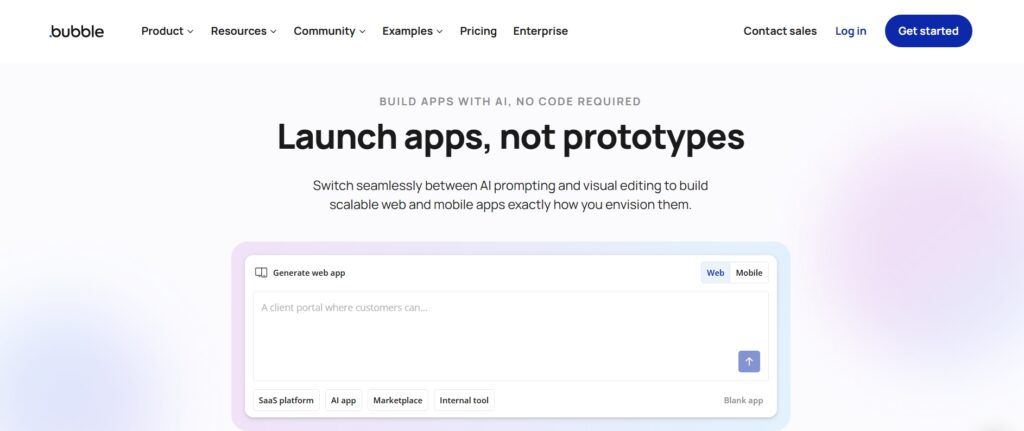
Bubble.io is a no-code visual programming platform that lets you build full-stack web applications using a drag-and-drop interface and a workflow-based logic system — no JavaScript, no SQL, no backend API code required. Founded in 2012, it has grown into one of the most powerful no-code platforms available, trusted by thousands of startups, agencies, and enterprises globally to build everything from simple internal tools to multi-sided marketplace platforms with tens of thousands of users.
What makes Bubble genuinely different from simpler no-code tools is that it handles the full stack: frontend UI design, backend business logic, and database management all live in the same visual editor. You’re not just building a website or automating a workflow — you’re building a complete application with real user authentication, dynamic data, complex conditional logic, and API integrations, all without touching a code editor.
Read Top 5 Powerful AI Tools for No Code / Low Code Click Here
Who Created Bubble.io?
Bubble was co-founded in 2012 by Emmanuel Straschnov and Josh Haas, both Harvard graduates with engineering backgrounds who wanted to democratise software development. The company has remained independent and founder-led, which has allowed it to invest heavily in platform depth rather than chasing short-term monetisation trends. That independence shows in the product — Bubble has added native mobile capabilities, significantly expanded its AI integration tools, and revamped its pricing model around Workload Units in recent years, all of which reflect a platform that’s actively evolving rather than coasting.
How Bubble.io Works (Step-by-Step)
Bubble’s architecture combines frontend, backend, and database into a single visual environment. The key insight that makes it powerful — and also creates its learning curve — is that these three layers are deeply interconnected rather than separated. Understanding how they work together is essential before you start building anything serious.
Core Components of Bubble.io
1.Visual Editor
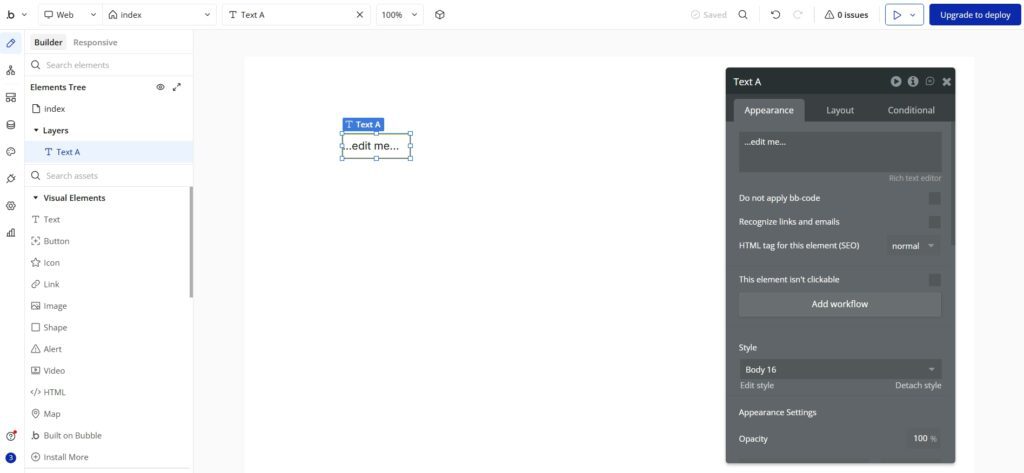
The visual editor is where you design your application’s UI — every page, every element, every layout. You drag elements onto the canvas (buttons, input fields, text, images, repeating groups for lists of data), position them, style them, and configure their responsive behaviour. The editor handles desktop and mobile responsiveness through a visual layout system rather than CSS media queries, which means non-developers can create professional-looking interfaces without understanding HTML or CSS. The canvas is what you see; what you’re actually building underneath is a structured hierarchy of elements with conditions, states, and data bindings attached.
2.Workflow Engine
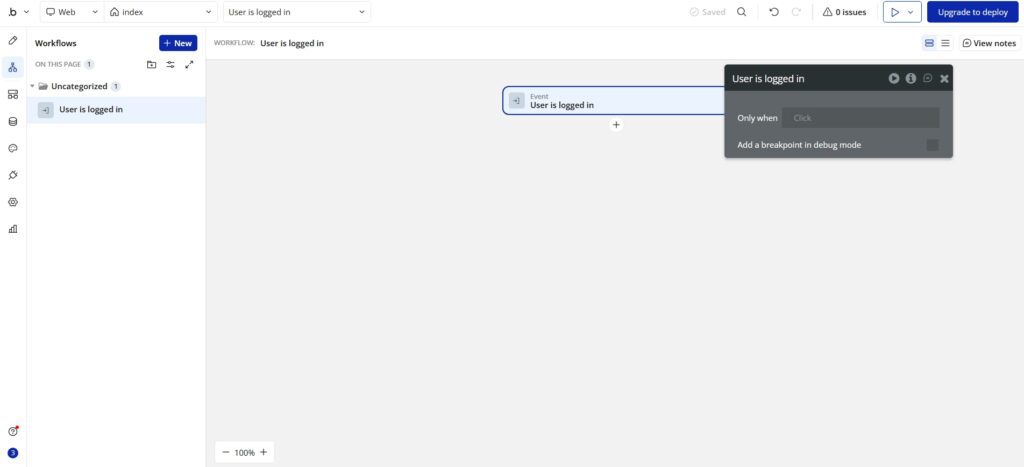
Workflows are Bubble’s equivalent of code logic — they define what happens when a user takes an action. When someone clicks a button, submits a form, logs in, or triggers any other event, a workflow runs a sequence of actions in order: create a database record, send an email, make an API call, navigate to a page, update a field, run a conditional check. The workflow editor is visual rather than textual, which makes logic transparent and auditable in a way that traditional code often isn’t. Backend workflows run server-side without user interaction, enabling scheduled tasks, webhook processing, and complex data operations that would typically require a separate backend service.
3.Database
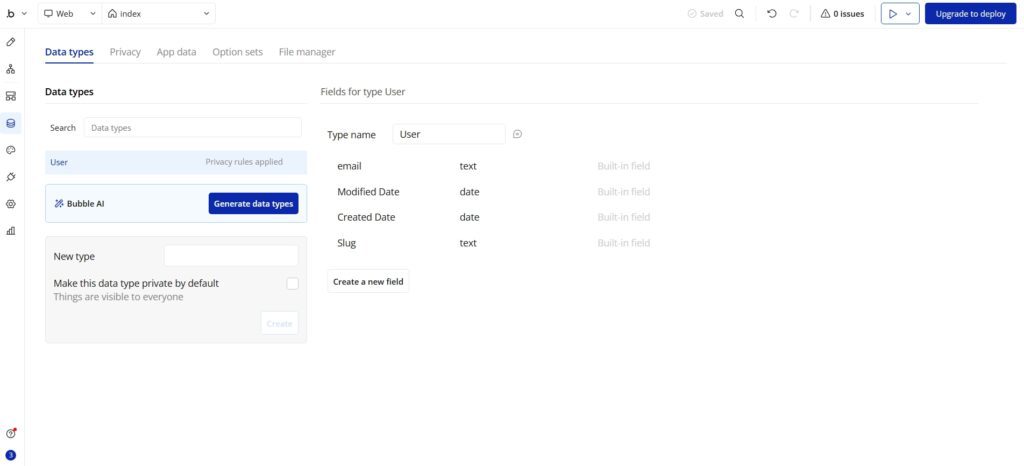
Bubble includes a native relational database — you define data types (think: tables) and fields (think: columns), and Bubble stores, retrieves, and updates records based on your workflows. Privacy rules let you control exactly which users can read or modify which records, which is how you build secure multi-user applications without writing database access control code. The database is deeply integrated with the UI — you can display a list of database records in a repeating group, filter them dynamically based on user inputs, and update them in real time through user interactions, all configured visually.
4.Plugins & API Integrations
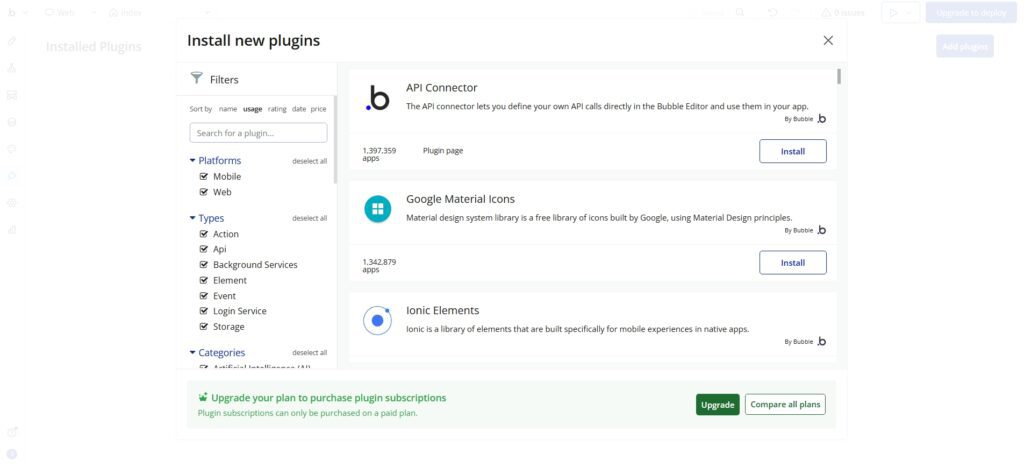
Bubble’s plugin marketplace has over 6,000 plugins built by both the Bubble team and the community, covering everything from Stripe payment processing and OpenAI GPT integration to Google Maps, SendGrid, Twilio, and hundreds of SaaS tools. The REST API Connector lets you connect to any external service with an API, without code — you configure the endpoint, authentication, headers, and parameters visually, then call it from workflows. This is the bridge between your Bubble app and the broader software ecosystem, and it works remarkably well for the vast majority of modern APIs.
Key Features of Bubble.io
Visual App Builder
Bubble’s visual editor goes well beyond what most people expect from “drag and drop.” You can build complex UI layouts with conditional visibility (show this element only if the user is logged in and their subscription is active), dynamic data binding (display the current user’s name from the database in this text element), responsive behaviour configurations, hover states, and multi-page navigation flows — all without writing a line of HTML or CSS. For anyone who has tried to build interfaces using traditional tools and found them inaccessible, the visual editor is genuinely revelatory. The gap between what you can see in the editor and what actually renders in the browser is much smaller in Bubble than in most competing platforms.
Powerful Workflow Automation
The workflow engine is where Bubble earns its reputation as a serious application platform rather than just a website builder. A single workflow can chain dozens of actions: authenticate a user, create a record in the database, send a confirmation email via SendGrid, call a Stripe API to create a subscription, update a field based on the result, and redirect to a dashboard page — all triggered by a single button click. Conditional branches let you handle error states and alternate paths without duplicating workflows. For non-developers, the visual clarity of Bubble workflows is often easier to reason about than traditional code, because the logic is laid out sequentially and visibly rather than distributed across multiple files and functions.
Built-in Database
The native database eliminates one of the biggest barriers for non-technical builders: setting up and managing a backend database service. Most alternatives require you to configure Airtable, Supabase, Firebase, or another external database and then wire it up to your frontend through an API. Bubble handles all of this internally, which significantly reduces the complexity of your app’s architecture and the number of moving parts you need to manage. The privacy rule system is particularly impressive — you can define exactly who can create, read, update, and delete each data type, with conditions that reference the current user’s data, making it possible to build genuinely secure multi-user applications without backend code.
Scalability & Performance
Bubble’s performance model changed significantly with the introduction of Workload Units (WUs) — a capacity metric that measures the server resources your app consumes. Every database query, workflow action, API call, and page load consumes WUs, and your plan determines how many you get per month. This model is more transparent than the old “server capacity” framing, but it also requires thoughtful app architecture — inefficient database queries and unoptimised workflows can burn through your WU allocation faster than expected. Dedicated server plans (Growth and above) provide consistent performance by isolating your app from shared infrastructure, which matters once you have real paying users who expect reliability.
Real-World Use Cases of Bubble.io
SaaS Startups
This is Bubble’s strongest use case and where its depth of capability is most valuable. A founder with a clear product idea but no development team can build a full SaaS application — user authentication, subscription billing via Stripe, feature-gated content, admin dashboards, email notifications, and customer onboarding flows — entirely in Bubble, typically within weeks rather than the months a traditional development timeline would require. The cost saving is substantial: a custom-developed SaaS MVP typically costs $50,000–$150,000 from a development agency; the same product on Bubble costs the time to build it plus $29–$119/month in hosting. Many real SaaS businesses generating six-figure annual revenue are running entirely on Bubble, which is the clearest evidence that the platform is production-capable.
Internal Business Tools
Companies use Bubble to build internal tools that their specific workflow requires but that off-the-shelf software doesn’t cover. Custom CRM systems tailored to a specific sales process, admin dashboards that surface exactly the data operations teams need, HR portals with custom approval workflows, project management tools with business-specific logic — all of these can be built in Bubble for a fraction of the cost of custom development, and updated immediately when requirements change without waiting for a development sprint. The speed of iteration is one of Bubble’s most underrated advantages for internal tooling.
Marketplaces
Two-sided marketplace applications — where buyers and sellers interact, transactions are facilitated, and both parties have distinct user experiences — are among the most complex types of web applications to build. Bubble handles them well because its database privacy rules, workflow logic, and Stripe Connect integration (for managing payments between parties) provide the building blocks that marketplace architectures require. Booking platforms, freelancer marketplaces, rental platforms, and subscription-based community products have all been successfully launched on Bubble. The key requirement is thoughtful data modelling and workflow design from the start — marketplace apps built poorly on Bubble will hit performance walls; marketplace apps built well can scale to significant user volumes.
Bubble.io Pricing
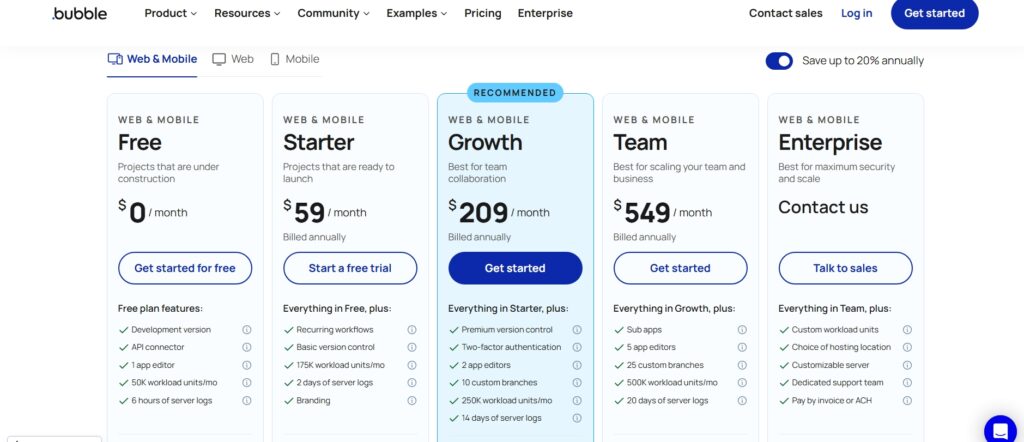
Bubble’s pricing changed significantly in recent years with the introduction of Workload Units (WUs) — a metric that measures the server resources your app consumes per month. Every database operation, workflow action, API call, and page load consumes WUs. Your plan determines your monthly WU allocation, and exceeding it requires purchasing additional WUs. Here are the verified 2026 prices for web-only plans on annual billing:
| Plan | Annual Price (Web) | Monthly WUs | Editors | Best For |
|---|---|---|---|---|
| Free | $0 | 50,000 | 1 | Learning, prototyping, testing |
| Starter | $29/mo | 175,000 | 1 | First live app, MVPs, side projects |
| Growth | $119/mo | 250,000 | 2 | Growing SaaS, active user base |
| Team | $349/mo | 500,000 | 5 | Multi-person teams, agency clients |
| Enterprise | Custom | Custom | Custom | Large orgs, compliance, dedicated infra |
A few honest notes on Bubble’s pricing that most reviews skip. First, the free plan cannot deploy a live app — it’s purely for building and testing, which makes it excellent for prototyping but means $0 is genuinely not a production option. Second, Starter at $29/month is the minimum viable plan for any customer-facing product, but a realistic budget for a production app on Starter often reaches $80–$150/month once you add payment processing fees, email service costs (SendGrid, Postmark), and any premium plugins. On Growth, total monthly costs often reach $200–$400/month. Third, Bubble launched native mobile capabilities in 2025, with separate mobile plans starting at $42/month and combined web + mobile plans from $59/month (Starter) to $549/month (Team).
Pros and Cons of Bubble.io
Pros
- Genuine full-stack no-code — frontend, backend logic, and database all in one environment, no external services required
- Powerful workflow engine that handles complex multi-step business logic visually
- 6,000+ plugins covering Stripe, OpenAI, Google Maps, SendGrid, Twilio, and most major SaaS APIs
- Strong, active community with templates, courses, and a thriving agency ecosystem
- Native mobile capabilities added in 2025 — iOS and Android app builds without a separate tool
- Starter plan ($29/month) is affordable for early-stage validation and MVPs
- Production-proven — real SaaS businesses generating six-figure revenue run on Bubble
Cons
- Steeper learning curve than simpler no-code tools — workflows and data modelling require real investment to understand
- Vendor lock-in risk — your app’s logic, data, and architecture are tightly coupled to Bubble’s platform; migrating away later is very difficult
- Performance optimisation requires experience — poorly built apps hit WU limits faster than expected
- Workload Unit pricing model adds unpredictability — costs can spike unexpectedly with heavy usage or inefficient workflows
- Mobile apps are a web wrapper (PWA), not fully native — for apps requiring deep device integration, native frameworks are still superior
- SEO is limited compared to traditionally built websites — Bubble apps are not ideal for content-heavy, search-driven products
Bubble.io vs Other No-Code Tools
The most common mistake people make when evaluating Bubble is comparing it to tools that are solving fundamentally different problems. Here’s an honest breakdown of where Bubble sits versus the platforms it’s most often compared against:
| Platform | Best For | Starting Price | App Logic | Database | Mobile |
|---|---|---|---|---|---|
| Bubble.io | Complex web apps, SaaS, marketplaces | $29/mo | Full workflow engine | Built-in native | Web wrapper (PWA) |
| Webflow | Marketing websites, CMS content sites | ~$14/mo | Limited (interactions) | CMS only | Responsive web |
| Adalo | Simple mobile-first apps | $36/mo | Basic logic | Built-in, limited | True native iOS/Android |
| FlutterFlow | Native mobile apps with design depth | $30/mo | Actions + custom code | Firebase | True native |
| Glide | Simple internal tools from spreadsheets | $49/mo | Simple actions | Google Sheets / Glide | PWA + native |
Bubble.io vs Webflow
Webflow is a website builder with CMS capabilities — it’s outstanding for marketing sites, landing pages, and content-heavy properties, and its design capabilities are significantly more advanced than Bubble’s. But Webflow is not an application platform. It doesn’t have a real database, workflow logic, user authentication beyond Memberstack integrations, or the ability to build genuinely interactive multi-user applications. If your goal is a public-facing website with great design, Webflow wins. If your goal is a web application where users log in, interact with data, and trigger business logic, Bubble wins decisively. These are not competing tools — they’re built for different outcomes.
Bubble.io vs Adalo
Adalo builds true native iOS and Android apps — apps that publish directly to the App Store and Google Play, with access to device features like camera, push notifications, and offline storage. Bubble’s mobile offering is a progressive web app wrapper, not a native app, which means it lacks some device integration capabilities and has limitations around offline functionality and app store distribution. If native mobile is your primary target and your app’s logic is relatively simple, Adalo or FlutterFlow are more appropriate choices. If you’re building a complex web application that also needs to work well on mobile browsers, Bubble is the stronger platform.
Bubble.io vs Traditional Development
The comparison that matters most for most people reading this. Traditional development gives you maximum flexibility, no vendor lock-in, and no platform-imposed architectural constraints — but it requires a development team, typically costs $50,000–$200,000+ for an MVP, and takes 3–9 months to first launch. Bubble compresses that to weeks and a few hundred dollars per month, at the cost of working within the platform’s constraints and accepting the lock-in that comes with it. For validation-stage products and internal tools, the Bubble trade-off is almost always worth it. For products that will eventually require highly custom, performance-critical architecture, the calculus is more complex — but even then, many teams use Bubble to validate and reach early revenue before rebuilding in a traditional stack.
Is Bubble.io Scalable for Production Apps?
Yes — with an important caveat. Bubble can absolutely support production applications with real paying users, significant data volumes, and serious traffic. Many six-figure and even seven-figure SaaS businesses run entirely on Bubble. But scalability on Bubble is not automatic — it’s a function of how well your application is architected. An app with inefficient database searches that scan large datasets without proper constraints, or workflows that make unnecessary API calls in loops, will burn through Workload Units rapidly and hit performance walls long before a well-optimised app would on the same plan.
The practical implication is this: if you’re building seriously on Bubble, invest time in learning how WUs are consumed, how to use search constraints efficiently, how to structure backend workflows to minimise database operations, and when to use server-side logic versus client-side. The Bubble community and official documentation cover these topics well. Teams that treat WU efficiency as a first-class concern during development build apps that scale comfortably; teams that ignore it until they hit a wall spend significant time and cost rearchitecting.
Who Should Use Bubble.io?
Bubble is the right choice for startup founders who need to validate a SaaS idea without a development team, indie hackers building and iterating on web products quickly, product managers who want to prototype and test application ideas without waiting for engineering sprints, agencies building custom client applications on tight timelines and budgets, and non-technical entrepreneurs who have a clear vision of a product and the time to invest in learning Bubble’s workflow system. The common thread is: complex web application logic, limited development resources, and a need to move faster than traditional development allows.
Bubble is the wrong choice if you primarily need native iOS or Android apps with deep device integration (FlutterFlow or React Native are better fits), if your product’s competitive advantage depends on performance characteristics that a managed platform can’t deliver, if your application has extreme security or regulatory compliance requirements that need custom infrastructure, or if you need a marketing website rather than a web application — Webflow or WordPress solve that better and cheaper.
Conclusion: Should You Use Bubble.io in 2026?
For the right use case, Bubble.io is one of the most powerful decisions a non-technical founder or small team can make. It genuinely eliminates the development bottleneck that keeps most app ideas permanently in the “someday” category, and it does so at a price point that’s accessible from the first day. The platform has matured significantly — native mobile support, improved performance tooling, a richer plugin ecosystem — and the community of experienced Bubble developers, templates, and tutorials makes the learning curve much more navigable than it was even two or three years ago.
The honest caution is around lock-in and architectural discipline. Bubble is not a stepping stone to a “real” app — it is the app, and your data and logic live inside its ecosystem. Build on it deliberately, optimise for WU efficiency from the start, and treat it as a production platform rather than a prototype tool. Do that, and Bubble can take a product from idea to revenue-generating reality faster and more affordably than almost any alternative available in 2026.
Is Bubble.io really no-code?
Yes. Bubble.io enables full-stack web application development without writing code — no JavaScript, no SQL, no backend API code. You build UI visually, define logic through a visual workflow editor, and manage a database through a point-and-click interface. That said, building complex applications on Bubble still requires learning its workflow and data modelling system, which has a real learning curve. ‘No-code’ means no traditional coding, not no skill required.
Can Bubble.io build scalable apps?
Yes, with the right architecture. Many production SaaS businesses generating six-figure annual revenue run entirely on Bubble. Scalability depends heavily on how efficiently your app is built — specifically how your database queries, workflow actions, and API calls consume Workload Units. Apps built with WU efficiency in mind scale comfortably; apps with inefficient data operations hit capacity limits faster. The Growth plan ($119/month) and above provide dedicated server infrastructure, which is the foundation for reliable scaling.
Is Bubble.io good for SaaS startups?
Yes — it’s one of the best platforms for early-stage SaaS MVPs specifically. A founder can build a complete SaaS product — user authentication, subscription billing via Stripe, feature-gated content, admin dashboard, email notifications — without a development team, typically in weeks rather than months. The cost saving compared to custom development ($50,000–$150,000 for an agency-built MVP vs a few hundred dollars per month on Bubble) is the primary reason many early-stage founders choose it. The trade-off is platform lock-in and the architectural discipline required for the product to scale.
Does Bubble.io support APIs?
Yes, extensively. Bubble’s built-in API Connector lets you connect to any external REST API without code — you configure endpoints, authentication, headers, and parameters visually, then call them from workflows. The plugin marketplace offers 6,000+ pre-built integrations for major services including Stripe, OpenAI, Google Maps, SendGrid, Twilio, Airtable, and hundreds more. Bubble also exposes its own API so external services can interact with your Bubble app’s database and trigger workflows.
Is Bubble.io free to use?
Bubble has a free plan, but it has important limitations: your app lives on a Bubble subdomain, you cannot deploy a live production app (the free plan is for building and testing only), and your WU allocation is limited to 50,000 per month. The minimum plan for a customer-facing live application is Starter at $29/month. A realistic budget for a production app including hosting, email, and plugins is typically $80–$150/month on Starter and $200–$400/month on Growth.
Can Bubble.io replace developers?
For many web application use cases, yes — Bubble can replace the need for a development team entirely during the validation and early-revenue stages. For products with very specific performance requirements, complex custom integrations, or architecture that needs low-level control that a managed platform can’t provide, traditional development remains necessary. Many teams use Bubble to validate, launch, and reach initial revenue, then evaluate whether to continue scaling on Bubble or rebuild in a custom stack based on what they’ve learned from real users.
Is Bubble.io SEO-friendly?
Partially. Bubble supports custom meta titles, descriptions, and Open Graph tags for each page, and Bubble pages are indexable by search engines. However, Bubble apps are single-page applications rendered client-side, which historically has SEO disadvantages compared to server-side-rendered websites. For products where organic search traffic is a primary growth channel, a traditionally built or Webflow-based site is a stronger choice. For applications where users log in to access functionality — where SEO matters less than the in-app experience — Bubble’s SEO limitations are largely irrelevant.
What are the best Bubble.io alternatives?
It depends entirely on what you’re building. For native mobile apps, FlutterFlow and Adalo are the strongest alternatives. For marketing websites and CMS-driven content, Webflow is better suited. For simple internal tools built from spreadsheet data, Glide is faster and cheaper. For workflow automation between existing apps, Zapier or Make are more appropriate. For low-code with code flexibility, Retool (internal tools) or Xano + Webflow (web apps with a custom backend) offer more control. Bubble’s unique position is full-stack web application complexity without code — no other platform in the no-code space matches its depth for that specific use case.





I am Ashish Yadav a software engineer and AI tools researcher with over five years of practical experience working with real-world systems and automation. I am founder of CognifyFuture, where I analyzes, tests, and breaks down AI tools with a focus on what actually works—not what’s trending.
My content is built on hands-on usage, not theory. Instead of generic advice, I focuses on real implementation—how AI tools can be used to automate tasks, improve efficiency, and solve any specific business or individual problems.
Through CognifyFuture, My aims is to eliminate confusion around AI by delivering clear, honest, and actionable insights that help users make smarter technology decisions.







