
You’re somewhere between frustrated and confused right now, aren’t you? You searched Moosend vs MailerLite because both platforms keep showing up on every “affordable email marketing tools” list — and yet nobody seems to give you a straight answer on which one is actually better for your specific situation. I’ve been there. And after testing both platforms across real campaigns, real clients, and real use cases, I can tell you: the differences matter more than most comparison articles let on.
Both Moosend and MailerLite target the same audience — small businesses, freelancers, bloggers, and growing brands that want professional email marketing without paying Mailchimp or ActiveCampaign prices. But they make very different choices about what to prioritize, and both have gone through real changes recently: Moosend was acquired by Constant Contact in June 2025, and MailerLite overhauled its pricing and plan names in June 2026. Most comparison articles online are still running on stale numbers. In this Moosend vs MailerLite breakdown, I’m going to walk you through nine real differences — covering pricing, automation, templates, deliverability, e-commerce, and more — so you can stop comparing and start sending.
Moosend vs MailerLite: A Quick Platform Overview Before We Dive In
What Is Moosend?
Moosend is a Greek-born email marketing and automation platform founded in 2011 in Athens by Yannis Psarras and Panos Melissaropoulos. It was acquired by Sitecore in 2021, which gave it a significant infusion of resources and enterprise backing without dramatically changing the product’s small-business focus. More recently, Constant Contact acquired Moosend from Sitecore in June 2025 — Moosend now operates as part of Constant Contact’s portfolio while continuing to power Sitecore Send for Sitecore’s existing customers under a separate arrangement. For everyday users, this ownership change hasn’t altered the core product or pricing so far, but it’s worth knowing who actually owns the platform today.
Moosend is built around three core pillars: powerful marketing automation, advanced email analytics, and an AI-driven product recommendation engine that’s genuinely impressive for its price point. Moosend’s automation capabilities are often the first thing that surprises new users — the platform punches well above its weight in this area, offering workflow sophistication that typically shows up in tools costing two or three times as much. It’s a strong fit for e-commerce brands, data-driven marketers, and businesses that want automation depth without enterprise pricing.

What Is MailerLite?
MailerLite was founded in 2010 in Vilnius, Lithuania, with a clear mission: make professional email marketing genuinely accessible — in terms of both price and usability — for everyone, not just marketers with years of experience. Today it serves over 1 million businesses worldwide and has built a reputation for being one of the cleanest, most intuitive email marketing platforms available at any price.
Read Detailed Guide of MailerLite Review 2026: Pricing, Features, Pros & Cons
MailerLite’s strength is a combination of simplicity and comprehensiveness. The drag-and-drop editor is best-in-class for its tier. The feature set — email campaigns, automation, landing pages, pop-ups, a website builder, and even a digital product selling feature — covers most of what a small business needs without feeling bloated or overwhelming. One important update: MailerLite restructured its pricing and plan names on June 16, 2026 — the old “Growing Business” and “Advanced” plans are now called Comfort and Power, and the free plan is considerably smaller than it used to be. More on exactly what changed in the pricing section below.
In broad terms: Moosend goes deeper on automation and analytics; MailerLite goes wider on design, usability, and all-in-one features. Let’s explore what that means across nine specific categories.
1. Pricing: Moosend vs MailerLite — Which One Is More Affordable in 2026?
Pricing is usually the starting point in a Moosend vs MailerLite comparison — and for most small businesses, it’s also the most important factor. Both platforms are positioned as budget-friendly alternatives to expensive tools like Mailchimp or HubSpot, but the pricing structures are different in ways that matter, and MailerLite’s numbers changed significantly in mid-2026.
Moosend Pricing (2026)
Moosend prices by number of contacts, with all features included on the Pro plan (no feature-gating by tier for core functionality):
- Free Trial: 30-day free trial | Full Pro feature access | No credit card required | Up to 1,000 contacts
- Pro Plan: Starts at $9/month (500 contacts, billed monthly) | Unlimited emails on every paid plan | Marketing automation | Landing pages | Subscription forms | No Moosend branding | 20% off with annual billing, 15% off bi-annual, plus a 25% nonprofit discount that stacks with annual
- Moosend+ (Enterprise Add-ons): Custom pricing, layered on top of Pro | Dedicated IP | Custom reports | SSO/SAML | Transactional email | Additional team seats | Dedicated account manager
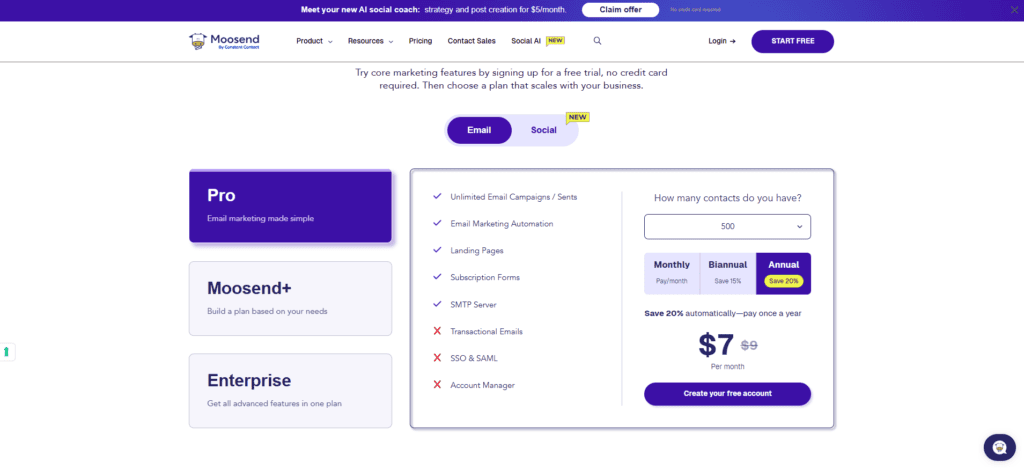
Here’s what makes Moosend’s core pricing genuinely compelling: the standard $9/month Pro plan already includes unlimited sends and full marketing automation — that’s rare at this price point. As your contact count grows, the price scales up: roughly $24/month at 2,000 contacts and around $48/month at 5,000 contacts, based on Moosend’s published rate card. Above that, pricing continues to scale with your contact count — check Moosend’s own pricing calculator for exact numbers at your specific list size, since tiers above 5,000 aren’t published in a simple table.
Two important notes: Moosend does not have a permanent free plan — only a 30-day trial. After that, you’re on a paid plan or you’re out. And despite what some older articles claim, transactional email is not included in the base Pro plan — it’s a Moosend+ add-on with custom pricing (more on this in Section 8 below).
MailerLite Pricing (2026) — Recently Overhauled
MailerLite introduced new pricing and renamed its plans on June 16, 2026. If you’ve seen an older comparison mentioning “Growing Business” or “Advanced” plans, or a free plan with 1,000 subscribers — that information is outdated. Here’s the current structure:
- Free Plan: Up to 250 active subscribers | 2,500 emails/month | 2 user seats | Automation, a website, a landing page, and signup forms included, though limited in number (feature caps of 3 automations, 3 forms, 1 landing page, 1 website, 1 digital product are being enforced from August 13, 2026)
- Comfort: From $12/month (small lists) | Unlimited templates, dynamic emails, campaign auto-resend, multivariate testing, AI writing assistant, smart sending | Sending limits scale with your subscriber tier
- Power: From $25/month | Everything in Comfort, built for marketers running several revenue streams and funnels, with deeper personalization and monetization tools
- Enterprise: Custom pricing, aimed at accounts above roughly 250,000 subscribers | Dedicated Customer Success Manager | Dedicated sending IP
This is a meaningfully smaller free plan than MailerLite used to offer — the subscriber cap dropped from 500 (and 1,000 before that) down to 250, and the monthly sending limit fell from 12,000 emails to 2,500. It’s still a genuine, permanent free plan with no time limit, which is a real advantage over Moosend’s 30-day-only trial — but it’s no longer the standout, highly generous free tier it once was. If you’re comparing based on an article written before mid-2026, budget for higher costs than you might be expecting.
Pricing verdict: At the entry paid tier, Moosend ($9/month) is now cheaper than MailerLite’s Comfort plan ($12/month). MailerLite still wins on having a genuinely permanent free plan — useful if you want a zero-cost, no-deadline starting point — but that free tier is far less generous than it was a year ago. Moosend wins on core-plan value: unlimited sends and full automation are included from the very first paid dollar, with no separate “Advanced-only” feature gate for essentials.
2. Email Automation: Where Moosend vs MailerLite Diverge Most Dramatically
If there’s one area that defines the Moosend vs MailerLite comparison more than any other, it’s marketing automation. This is where Moosend genuinely surprises people — because for a platform at this price point, the automation depth is exceptional.
Moosend Automation: Surprisingly Powerful for the Price
Moosend’s automation builder is a visual, canvas-based workflow system that supports multi-step, multi-branch sequences with a wide range of triggers, conditions, and actions. What sets it apart from MailerLite’s automation is the sophistication of the conditional logic and the range of available triggers — particularly for e-commerce and behavioral targeting.
Moosend automation highlights:
- Triggered by email behavior (opens, clicks, non-opens after X days)
- Website behavior triggers (page visits, product views, specific URL patterns via tracking script)
- E-commerce triggers: cart abandoned, product purchased, order placed, item viewed
- Date-based triggers (birthdays, anniversaries, subscription date)
- Custom event triggers (API-based, for developers building product integrations)
- Multi-branch conditional paths based on subscriber attributes, tags, or behavior
- Lead scoring: assign and update scores based on engagement, then trigger automations when a threshold is hit
- Weather-based triggers: a genuinely unique feature — Moosend publishes ready-made automation recipes that adjust product recommendations based on real-time weather at a subscriber’s location (useful for apparel, outdoor products, and seasonal goods)
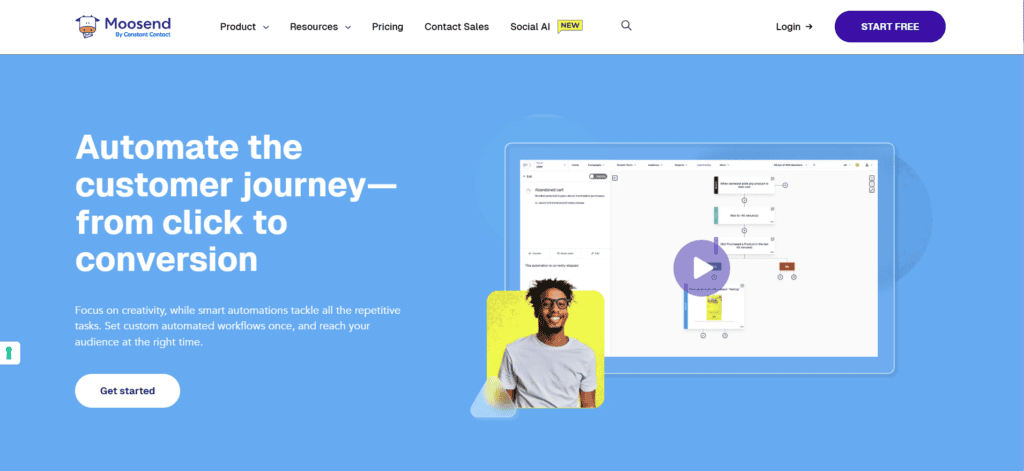
I tested the abandoned cart automation in Moosend for an e-commerce client running a WooCommerce store. From setup to first send took about 40 minutes — including configuring the tracking script, building a 3-email abandoned cart sequence, and setting the timing delays. The result was a cart recovery rate that noticeably beat what we’d achieved with a more expensive tool previously, and the product recommendation blocks inside those emails — powered by Moosend’s AI engine — showed items related to what the customer had left in their cart, not just random bestsellers. That kind of behavioral personalization at $9–$48/month depending on list size is genuinely impressive.
MailerLite Automation: Reliable and Well-Suited for Standard Needs
MailerLite’s automation builder is clean, visual, and covers all the essential use cases that most email marketers actually need day-to-day. The step-by-step workflow canvas is intuitive — you choose a trigger, add steps (emails, delays, conditions, actions), and the logic flows clearly from one step to the next.
MailerLite automation strengths:
- Welcome sequences triggered by form sign-up or group addition
- Date-based automations (birthday emails, subscription anniversary)
- Click- and open-based conditional branching within sequences
- E-commerce triggers via Shopify and WooCommerce integrations (purchase, abandonment)
- Segment-based triggers and re-engagement automations
- Multiple automation entry points from different forms or sources
Where MailerLite automation falls short compared to Moosend: there’s no website behavior tracking trigger without third-party integration, no native lead scoring, no weather-based triggers, and the conditional branching logic is simpler than Moosend’s multi-path canvas. Worth noting too: on MailerLite’s Free plan, automations are now capped at 3 (enforced from August 2026), so if automation is central to your strategy, you’ll likely need a paid plan sooner than you would with Moosend. For standard welcome sequences, re-engagement campaigns, and basic e-commerce follow-ups — MailerLite delivers excellently. For complex, behavior-driven automation trees — Moosend has a clear edge.
Automation winner: Moosend — significantly more sophisticated automation at a comparable (and often lower) price. If automation depth is your priority, this one comparison may decide the whole debate.
3. Email Design and Templates: MailerLite’s Strongest Advantage
MailerLite Email Design
MailerLite’s drag-and-drop email editor is one of the most polished in the affordable email marketing space — and it’s genuinely a pleasure to use. The interface is clean, the blocks are intuitive, and the output is consistently professional-looking without requiring any design expertise.
The template library offers 100+ professionally designed, mobile-responsive email templates across categories including newsletters, e-commerce, announcements, events, promotions, and seasonal campaigns. Template quality is high — modern layouts, clean typography, proper use of white space. You can customize colors, fonts, and branding globally so your emails are consistently on-brand. Note that on the Free plan, custom campaign templates were only unlocked in mid-2026 — previously free users had to start from scratch.
MailerLite also includes a rich-text editor for plain-text or minimal-format emails — useful for personal newsletters or emails that intentionally want to feel like direct correspondence rather than marketing material. The block library includes text, images, buttons, video thumbnails, countdown timers, social icons, product blocks, surveys, and custom HTML — essentially everything a marketer needs.
Moosend Email Design
Moosend’s email editor is functional and covers the necessary bases, but it’s a step behind MailerLite in both template quality and editor polish. The drag-and-drop builder works reliably, and there’s a solid library of templates spanning 65+ categories — from Black Friday sales to real estate and travel — though the design quality and variety are less impressive overall than MailerLite’s.
Where Moosend’s editor genuinely stands out is in its AI-powered product recommendation blocks. For e-commerce users, you can insert a block that dynamically pulls personalized product recommendations for each subscriber based on their browsing and purchase behavior — and it works inside regular campaign emails, not just automation sequences. This is a legitimately advanced feature that most platforms charge a premium for or don’t offer at all at this price point.
Moosend also supports a countdown timer block, custom HTML, and product blocks from integrated e-commerce stores. The editor gets the job done — but if design quality and creative flexibility are top priorities, MailerLite gives you a better experience.
Email design winner: MailerLite — cleaner editor, better template quality, and a more enjoyable design experience. Moosend’s AI product recommendation blocks are a standout e-commerce feature, but MailerLite wins the overall design round.
4. E-commerce Features: Moosend vs MailerLite for Online Stores
If you run an online store, the Moosend vs MailerLite for e-commerce comparison is one of the most important things to get right — because the two platforms approach e-commerce email marketing very differently.
Moosend E-commerce Features
E-commerce is one of Moosend’s core strengths, and the platform has built a set of features specifically designed for online retailers:
- AI product recommendation engine: Uses collaborative filtering and individual browse/purchase history to show each subscriber the products most likely to interest them — dynamic, personalized, and available on Pro plan accounts
- Abandoned cart automation: Multi-email sequences triggered by cart abandonment events, with dynamic product blocks showing the exact items left behind
- Product view retargeting: Trigger emails based on which products a subscriber viewed on your website without purchasing
- Purchase-based segmentation: Automatically segment customers by total spend, purchase frequency, product category, and recency
- Weather-based product targeting: Unique feature — trigger different product recommendations based on the weather in a subscriber’s location (relevant for apparel, outdoor products, seasonal goods)
- Integrations with WooCommerce, Shopify, Magento, PrestaShop, and OpenCart
For an e-commerce store, Moosend’s AI recommendation engine alone can justify the platform choice. In my experience, product recommendation emails built this way consistently earn noticeably higher click rates than standard promotional emails, because the content is genuinely relevant to each recipient — not just a generic bestsellers list.
MailerLite E-commerce Features
MailerLite offers solid e-commerce integration with Shopify and WooCommerce — you can trigger automations based on purchases, send abandoned cart emails, create product-based segments, and insert dynamic product blocks in campaigns. There’s also a built-in digital product selling feature that lets you sell ebooks, templates, or downloadable files directly through MailerLite with Stripe payment processing (limited to 1 digital product on the Free plan under the current feature caps).
For a small Shopify or WooCommerce store doing basic e-commerce email — welcome series, order confirmations, cart recovery, post-purchase follow-ups — MailerLite handles this reliably and affordably. What it doesn’t have is Moosend’s AI-powered recommendation engine or the depth of behavioral product targeting. The e-commerce features feel solid but standard rather than differentiated.
E-commerce winner: Moosend — the AI product recommendation engine, weather-based triggers, and deeper behavioral e-commerce automation are genuinely ahead of what MailerLite offers in this category.
5. Landing Pages and List-Building Tools: MailerLite vs Moosend
MailerLite Landing Pages and Pop-ups
MailerLite includes a fully featured landing page builder with 40+ templates, the same drag-and-drop editor used for email campaigns (so there’s no new tool to learn), and support for custom domains on paid plans. The Free plan now includes just 1 landing page under the current feature caps — enough to test a single lead magnet or opt-in campaign, though a step down from the 10 free landing pages MailerLite used to offer.
The pop-up and embedded form builder is where MailerLite particularly shines for list building. You get advanced display rules including exit intent, scroll depth, time on page, and URL-specific targeting — all configurable without touching code. For content blogs and websites focused on newsletter list growth, MailerLite’s pop-up options are more sophisticated than most competitors at this price point.
MailerLite also includes a basic website builder — you can host a simple multi-page website directly on MailerLite, which is useful for creators or freelancers who need a web presence without paying for separate hosting.
Moosend Landing Pages and Forms
Moosend includes landing pages on Pro plan accounts, with a drag-and-drop page builder and a library of templates. The landing page tool is functional and integrates cleanly with Moosend’s automation — when someone submits a form on a Moosend landing page, they can immediately enter an automation sequence without any Zapier setup required.
Moosend’s subscription forms and pop-ups are available in multiple formats (inline, pop-up, floating bar, slide-in) with basic targeting rules. The form builder is solid but less sophisticated than MailerLite’s — particularly on exit intent logic and the granularity of display conditions. There’s no built-in website builder in Moosend.
Landing pages and list-building winner: MailerLite — more polished landing page editor, more advanced pop-up targeting options, and a website builder that Moosend doesn’t include.
6. Analytics and Reporting: Moosend’s Data Depth vs MailerLite’s Clarity
Moosend Analytics
Moosend’s reporting suite is one of the platform’s most underrated strengths in the Moosend vs MailerLite comparison. The analytics go significantly deeper than what you’d typically expect at this price point:
- Real-time campaign dashboard with opens, clicks, bounces, unsubscribes, and complaints
- Heat map click reporting: Visual click maps that show exactly which links and content blocks inside your email received clicks — no third-party tool needed
- Device and email client breakdown (iPhone vs Android, Gmail vs Outlook, desktop vs mobile)
- Geographic reporting (where in the world your subscribers are opening from)
- Automation performance reporting (conversion rates per automation step, drop-off analysis)
- Revenue tracking (when integrated with Shopify or WooCommerce, tracks revenue attributed to each campaign)
- Subscriber growth and list health metrics over time
The heat map reporting is genuinely useful — I’ve used it to identify that a client’s primary CTA button was getting far fewer clicks than a text link lower in the email, which led us to restructure the email layout and meaningfully improve click-through rate. That kind of insight from a built-in report — no Litmus, no third-party tools — is something you’d normally pay extra for.
MailerLite Analytics
MailerLite provides clear, well-presented analytics covering the essential campaign metrics: open rate, click rate, bounce rate, unsubscribe rate, spam complaints, and click map visualization. The dashboard is clean and easy to read — you get the data you need without information overload.
MailerLite includes a click map that shows link-level click data, device and email client breakdown, and subscriber growth tracking. Automation reporting shows step-by-step performance through each workflow. For most users, MailerLite’s analytics are entirely sufficient — everything important is visible, clearly presented, and actionable.
Where MailerLite falls behind Moosend is in the depth of e-commerce revenue attribution and the granularity of automation funnel reporting. Moosend’s analytics go a layer deeper for data-driven marketers who want to optimize every element of their campaigns.
Analytics winner: Moosend — deeper reporting, revenue attribution, and click heat maps that go further than MailerLite’s solid but more standard analytics suite.
7. Ease of Use: Which Platform Is More Beginner-Friendly?
MailerLite Ease of Use
MailerLite consistently wins on ease of use — and it’s not particularly close. The platform has made simplicity a core design principle, and it shows in every corner of the product. The onboarding experience is guided and logical. The dashboard is uncluttered. The email editor is drag-and-drop with clear, intuitive controls. Every feature sits where you’d expect it to.
I’ve onboarded complete beginners — people who had never sent a marketing email in their life — to MailerLite, and watched them successfully set up and send their first campaign in under an hour. That’s genuinely impressive, and it speaks to how thoughtfully the platform is designed for non-technical users.
MailerLite’s help documentation is comprehensive, well-organized, and searchable. There’s also a solid video tutorial library on YouTube. Customer support includes 24/7 live chat on paid plans, and a 14-day trial of premium features (including that support) is available to free-plan users evaluating the platform.
Moosend Ease of Use
Moosend is also reasonably approachable for new users — more so than platforms like ActiveCampaign or HubSpot. The dashboard is clean and the navigation is logical. The email builder, while slightly less refined than MailerLite’s, is functional and learnable within a few sessions.
Where Moosend’s complexity starts to show is in the automation builder — the multi-branch canvas with behavioral triggers, lead scoring, and advanced conditions is more powerful than MailerLite’s, but that power comes with additional learning time. New users may feel slightly overwhelmed by the range of automation options available if they’re not yet sure what they need. Moosend does offer pre-built “automation recipes” to soften this learning curve, letting you start from a template rather than a blank canvas.
Moosend’s customer support is available via live chat and email on Pro plans, with generally responsive times during business hours. The documentation covers the platform well, though it’s less polished than MailerLite’s knowledge base.
Ease of use winner: MailerLite — one of the most beginner-friendly email platforms available at any price. Moosend is accessible but has a steeper learning curve on its more advanced features.
8. Transactional Email: A Closer Race Than It First Appears
This is a comparison point that often gets overlooked in Moosend vs MailerLite articles — and it’s also one where a lot of older content online gets the facts wrong. For businesses running web apps, SaaS products, or any platform that needs to send transactional emails (order confirmations, password resets, account notifications), here’s the accurate picture in 2026.
Moosend Transactional Email
Contrary to what some comparison articles claim, transactional email is not included free in Moosend’s standard $9/month Pro plan. It’s an add-on available through Moosend+, Moosend’s custom-priced tier that also includes things like dedicated IP addresses, custom reports, and SSO. Moosend doesn’t publish a fixed price for the transactional email add-on — you’ll need to request a quote based on your volume.
If you only need marketing emails, the $9/month Pro plan covers everything. But if transactional email matters to you, budget for a custom Moosend+ quote on top of your Pro subscription rather than assuming it’s bundled in for free.
MailerLite Transactional Email
MailerLite doesn’t include transactional email functionality in its standard marketing plans either. Transactional email is available through a separate product called MailerSend — a standalone transactional email service billed independently from your MailerLite subscription. MailerSend’s Free tier allows 500 emails/month (with a 100/day cap, mainly useful for testing), and the first real production tier — Hobby — starts at $7/month for 5,000 emails.
It’s a capable, well-priced tool on its own — but it does mean you’re managing two separate platforms, two separate accounts, and two separate bills if you need both marketing and transactional email.
Transactional email verdict: Roughly tied, both requiring an extra purchase. Neither platform bundles transactional email into its core marketing plan for free anymore. MailerSend has the edge on price transparency — a clear $7/month entry point for 5,000 emails — while Moosend+ requires you to contact sales for a custom quote before you know what you’ll actually pay.
9. Deliverability: Do Your Emails Land in the Inbox?
Moosend Deliverability
Moosend maintains strong deliverability rates — commonly cited around 95%+ inbox placement in independent benchmark tests, though exact figures vary by list quality and sending practices as with any platform. The platform supports full DKIM, SPF, and DMARC authentication, enforces anti-spam compliance on all accounts, and actively monitors shared IP pool health. Dedicated IP options are available (via Moosend+) for high-volume senders who want full control over their sending reputation.
One practical Moosend deliverability feature worth noting: the platform includes a spam analysis tool that checks your email content against common spam triggers before you send — flagging issues with subject lines, link ratios, or content patterns that could hurt inbox placement. It’s a small but genuinely useful pre-send check that not all platforms offer at this tier.
MailerLite Deliverability
MailerLite also delivers strong inbox placement rates — commonly cited in the low-to-mid 90s percentage range across third-party deliverability benchmarks. The platform has a manual account approval process for new users (your account is reviewed before you can start sending), which helps maintain the health of shared IP pools and keeps deliverability rates high across the platform.
MailerLite supports full email authentication (DKIM, SPF, DMARC), automatic bounce and unsubscribe management, and provides clear guidance on list hygiene best practices in its documentation. For most users, MailerLite’s deliverability is excellent and requires no special management beyond standard best practices.
Deliverability verdict: Effectively tied — both platforms maintain strong inbox placement rates in independent testing. Moosend’s built-in spam checker gives it a slight practical edge for pre-send quality control. As with any platform, your own sending reputation and list hygiene matter more than small percentage-point differences between providers.
Moosend vs MailerLite: Full Feature Comparison Table
| Feature | Moosend | MailerLite |
|---|---|---|
| Current Owner | Constant Contact (since June 2025) | Independent (private) |
| Free Plan | ❌ 30-day trial only | ✅ Permanent (250 subs, 2,500 emails/mo) |
| Starting Paid Price | $9/month (500 contacts) | $12/month (Comfort plan) |
| Feature Gating by Plan | ✅ Core features all on Pro plan | ⚠️ Some features Power-only |
| Marketing Automation | ⭐⭐⭐⭐⭐ Advanced, multi-branch | ⭐⭐⭐⭐ Solid, step-based |
| AI Product Recommendations | ✅ Built-in, Pro accounts | ❌ Not available |
| Email Templates | 65+ template categories | 100+ templates (higher quality) |
| Email Editor Quality | ⭐⭐⭐⭐ Functional | ⭐⭐⭐⭐⭐ Best-in-class for tier |
| Landing Pages | ✅ Included on Pro | ✅ Included (1 free, unlimited paid) |
| Pop-up Forms | Basic display rules | Advanced (exit intent, scroll, URL) |
| Website Builder | ❌ Not available | ✅ Basic website builder included |
| Transactional Email | ⚠️ Moosend+ add-on, custom price | ⚠️ Separate product (MailerSend, from $7/mo) |
| Lead / Contact Scoring | ✅ Built-in | ❌ Not available |
| Click Heat Maps | ✅ Built-in reporting | ✅ Basic click maps |
| Revenue Attribution | ✅ E-commerce revenue tracking | ⚠️ Limited |
| Weather-Based Triggers | ✅ Unique feature | ❌ Not available |
| E-commerce Integrations | Shopify, WooCommerce, Magento, PrestaShop | Shopify, WooCommerce, BigCommerce |
| Deliverability | Strong (~95%+ cited) | Strong (low-to-mid 90s% cited) |
| Ease of Use | ⭐⭐⭐⭐ Good | ⭐⭐⭐⭐⭐ Excellent |
| Customer Support | Live chat + email (Pro) | 24/7 live chat (paid plans) |
| Digital Product Selling | ❌ Not built-in | ✅ Built-in with Stripe (1 on Free plan) |
Moosend vs MailerLite: Who Should Use Which Platform?
Choose Moosend If You Are:
- An e-commerce store owner who wants AI-powered product recommendations and deep behavioral automation to drive more sales from your email list
- A data-driven marketer who needs detailed analytics including revenue attribution, heat map reporting, and funnel performance data
- Looking for the lowest entry-level paid price with unlimited sends and full automation included from day one ($9/month)
- A business where automation sophistication matters more than template design — you want complex, multi-branch workflows responding to real behavioral triggers
- A marketer who wants lead scoring to prioritize follow-up on the most engaged subscribers
- An advanced user comfortable with a modest learning curve, and comfortable starting on a 30-day trial rather than a permanent free plan
Choose MailerLite If You Are:
- A beginner or non-technical user who needs the simplest, most intuitive email marketing experience available
- A blogger, creator, or newsletter writer with a small list who wants clean, beautiful emails and a genuinely permanent (if modest) free plan while you get started
- A small business that needs email, landing pages, pop-ups, and basic automation without paying for a dozen different tools
- A freelancer or consultant selling digital products who wants a built-in digital product store with Stripe integration
- Someone who wants a zero-cost, no-deadline starting point — even though the current free tier (250 subscribers, 2,500 emails/month) is smaller than it used to be
- A content website or blog that wants sophisticated pop-up forms with exit intent and scroll-based targeting to grow subscriber numbers
- A user who values design quality and creative control in their email campaigns above raw automation power
Real-World Problems Each Platform Solves Best
Problems Moosend Solves Exceptionally Well
- “My abandoned cart emails show the wrong products — just generic bestsellers, not what the customer actually left behind” → Moosend’s AI recommendation engine and dynamic cart blocks solve this with genuine personalization
- “I need website visitor tracking to trigger emails based on which product pages someone visited” → Moosend’s website tracking script and behavior-based triggers handle this natively
- “I want the lowest possible entry price with unlimited sends included, not gated behind a higher tier” → Moosend’s $9/month Pro plan includes unlimited emails and full automation from the start
- “I want to automatically prioritize follow-up on my most engaged subscribers, not blast the whole list equally” → Moosend’s lead scoring feature is built for exactly this
- “I want to know exactly which part of my email people click on, not just which link URL” → Moosend’s click heat map shows a visual map of where clicks happen within the email layout
Problems MailerLite Solves Exceptionally Well
- “I’ve never used email marketing software before and every platform I try feels overwhelming” → MailerLite’s onboarding and interface are purpose-built for first-time users
- “I need pop-ups that show when someone is about to leave my website — without hiring a developer” → MailerLite’s exit intent pop-up builder requires zero code and works immediately
- “I want to sell my ebook directly through my email platform without setting up a Shopify store” → MailerLite’s built-in digital product selling with Stripe solves this
- “I have a very small list right now and want to start for free with no time limit” → MailerLite’s Free plan (250 subscribers, 2,500 emails/month) has no expiration date, unlike Moosend’s 30-day trial
- “I want my emails to look beautiful and on-brand, but I have no design experience” → MailerLite’s template library and drag-and-drop editor produce professional results for non-designers
The Honest Verdict: Moosend vs MailerLite — Which One Wins in 2026?
After going through all nine comparison categories, here is my clear, experience-backed verdict on the Moosend vs MailerLite debate:
Moosend wins on: automation depth, e-commerce intelligence (AI recommendations, behavioral triggers), analytics and reporting, lead scoring, and lowest entry-level price with everything included.
MailerLite wins on: ease of use, email design quality, template library, having a genuinely permanent (if now smaller) free plan, pop-up sophistication, website builder, and digital product selling.
My honest take: if you’re an e-commerce brand or data-driven marketer who needs automation power and behavioral personalization — Moosend is the smarter choice and will likely deliver better ROI from your email channel, especially now that its entry price undercuts MailerLite’s. If you’re a creator, blogger, small business, or beginner who needs something beautiful, intuitive, and affordable to get started with email marketing — MailerLite is outstanding and will serve you well, though budget a bit more than you might expect given its 2026 pricing changes.
Moosend’s entry paid plan ($9/month) is now cheaper than MailerLite’s Comfort plan ($12/month), and Moosend still offers a 30-day full-access trial with no credit card required, while MailerLite offers a genuinely free (if smaller) permanent tier. There’s no reason not to try both before committing — the setup time is minimal, and you’ll have your answer within a few hours of hands-on use.
Conclusion: Stop Overthinking and Start Emailing
The Moosend vs MailerLite debate comes down to one core question: do you prioritize automation power and data depth, or design quality and ease of use? Both platforms are legitimate, well-maintained tools with real businesses achieving real results. Neither is a bad choice — they’re just optimized for different users and different goals, and both have changed meaningfully in 2025–2026, so it’s worth re-checking their pricing pages directly before you commit.
Moosend is the automation-first platform for e-commerce brands and data-minded marketers who want behavioral personalization and analytics depth without paying enterprise prices — now backed by Constant Contact’s resources. MailerLite is the design-first platform for creators, small businesses, and beginners who want professional email marketing that’s genuinely easy to use from day one.
Take the knowledge from this comparison, match it against your actual needs, and make a confident decision. Your email list isn’t going to grow while you’re still comparison-shopping.
1. Is Moosend better than MailerLite for e-commerce?
For most e-commerce use cases, yes. Moosend’s AI-powered product recommendation engine, behavioral website tracking triggers, abandoned cart automation with dynamic product blocks, and revenue attribution reporting give it significantly more e-commerce-specific capability than MailerLite, which handles the basics well but lacks Moosend’s behavioral personalization depth.
2. Does Moosend have a free plan in 2026?
No. Moosend offers a 30-day free trial with full Pro feature access (up to 1,000 contacts, no credit card required), after which you need a paid Pro plan starting at $9/month. MailerLite’s permanent free plan (250 subscribers, 2,500 emails/month as of mid-2026) is the better option if you need a zero-cost, no-deadline starting point.
3. Which has better email templates: Moosend or MailerLite?
MailerLite has the edge in design quality and visual polish, with 100+ modern, professionally crafted templates. Moosend offers 65+ template categories that are functional but less refined. For design-focused campaigns, MailerLite is the stronger choice.
4. Can Moosend handle transactional emails like order confirmations?
Yes, but not for free on the standard Pro plan. Transactional email is a Moosend+ add-on with custom pricing based on volume. MailerLite has a similar setup: transactional email requires a separate product called MailerSend, starting at $7/month for 5,000 emails. Neither platform bundles transactional email into its core marketing plan for free.
5. Is MailerLite easier to use than Moosend for beginners?
Yes. MailerLite is consistently rated one of the most beginner-friendly email platforms available, with a guided onboarding flow and an intuitive drag-and-drop editor. Moosend is also accessible, but its more powerful automation builder has a steeper learning curve for new users.
6. Does MailerLite include automation on the free plan?
Yes, though with limits. As of mid-2026, MailerLite’s Free plan includes automation capped at 3 active workflows (enforced from August 13, 2026), alongside a 250-subscriber and 2,500-email-per-month limit. It’s genuinely useful for small-scale automated email marketing but more limited than in previous years.
7. How does Moosend’s AI product recommendation feature work?
It combines collaborative filtering (what similar customers bought), individual browse history tracked via a website script, and purchase history to generate personalized product recommendations per subscriber. These update at send time and can appear in both campaign emails and automation sequences once your store is connected.
8. Who owns Moosend and MailerLite now?
Moosend was acquired by Sitecore in 2021 and then acquired again by Constant Contact, which purchased Moosend from Sitecore in June 2025. MailerLite remains an independent, privately held company based in Vilnius, Lithuania, with no acquisition history.
9. What are the best alternatives if neither Moosend nor MailerLite fits my needs?
Consider Brevo for multi-channel marketing (email, SMS, WhatsApp) plus transactional email; GetResponse for webinars and conversion funnels; ActiveCampaign for deep CRM integration; Klaviyo for high-volume e-commerce automation; and Kit (formerly ConvertKit) for creators monetizing newsletters and digital products.





I am Ashish Yadav a software engineer and AI tools researcher with over five years of practical experience working with real-world systems and automation. I am founder of CognifyFuture, where I analyzes, tests, and breaks down AI tools with a focus on what actually works—not what’s trending.
My content is built on hands-on usage, not theory. Instead of generic advice, I focuses on real implementation—how AI tools can be used to automate tasks, improve efficiency, and solve any specific business or individual problems.
Through CognifyFuture, My aims is to eliminate confusion around AI by delivering clear, honest, and actionable insights that help users make smarter technology decisions.







