
Here’s the situation: you’re a creator, a coach, a blogger, or a small business owner who’s finally ready to get serious about email marketing. You’ve narrowed it down to two platforms that keep coming up in every recommendation thread — ConvertKit vs MailerLite. Both look clean. Both seem affordable. Both claim to be built for people like you. So why is it so hard to just pick one?
Because the surface-level similarities hide some genuinely important differences that will either make your email marketing feel effortless — or quietly frustrate you six months from now when you realize you picked the wrong tool for your actual workflow. I’ve tested both platforms in real campaigns, helped clients migrate between them, and spent way too much time in their respective automation builders. In this ConvertKit vs MailerLite breakdown, I’m going to give you the honest, experience-backed comparison that finally makes the decision obvious.
ConvertKit vs MailerLite: Understanding What Each Platform Is Built For
Before diving into the feature-by-feature ConvertKit vs MailerLite comparison, you need to understand the philosophy behind each tool — because that shapes literally every design and pricing decision they’ve made.
What Is ConvertKit? (Now Rebranded as Kit)
ConvertKit — recently rebranded as “Kit” — was founded in 2013 by Nathan Barry, a designer and blogger who was frustrated with email tools that weren’t built for creators. That origin story is still baked into every corner of the product. ConvertKit is unapologetically built for professional creators — bloggers, podcasters, YouTubers, course creators, authors, independent journalists, and anyone building a business around their personal brand and audience.
The platform’s tag-based subscriber management, creator-focused landing pages, and deep integration with platforms like Teachable, Gumroad, and Shopify all reflect a clear point of view: your email list is your most valuable asset as a creator, and ConvertKit is designed to help you build and monetize it effectively.
ConvertKit also introduced a built-in creator commerce feature called Kit Commerce (formerly ConvertKit Commerce), which lets you sell digital products, subscriptions, and tip jars directly through the platform — without needing a separate e-commerce tool.

What Is MailerLite?
MailerLite was founded in 2010 in Vilnius, Lithuania, with a very different mission: make professional email marketing accessible and affordable for everyone — not just creators, but small businesses, nonprofits, freelancers, local retailers, agencies, and anyone who needs to communicate with an audience via email without a steep learning curve or a high monthly bill.
MailerLite is a genuinely versatile tool. It does email campaigns, automation, landing pages, pop-ups, and even a simple website builder. It’s cleaner and simpler than most of its competitors, which makes it approachable for non-technical users while still offering enough depth for marketers who want more control.
The result: MailerLite is the better all-rounder for small businesses, while ConvertKit is the better specialist tool for creators. Understanding that distinction will make everything else in this comparison click into place.
1. Pricing: ConvertKit vs MailerLite — Which One Is Actually More Affordable?
Pricing is almost always the first question in a ConvertKit vs MailerLite comparison — and for good reason. The difference is meaningful, especially as your list grows.
ConvertKit Pricing (2026)
ConvertKit prices by number of subscribers across all plans:
- Free Plan: Up to 10,000 subscribers | Unlimited landing pages & forms | 1 automation | No email sequences
- Creator (formerly Creator): Starts at $25/month (1,000 subscribers) | Automated email sequences | Integrations | Third-party integrations | Free migration
- Creator Pro: Starts at $50/month (1,000 subscribers) | Newsletter referral system | Subscriber scoring | Priority support | Advanced reporting
Here’s where the sticker shock hits: at 10,000 subscribers, ConvertKit Creator costs around $100/month. At 25,000 subscribers, you’re looking at $166/month. At 50,000 subscribers — $379/month. If you’re a creator with a rapidly growing list, those numbers compound fast.
MailerLite Pricing (2026)
- Free Plan: Up to 1,000 subscribers | 12,000 emails/month | Automation included | 1 website | 10 landing pages
- Growing Business: Starts at $9/month (1,000 subscribers) | Unlimited emails | Custom domains | No MailerLite branding | 3 users
- Advanced: Starts at $19/month | AI writing assistant | Unlimited users | Custom HTML editor | Facebook custom audiences
- Enterprise: Custom pricing for 100,000+ subscribers
At 10,000 subscribers, MailerLite Growing Business costs around $54/month. At 25,000 subscribers, approximately $87/month. At 50,000 subscribers, around $139/month. The savings over ConvertKit at scale are substantial — often 30–60% cheaper for the same subscriber count.
There’s one more important point: MailerLite’s free plan is genuinely more useful than ConvertKit’s. You get automation, unlimited email sends (up to 12,000/month), landing pages, and pop-ups — all on the free plan. ConvertKit’s free plan has a 10,000-subscriber limit but blocks email sequences and most automation, which are core reasons to use an email platform in the first place.
Pricing winner: MailerLite — significantly cheaper at every subscriber tier and a more functional free plan.
2. Ease of Use: Which Platform Wins on Simplicity?
ConvertKit Ease of Use
ConvertKit’s interface is clean, minimal, and opinionated — and that’s actually a design choice, not an oversight. The platform deliberately strips away complexity to keep creators focused on what matters: writing, sending, and building an audience.
The email editor in ConvertKit is text-first by design. There’s no elaborate drag-and-drop template builder with image blocks and color palettes — instead, ConvertKit gives you a clean writing canvas that produces emails that look more like personal correspondence than marketing flyers. For creators whose brand is built on a direct, personal voice, this is exactly right. For small businesses that want polished visual email designs, it can feel limiting.
The subscriber management system — built on tags rather than lists — is also a different mental model than most email platforms. It’s more powerful and flexible once you understand it, but it takes a bit of time to click if you’re used to traditional list-based tools.
MailerLite Ease of Use
MailerLite is one of the most beginner-friendly email platforms I’ve used. The dashboard is well-organized, navigation is intuitive, and the drag-and-drop email editor is genuinely smooth — with a healthy balance between flexibility and simplicity. You can build a beautiful, visually compelling email campaign in under 30 minutes without any design background.
The onboarding experience is particularly well-thought-out. A guided checklist walks you through setting up your sender details, importing your first contacts, creating your first campaign, and activating a welcome automation — without overwhelming you with too many decisions at once.
A client I worked with — a bakery owner with no prior email marketing experience — was sending her first MailerLite campaign within 45 minutes of signing up, using one of the pre-built templates as a starting point. That’s a testament to how well the platform is designed for non-technical users.
Ease of use winner: MailerLite — the drag-and-drop editor, template library, and onboarding experience are more accessible for a wider range of users. ConvertKit’s simplicity is intentional but better suited to writers and creators who prefer plain-text emails.
3. Email Design and Templates: ConvertKit vs MailerLite for Visual Email Campaigns
ConvertKit Email Design
The ConvertKit email editor is deliberately plain. The default email style is a clean, text-heavy format that looks like it came from a real person — because that’s exactly what ConvertKit believes converts better for creators. The platform argues (with some data to back it up) that personal-looking emails get higher open and click rates than heavily designed HTML emails, because they feel more authentic.
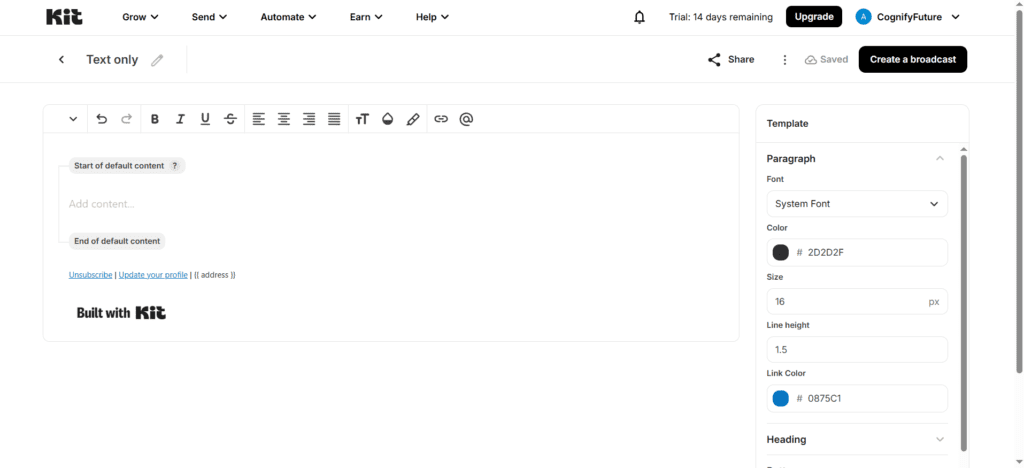
You can customize colors, add images, and use basic formatting — but if you’re expecting a rich drag-and-drop template library like Mailchimp’s, you’ll be disappointed. ConvertKit offers a small selection of templates (around 9–10) that serve as starting structures, not finished designs.
For a newsletter creator or course seller, this approach works beautifully. For a local restaurant trying to promote a weekly special with a colorful, image-driven layout — not so much.
MailerLite Email Design
MailerLite’s email editor is one of its genuine strengths. The drag-and-drop builder is clean and flexible, with a library of 70+ professionally designed, mobile-responsive templates across categories including newsletters, promotions, announcements, e-commerce, and more. Each template is modern and well-crafted — you won’t feel like you’re using a template that’s been recycled since 2015.
You can also build emails from scratch using content blocks — text, images, buttons, video thumbnails, countdown timers, social links, and custom HTML. For non-designers, the template starting points are excellent. For designers who want full control, the custom HTML block gives you complete flexibility.
Email design winner: MailerLite — significantly more design flexibility and a richer template library. ConvertKit’s text-first approach is a feature for its target audience, but a limitation for everyone else.
4. Marketing Automation: Where ConvertKit vs MailerLite Really Diverge
Automation is the feature that separates “sending emails” from “building a system that grows your business.” In the ConvertKit vs MailerLite comparison, this is where ConvertKit starts to make a stronger case — at least for creator-specific workflows.
ConvertKit Automation
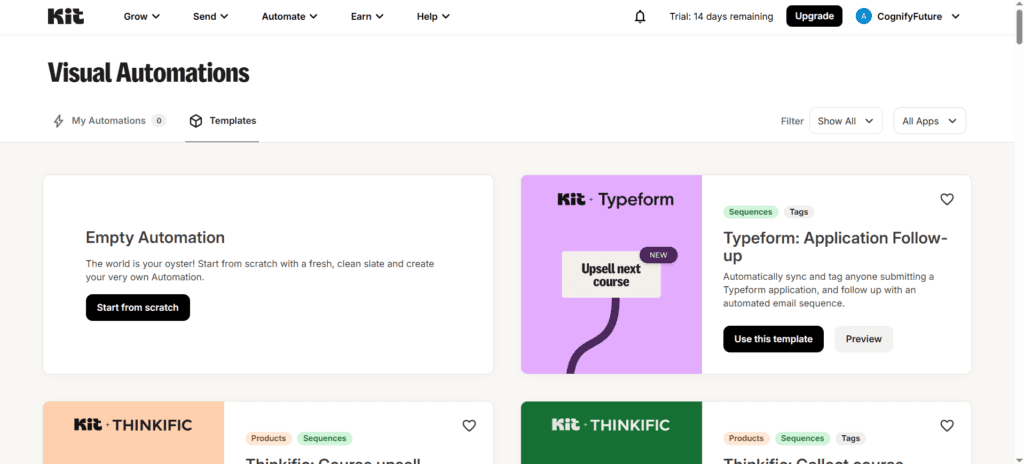
ConvertKit’s visual automation builder is one of the platform’s standout features — and it’s genuinely excellent for creator use cases. The canvas-based interface lets you build complex, multi-path automation sequences that respond to subscriber behavior in a way that feels natural and logical.
The tag-based system that underpins ConvertKit is where automation gets really powerful. Because every subscriber interaction (clicking a link, purchasing a product, visiting a page, completing a form) can add or remove tags, you can build highly personalized paths through your content. A subscriber who buys your beginner course gets tagged “customer-beginner” and enters a different sequence than someone who clicked your advanced course sales page but didn’t buy.
I’ve built automation funnels in ConvertKit for creators that:
- Segmented new subscribers by interest area based on their initial opt-in form
- Delivered a 10-email welcome sequence with content tailored to that interest
- Triggered a product promotion sequence after the subscriber clicked a specific blog post link
- Moved them to a post-purchase onboarding sequence after buying via ConvertKit Commerce
- Re-engaged cold subscribers with a “still interested?” email 90 days after their last click
All of that in a single, visual automation canvas. It’s genuinely impressive for creator workflows.
MailerLite Automation
MailerLite’s automation builder is solid and covers all the essential use cases — and importantly, it’s available on the free plan, which ConvertKit doesn’t offer. You get a visual step-by-step flow builder with triggers, delays, conditions, and actions.
Common MailerLite automation use cases:
- Welcome sequences triggered by form sign-up
- Date-based automations (birthday emails, anniversary follow-ups)
- E-commerce triggers (purchase confirmation, cart abandonment with Shopify/WooCommerce)
- Click- and open-based conditional branching
- Segment-based automations
- Re-engagement campaigns for inactive subscribers
Where MailerLite automation falls short compared to ConvertKit is in the depth of conditional logic and the sophistication of the tag-based personalization system. MailerLite uses a more traditional group/segment model, which is simpler but less flexible for complex audience segmentation.
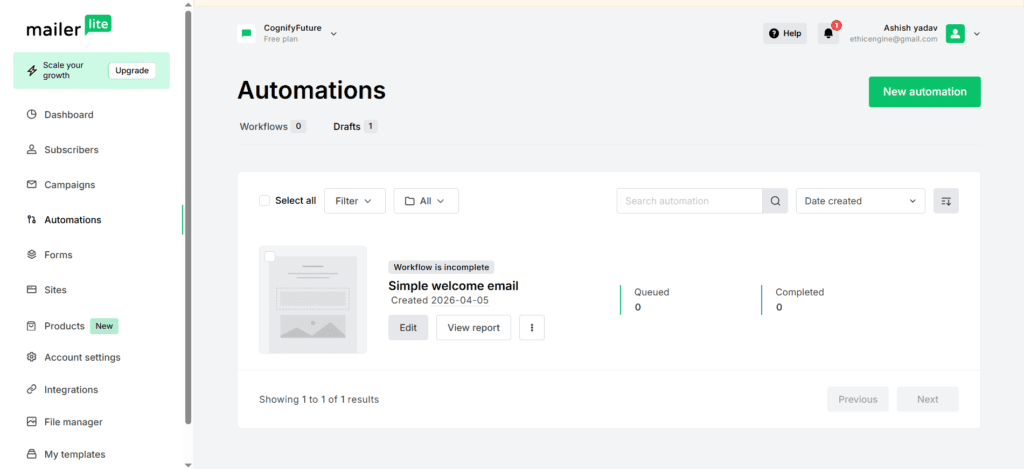
Automation winner: ConvertKit — the visual automation canvas and tag-based system are more powerful for complex, personalized creator workflows. MailerLite’s automation is excellent for standard business use cases but doesn’t match ConvertKit’s depth for creator-specific journeys.
5. Subscriber Management: Tags vs Groups — Which Approach Works Better?
This is one of the most underappreciated differences in the ConvertKit vs MailerLite comparison — and it has a massive impact on how you manage your audience as it grows.
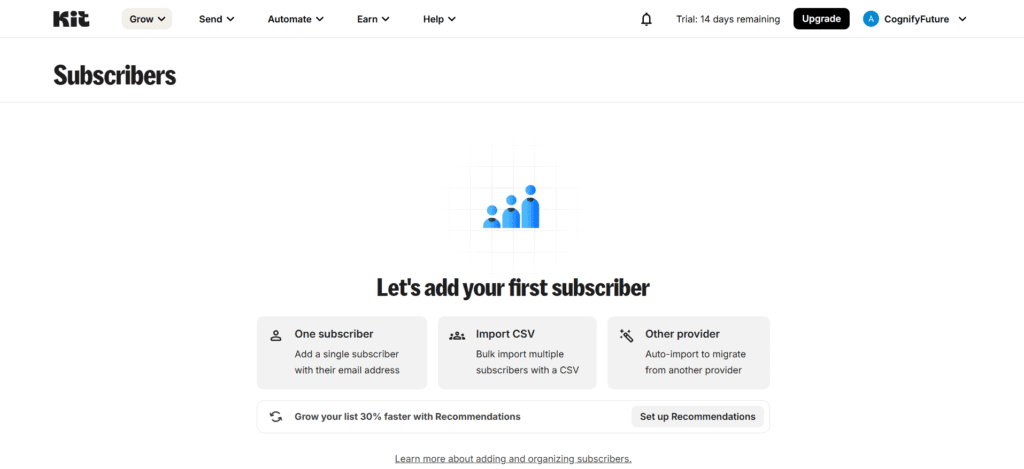
ConvertKit Subscriber Management: Tag-Based System
ConvertKit uses a tag-based architecture — meaning every subscriber lives in one unified database, and you organize and segment them by applying tags. A single subscriber can have dozens of tags: “purchased-course-A,” “interested-in-topic-B,” “attended-webinar-March,” “cold-90-days,” and so on.
This model is incredibly flexible. You never have duplicate contacts across multiple lists, you can create complex segments by combining tag filters, and your automations can add, remove, or check for tags to create highly personalized paths. Once you internalize the tag model, it genuinely feels like the most powerful way to manage a creator audience.
The learning curve, however, is real. If you’re coming from a list-based platform, the conceptual shift takes time — and if you don’t build a disciplined tagging system from the start, your subscriber database can become a mess of inconsistent tags that’s hard to work with.
MailerLite Subscriber Management: Groups and Segments
MailerLite uses a more traditional model: subscribers belong to groups (similar to lists), and you can create dynamic segments based on subscriber attributes, behavior, or group membership. It’s a familiar structure that most marketers will intuitively understand.
MailerLite also supports custom fields, which let you store additional data about each subscriber (industry, location, purchase history, birthday, and any custom data you collect). Segments can filter on any of these fields, giving you solid targeting capability without the complexity of a full tag system.
For most small businesses and straightforward use cases, MailerLite’s group/segment model is easier to manage and completely adequate. For creators who need multi-dimensional audience segmentation across dozens of products, topics, and behaviors — ConvertKit’s tag system is more powerful.
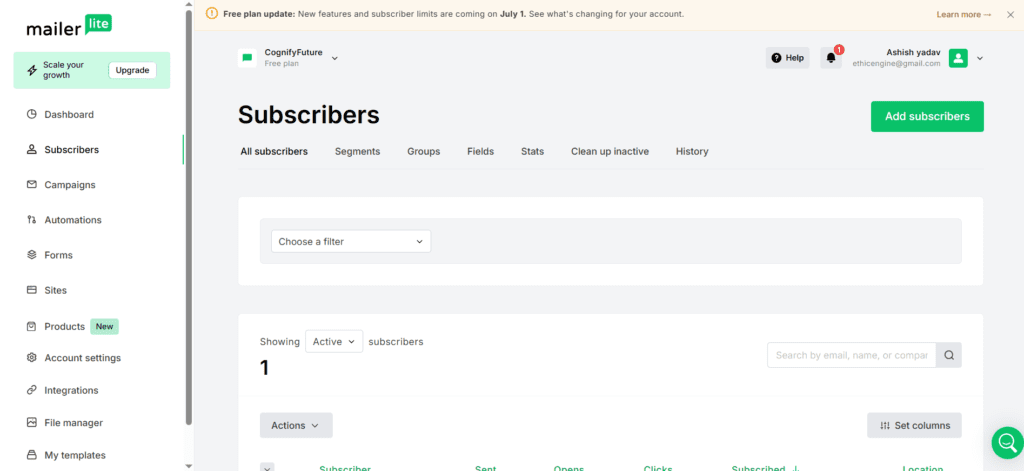
Subscriber management winner: ConvertKit for complex creator segmentation; MailerLite for simplicity and standard business use cases.
6. Creator Commerce and Monetization: ConvertKit’s Biggest Advantage
This is the category where ConvertKit has no real competition from MailerLite — and it’s one of the most compelling reasons a creator might choose ConvertKit despite the higher price.
ConvertKit Commerce (Kit Commerce)
ConvertKit includes a built-in digital commerce platform that lets you sell directly through your email marketing tool. Without any third-party integrations, you can:
- Sell digital downloads (ebooks, templates, presets, guides)
- Sell online courses (when integrated with platforms like Teachable or Podia)
- Set up paid newsletter subscriptions (Stripe-powered recurring billing)
- Accept tips and one-time payments from your audience
- Create discount codes for your products
- Trigger post-purchase automations immediately after a sale
ConvertKit charges a 3.5% + $0.30 fee per transaction on the free plan, and 0% + Stripe processing fees on paid plans. For a creator making $2,000–$5,000/month from digital products, eliminating that transaction fee alone can offset a significant portion of the monthly subscription cost.
The seamless connection between a purchase event and a follow-up automation sequence is where this really shines. Someone buys your $47 ebook → they’re instantly tagged “customer-ebook-title” → they enter a 5-email post-purchase sequence → they receive an upsell offer for your $197 course on day 7. All inside one platform, no Zapier required.
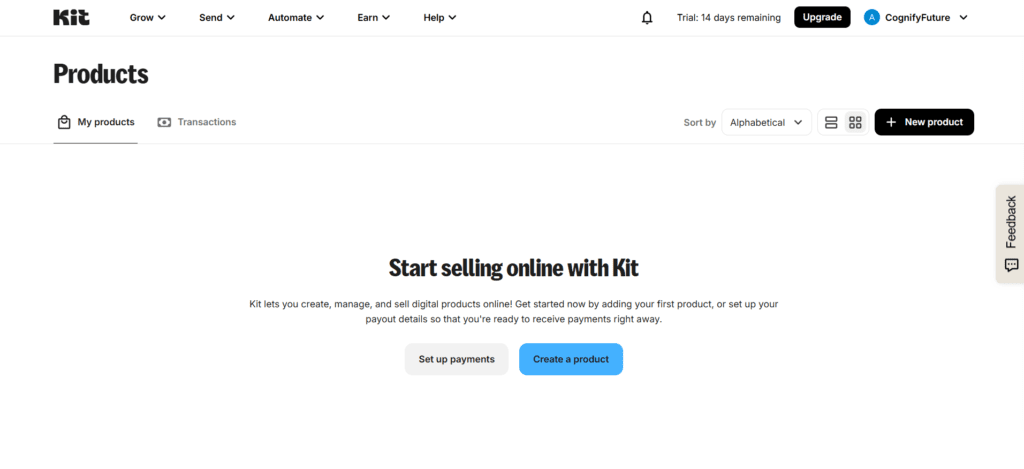
MailerLite Commerce
MailerLite added a digital products selling feature as well — you can sell ebooks, courses, and other digital downloads directly through MailerLite, with payment processed via Stripe. It’s a genuinely useful feature and compares reasonably to ConvertKit Commerce for basic use cases.
However, the commerce feature in MailerLite is less mature and less tightly integrated with the automation system than ConvertKit. The purchase-triggered automation flows aren’t as seamless, and the product management features are simpler. For serious creator commerce — building a real income from digital products — ConvertKit’s more developed ecosystem has a meaningful edge.
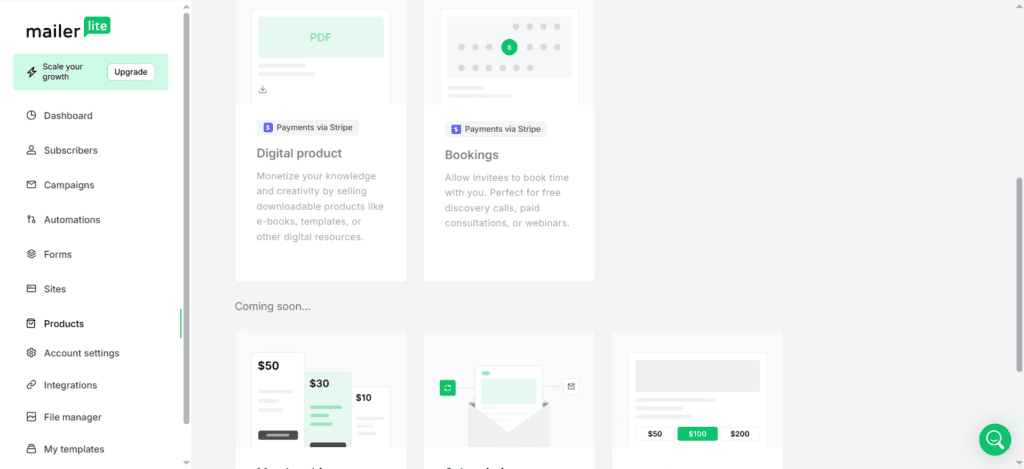
Creator commerce winner: ConvertKit — more mature, more tightly integrated with automations, and better designed for creators building revenue from digital products.
7. Landing Pages and Forms: ConvertKit vs MailerLite for List Building
ConvertKit Landing Pages and Forms
ConvertKit includes unlimited landing pages and forms on every plan — including the free plan. This is genuinely impressive and makes ConvertKit’s free tier much more useful than it might initially appear.
The landing page builder offers around 50+ templates, all with a clean, modern aesthetic that suits creator brands well. The templates are designed for specific creator use cases: newsletter sign-ups, lead magnet delivery, webinar registration, product waitlists, “link in bio” pages, and course enrollment. Each template is well-optimized for conversion and looks professional without requiring design work.
You can host landing pages on a ConvertKit subdomain for free, or connect a custom domain on paid plans. The forms are similarly polished — inline, pop-up, slide-in, and full-page formats are all available.
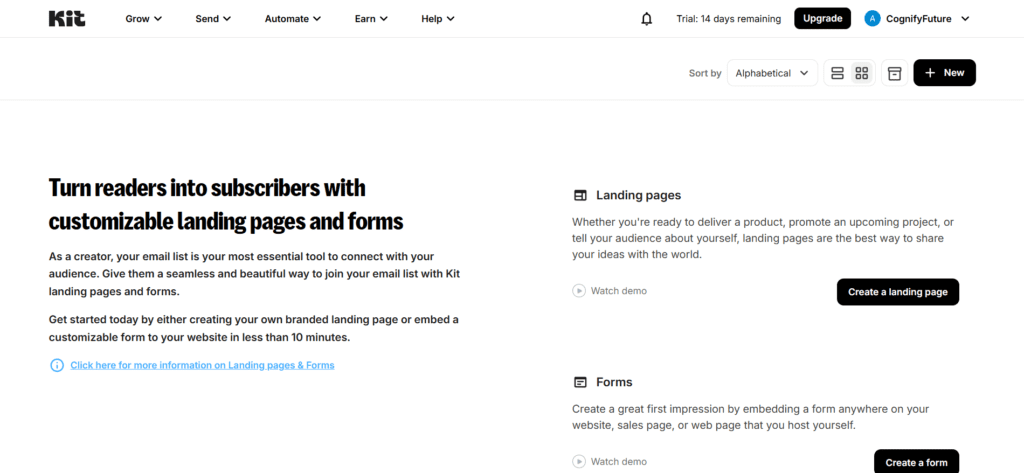
MailerLite Landing Pages and Forms
MailerLite includes landing pages and forms across all plans, though the free plan limits you to 10 landing pages. The landing page builder uses the same drag-and-drop editor as the email builder — so once you learn one, you know the other. There are 40+ templates available, covering newsletters, product promotions, events, and service-based businesses.
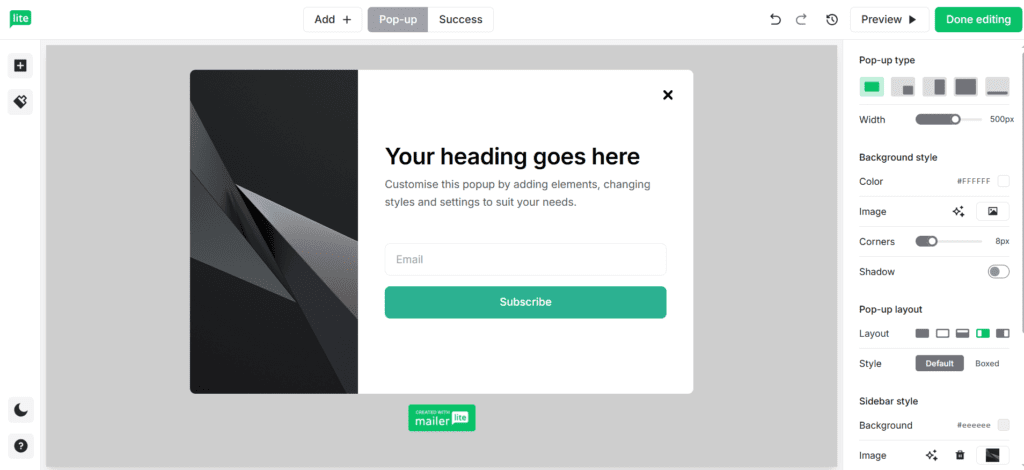
Pop-up forms in MailerLite are particularly strong — you can set display rules based on time on page, scroll depth, exit intent, and page URL targeting. For a content website or blog trying to grow a newsletter, MailerLite’s pop-up options are more sophisticated than ConvertKit’s.
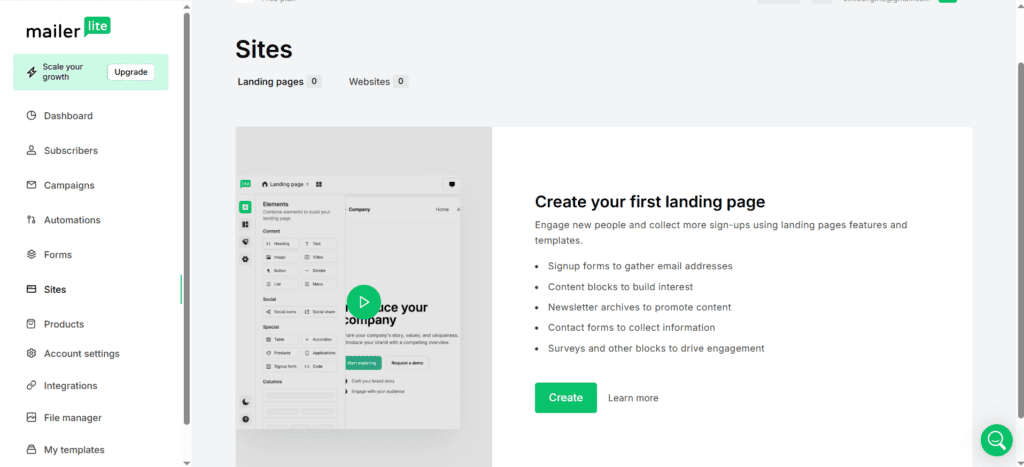
Landing pages and forms winner: Effectively tied — ConvertKit’s creator-focused templates are better for personal brand and newsletter sign-up pages; MailerLite’s drag-and-drop flexibility and advanced pop-up targeting work better for content sites and small businesses.
8. Deliverability and Support: Which Platform Keeps You Out of Spam?
ConvertKit Deliverability
ConvertKit maintains a strong deliverability reputation — consistently achieving 95%+ inbox placement in independent benchmark tests. A major factor in this is ConvertKit’s strict sender policy: they actively monitor sending behavior, enforce list hygiene, and require confirmed opt-in practices. Their text-first email format also tends to score better with spam filters than heavily image-based HTML emails.
Creator Pro subscribers get access to a newsletter referral system and subscriber scoring, which helps keep lists healthy by identifying and re-engaging (or removing) inactive subscribers. Healthy lists = better deliverability over time.
MailerLite Deliverability
MailerLite also delivers consistently strong inbox placement rates — typically above 93–95% in third-party tests. The platform uses DKIM, SPF, and DMARC authentication, enforces clean list practices, and provides tools for managing bounces and unsubscribes automatically.
One deliverability note worth mentioning: MailerLite has a manual account approval process for new users — your account is reviewed before you can start sending campaigns. This adds a short delay when you first sign up but is part of why their platform maintains strong deliverability across shared IP pools.
Customer Support: ConvertKit vs MailerLite
ConvertKit support includes email support on all plans and live chat on paid plans. Response quality is generally excellent — agents understand the platform deeply and provide genuinely helpful answers. ConvertKit also has an active creator community, detailed documentation, and a YouTube channel with tutorials. On the free plan, support is limited to email-only with slower response times.
MailerLite support includes 24/7 email support on paid plans and live chat on the Growing Business plan and above. The free plan gets email support only. In my experience, MailerLite support team responds quickly and accurately. The knowledge base is comprehensive and well-organized — most common issues can be self-resolved without contacting support.
Deliverability verdict: Tied — both maintain excellent inbox placement rates. Support verdict: Slight edge to MailerLite for faster response times across plan tiers.
ConvertKit vs MailerLite: Full Feature Comparison Table
| Feature | ConvertKit (Kit) | MailerLite |
|---|---|---|
| Free Plan | ✅ Up to 10,000 subs (limited features) | ✅ Up to 1,000 subs, 12,000 emails/mo |
| Pricing Model | By subscriber count | By subscriber count |
| Starting Paid Price | $25/month (1,000 subs) | $9/month (1,000 subs) |
| Email Editor | Text-first, minimal design | Drag-and-drop, full design control |
| Email Templates | ~10 basic templates | 70+ professional templates |
| Marketing Automation | Advanced (all paid plans) | Solid (including free plan) |
| Subscriber Management | Tag-based (flexible, complex) | Groups + Segments (simple, familiar) |
| Landing Pages | ✅ Unlimited (all plans) | ✅ 10 free, unlimited paid |
| Pop-up Forms | Basic pop-ups | Advanced pop-ups (exit intent, scroll) |
| Creator Commerce | ✅ Built-in (sell digital products) | ⚠️ Basic digital product selling |
| A/B Testing | Subject line testing (paid) | Full A/B testing (paid plans) |
| Deliverability | Excellent (95%+) | Excellent (93–95%+) |
| SMS Marketing | ❌ Not available | ❌ Not available |
| Integrations | 90+ (creator-focused) | 150+ (general business) |
| API / Developer Access | Available (not a core focus) | Available (not a core focus) |
| Customer Support | Email + live chat (paid) | 24/7 email + live chat (paid) |
| Ease of Use | ⭐⭐⭐⭐ Clean but unique mental model | ⭐⭐⭐⭐⭐ Very beginner-friendly |
ConvertKit vs MailerLite for Specific Use Cases: Who Should Use Which?
Best for Bloggers and Content Creators
ConvertKit is the stronger choice for bloggers and content creators — and this is where the platform truly excels. The tag-based segmentation lets you understand exactly which topics your readers care about. The text-first email editor produces emails that feel personal and get higher engagement. The commerce features let you monetize your audience directly. And the creator network (where ConvertKit subscribers can discover and recommend each other’s newsletters) is a genuine list-growth tool that MailerLite simply doesn’t have.
If you’re a blogger or creator building a business around your newsletter, ConvertKit was essentially built for you — and the feature depth justifies the higher price.
Best for Small Businesses and Local Services
MailerLite is clearly the better fit for small businesses — a restaurant, a boutique, a law firm, a fitness studio, a nonprofit. The design-friendly email editor lets you create visually compelling campaigns that represent your brand properly. The lower pricing makes it sustainable for businesses that aren’t building an audience monetization model. And the simplicity of the platform means your marketing team (or just you, wearing the marketing hat) can actually use it without a steep learning curve.
Best for Coaches and Course Creators
This is closer, but ConvertKit edges ahead for coaches and course creators who are actively selling programs and building a personal brand. The commerce features, the automation depth, and the creator-focused integrations (Teachable, Kajabi, Thinkific, Podia) give ConvertKit a more complete ecosystem for running a coaching or course business through email.
That said, if you’re just starting out and budget is a concern — MailerLite’s lower pricing and solid automation will serve you well until your revenue justifies upgrading to ConvertKit.
Best for Agencies and Freelancers
MailerLite is the more practical choice for agencies managing email marketing for multiple clients. The lower per-subscriber pricing keeps client costs manageable, the multi-user access on paid plans supports team workflows, and the versatile design tools work across many different client industries and brand styles. ConvertKit’s creator-focus and higher pricing make it less suitable as an agency workhorse tool.
Best Free Plan: ConvertKit vs MailerLite
This one is nuanced. ConvertKit’s free plan allows up to 10,000 subscribers — which sounds dramatically better. But the free plan blocks email sequences, advanced automations, and most monetization features, which are the core reasons most creators use ConvertKit in the first place. The free plan is essentially a list-building tool, not a full email marketing solution.
MailerLite free plan allows only 1,000 subscribers — but includes automation, landing pages, pop-ups, and full campaign functionality. For most early-stage users, MailerLite free plan delivers more immediate, practical value even at the lower subscriber limit.
Real Problems Each Platform Solves (and Where Each Falls Short)
Problems ConvertKit Solves Exceptionally Well
- “I want my emails to feel personal and authentic, not like marketing blasts” → ConvertKit’s text-first editor and personal email aesthetic solve this
- “I need to sell digital products without setting up a separate Shopify store” → ConvertKit Commerce handles this natively
- “I have multiple content topics and I need to send different emails to different readers” → ConvertKit’s tag system makes complex audience segmentation manageable
- “I want to grow my newsletter by connecting with other creators” → ConvertKit’s creator network and referral system are unique to the platform
- “I need automations that respond to very specific subscriber behaviors” → ConvertKit’s visual automation canvas with tag-based triggers handles complex flows
Problems MailerLite Solves Exceptionally Well
- “I want beautiful, branded emails without hiring a designer” → MailerLite’s template library and drag-and-drop editor solve this affordably
- “My Mailchimp bill is getting too expensive as my list grows” → MailerLite’s pricing is 30–60% cheaper than most competitors at similar subscriber counts
- “I need automation but I’m on a zero budget” → MailerLite’s free plan includes automation, which ConvertKit’s free plan doesn’t
- “I run a small business and I need something my non-technical staff can use” → MailerLite’s intuitive interface solves this without training overhead
- “I need pop-ups that respond to user behavior on my website” → MailerLite’s exit-intent and scroll-triggered pop-ups are more advanced than ConvertKit’s
The Honest Verdict: ConvertKit vs MailerLite — Which Should You Choose in 2026?
After eight years of using both platforms across dozens of client projects and my own marketing work, here’s my clear, definitive verdict on ConvertKit vs MailerLite:
Choose ConvertKit if you are:
- A blogger, podcaster, YouTuber, or newsletter writer building a personal brand
- A course creator or coach selling digital products directly to your audience
- Someone who wants deeply personalized, tag-based subscriber segmentation
- A creator who wants to monetize via subscriptions, digital downloads, or tips
- Someone who values automation sophistication over design flexibility
- A creator willing to pay a premium for creator-specific tools and ecosystem
Choose MailerLite if you are:
- A small business, local service, or nonprofit needing affordable professional email
- A beginner who wants the fastest, easiest onboarding experience
- A blogger or creator on a tight budget who needs automation without paying $25+/month
- Someone who wants visually rich, design-forward email campaigns
- An agency managing email marketing for multiple clients
- Anyone who needs a solid all-rounder without the creator-specific focus
My personal take: if you’re a creator building a real business around your audience, ConvertKit’s higher price buys you a genuinely better-fit tool that will pay for itself in better automation, better monetization, and a better experience for your subscribers. If you’re anything other than a creator — or if you’re a creator in the early stages who can’t yet justify the cost — MailerLite is an excellent, capable platform that will serve you well for years.
Conclusion: Stop Second-Guessing and Start Building Your List
The ConvertKit vs MailerLite debate doesn’t have one universal answer — it has the right answer for your specific situation. Both are legitimate, well-maintained platforms with passionate user communities and real track records of helping people grow their email lists and businesses.
ConvertKit is the specialist: purpose-built for creators, deeply integrated with creator commerce, and offering automation sophistication that’s hard to match at its price point. MailerLite is the versatile all-rounder: more affordable, more design-friendly, more beginner-accessible, and perfectly capable of supporting most email marketing strategies from day one.
The worst decision you can make is no decision — because the best email marketing platform is the one you’re actively using to show up consistently in your subscribers’ inboxes. Both options let you start for free. Pick the one that fits your situation, build your first campaign, and start growing. You can always migrate later when your needs evolve.
👉 Still torn between ConvertKit vs MailerLite? Tell me your specific use case in the comments — subscriber count, what you sell or share, and what you need email to do for your business — and I’ll give you a direct, personalized recommendation.
Frequently Asked Questions: ConvertKit vs MailerLite
1. Is ConvertKit better than MailerLite for bloggers?
For bloggers who are building a monetized personal brand — yes, ConvertKit is generally the better fit. Its tag-based segmentation lets you understand exactly what your readers care about, its text-first email style gets strong engagement, and the built-in commerce features let you sell digital products directly to your audience. However, for bloggers who just want to send a weekly newsletter and aren’t focused on digital product sales, MailerLite provides more than enough functionality at a fraction of the cost.
2. Which is cheaper: ConvertKit or MailerLite?
MailerLite is consistently cheaper at every subscriber tier. At 1,000 subscribers, MailerLite costs $9/month vs ConvertKit’s $25/month. At 10,000 subscribers, MailerLite costs ~$54/month vs ConvertKit’s ~$100/month. At 50,000 subscribers, the gap widens further. If budget is a primary concern, MailerLite wins this comparison clearly.
3. Can I switch from MailerLite to ConvertKit later without losing my list?
Yes. Both platforms allow you to export your subscriber list as a CSV file with all custom field data. ConvertKit offers a free migration service on paid plans where their team helps you move your list, sequences, and forms. The main work involved in switching is rebuilding your automation workflows and email templates — which don’t transfer between platforms — but the subscriber data migration itself is straightforward.
4. Does ConvertKit have a free plan in 2026?
Yes, ConvertKit’s free plan allows up to 10,000 subscribers — which is unusually generous. However, the free plan is significantly limited: it blocks email sequences, advanced automations, integrations, and the newsletter referral system. You can collect subscribers and send one-time broadcast emails, but the core automation and monetization features that make ConvertKit worth using require a paid plan starting at $25/month.
5. Is MailerLite good for course creators?
MailerLite is a capable option for course creators, particularly those who are just starting out or operating on a budget. It integrates with platforms like Teachable, Thinkific, and Podia, supports purchase-triggered automations, and includes basic digital product selling features. For course creators who are scaling and want tighter integration between their email marketing and product sales, ConvertKit’s more mature commerce ecosystem offers better long-term depth.
6. Which platform has better email deliverability: ConvertKit or MailerLite?
Both platforms maintain excellent email deliverability — consistently above 93–95% inbox placement rates in benchmark tests. ConvertKit’s text-first email format may have a slight edge with spam filters that penalize image-heavy HTML, but in practice the deliverability difference between the two platforms is minimal. Your list quality, sending frequency, and content will have a much greater impact on deliverability than your choice of platform.
7. Does MailerLite work for selling digital products?
Yes, MailerLite added a digital products selling feature that lets you sell ebooks, courses, and downloads directly through the platform via Stripe. It works for basic use cases and doesn’t require a separate e-commerce tool. However, ConvertKit’s commerce features are more mature, more tightly integrated with automations, and better designed for creators whose primary revenue stream is digital product sales.
8. What are the best ConvertKit alternatives if neither ConvertKit nor MailerLite fits my needs?
If neither platform is the right fit, consider: Brevo (formerly Sendinblue) for businesses that need multi-channel marketing (email + SMS + WhatsApp) at low cost; GetResponse for businesses that need webinars, sales funnels, and advanced e-commerce automation; ActiveCampaign for B2B teams that need deep CRM integration with email automation; and Klaviyo for high-volume e-commerce stores that need sophisticated product-based email sequences. The right alternative depends entirely on your specific use case and scale.
Related Reading
- Best Email Marketing and Automation Tools 2026 (full roundup)
- MailerLite Review 2026
- MailerLite vs GetResponse

About the Author
Ashish Yadav — Founder & Engineer, CognifyFuture
I’m a software engineer and AI tools researcher with 5 years of hands-on experience testing automation and AI platforms. Every review on this site is based on real, hands-on use — not repackaged spec sheets.
Reviewed and fact-checked for accuracy as of July 2026.




I am Ashish Yadav a software engineer and AI tools researcher with over five years of practical experience working with real-world systems and automation. I am founder of CognifyFuture, where I analyzes, tests, and breaks down AI tools with a focus on what actually works—not what’s trending.
My content is built on hands-on usage, not theory. Instead of generic advice, I focuses on real implementation—how AI tools can be used to automate tasks, improve efficiency, and solve any specific business or individual problems.
Through CognifyFuture, My aims is to eliminate confusion around AI by delivering clear, honest, and actionable insights that help users make smarter technology decisions.







