
Affiliate Disclosure: This Pipedrive review may contain affiliate links. If you sign up through them, I may earn a small commission at no extra cost to you. I only recommend tools I have personally evaluated, and this never influences my honest opinion.
Here’s a situation every sales manager recognises: the team has a healthy lead pipeline on paper, but deals are dying quietly at various stages because follow-ups slipped, emails weren’t sent, proposals were delayed, or no one remembered to check in after the demo. The CRM is full of stale data because updating it feels like extra admin rather than part of the selling process. Sound familiar? Nearly 65% of sales reps say they spend more time on administrative work than actually selling — and a CRM that adds to that friction rather than reducing it is part of the problem.
Pipedrive was built specifically to fix this — not by adding more features, but by making deal tracking and follow-up so visual and frictionless that sales reps actually use it. In this review, I’ll cover how it works in practice, what it genuinely does well, where it falls short, the accurate 2026 pricing (including the add-ons most reviews skip), and an honest comparison against HubSpot and Zoho CRM — the two platforms most people are choosing between.
What Is Pipedrive CRM?
Pipedrive is a sales pipeline management CRM founded in 2010 by salespeople who were frustrated that existing CRM tools were designed for data entry and management reporting rather than for the reps who actually needed to close deals. The result is a CRM that prioritises deal visibility, activity tracking, and follow-up consistency above all else — and deliberately omits the marketing automation, customer support ticketing, and complex reporting layers that make platforms like Salesforce and HubSpot powerful but overwhelming for pure sales teams.
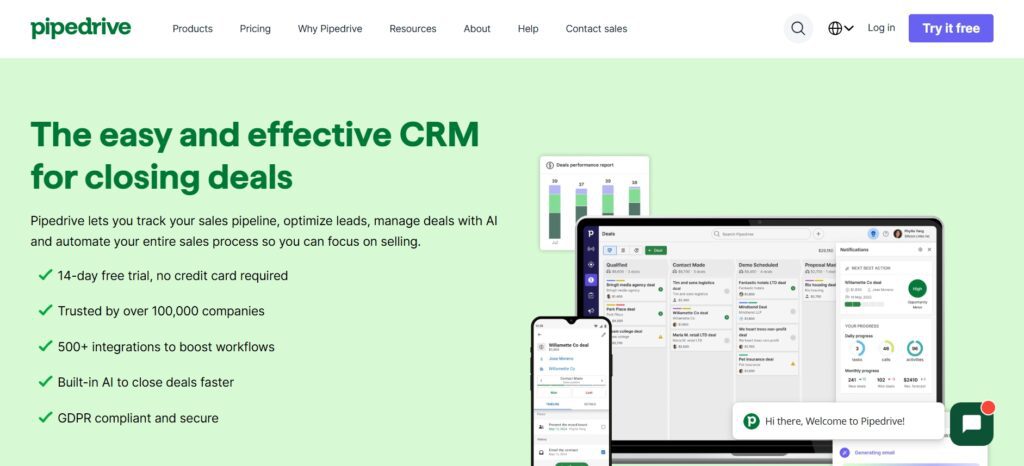
Used by over 100,000 businesses across more than 175 countries, Pipedrive’s core philosophy is “activity-based selling” — the idea that if you manage the right activities (calls, emails, demos, proposals) consistently, the deals will close as a natural result. The entire platform is built around making those activities visible, trackable, and as easy as possible to log.
Pipedrive Features (In-Depth Analysis)
1. Visual Sales Pipeline — Pipedrive’s Core Strength
The Kanban-style visual pipeline is what Pipedrive is best known for, and for good reason — it solves the problem of deal visibility better than any other CRM at this price point. Every deal in your pipeline appears as a card in its current stage: Prospect, Qualified, Demo Scheduled, Proposal Sent, Negotiation, Closed Won. At a glance, you can see exactly how much revenue sits in each stage, which deals haven’t had any activity recently (highlighted in red), and where the bottlenecks are forming. For a sales manager running a Monday morning pipeline review, this visual clarity replaces the 20-minute spreadsheet exercise with a 2-minute glance.
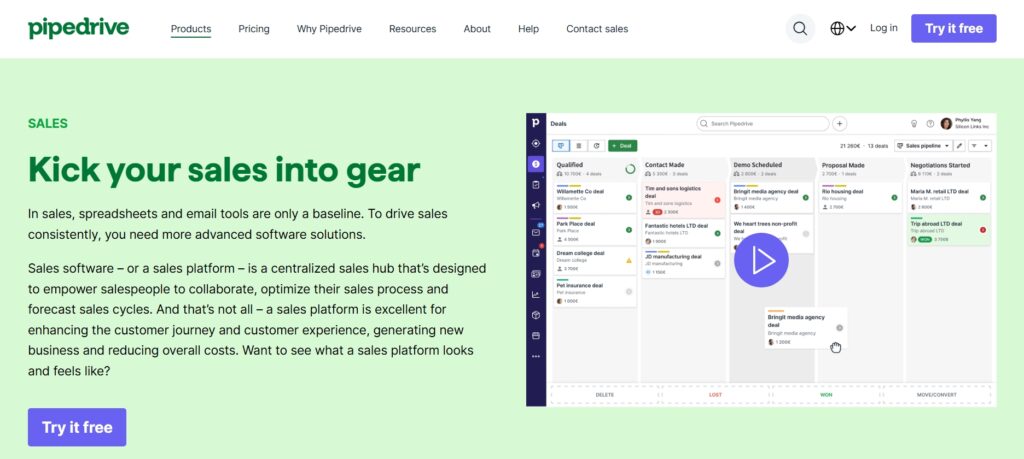
The pipeline is fully customisable — you define the stages that match your actual sales process rather than fitting your process into Pipedrive’s defaults. Multiple pipelines are supported, so if you have distinct processes for new business, renewals, and partnerships, each can have its own pipeline structure. Deal cards show probability scores that feed directly into the revenue forecasting view, giving you a probabilistically weighted pipeline value at any point in time rather than a simple total of all open deals.
2.Lead Management & LeadBooster Tools
Pipedrive makes a deliberate architectural decision that most CRMs don’t: it separates leads from active deals. Leads — unqualified contacts that haven’t been confirmed as sales opportunities — sit in a dedicated inbox rather than polluting the main pipeline. This separation matters for pipeline hygiene. When every unqualified inbound inquiry gets dumped directly into the pipeline alongside your confirmed opportunities, your pipeline becomes unreliable as a forecasting tool. Pipedrive’s approach keeps the pipeline clean by requiring conscious promotion of a lead to a deal.
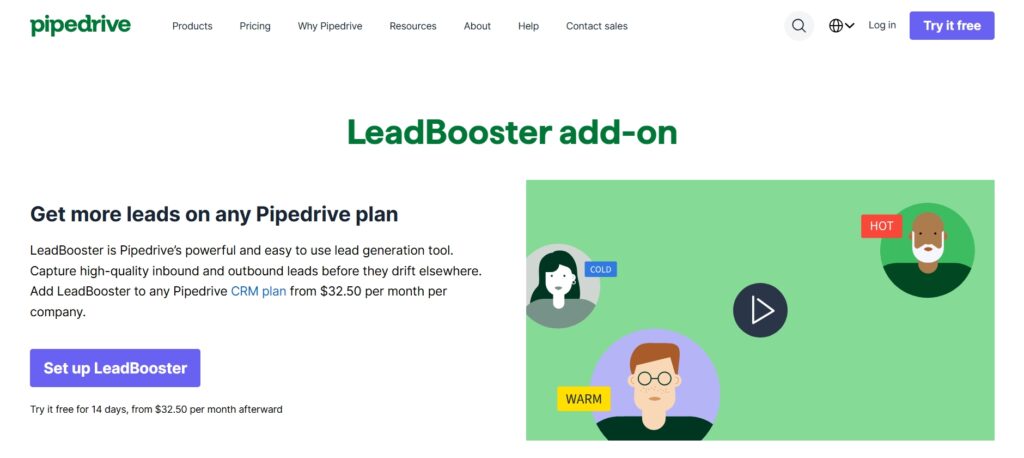
LeadBooster is Pipedrive’s paid lead generation add-on ($32.50/company/month) that adds a chatbot for your website, live chat, web forms, and access to Prospector — a database of 400+ million professional profiles for outbound lead sourcing. It’s a meaningful capability expansion for teams doing active outbound, though the add-on cost is worth factoring into your total budget from the start.
3.Sales Automation & Workflow Builder
Pipedrive’s workflow automation is available from the Advanced plan onwards, and it addresses the most common sales process leaks directly. When a deal moves to “Proposal Sent,” automatically create a follow-up task for three days later. When a lead is converted to a deal, automatically assign it to the right rep based on territory. When a deal has been inactive for seven days, send the rep an activity reminder. These event-triggered automations eliminate the “I forgot to follow up” problem that kills deals quietly in the middle stages of the pipeline — consistently the most expensive gap in most sales processes.
The automation builder is visual and straightforward — trigger, condition, action — with no coding required. It’s deliberately simpler than ActiveCampaign or HubSpot’s automation builders, which is appropriate for its use case: sales sequence automation rather than multi-channel marketing journeys. Teams that need the latter should look at HubSpot; teams that need the former will find Pipedrive’s approach fast to configure and maintain.
4.Email Integration & Communication Tracking
Two-way email sync with Gmail and Outlook means every email sent to or received from a contact is automatically logged against their deal record — no manual CRM updates required after each email. This is the feature that most directly reduces CRM maintenance burden for reps, because the data stays current without anyone having to copy-paste email threads into the system. Email open and click tracking (Advanced and above) tells you when a prospect opens your email and clicks a link, which gives reps real-time buying intent signals for prioritising callbacks.
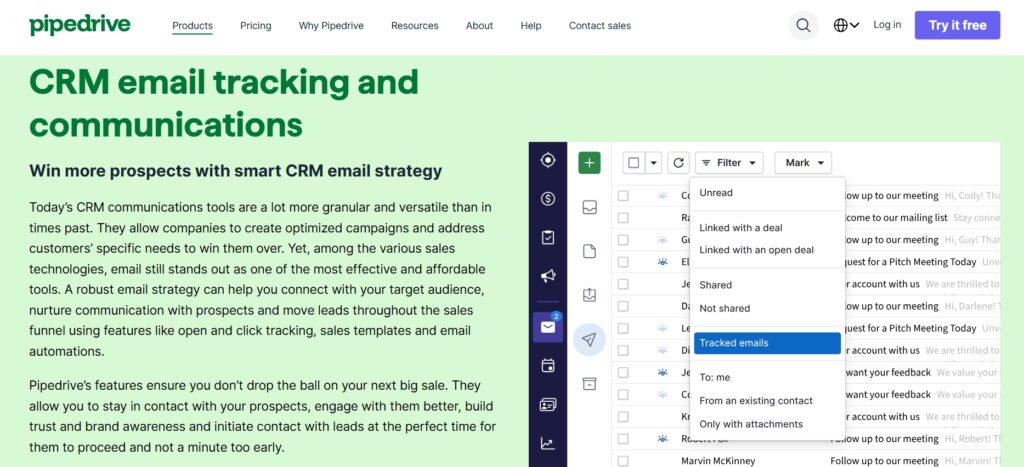
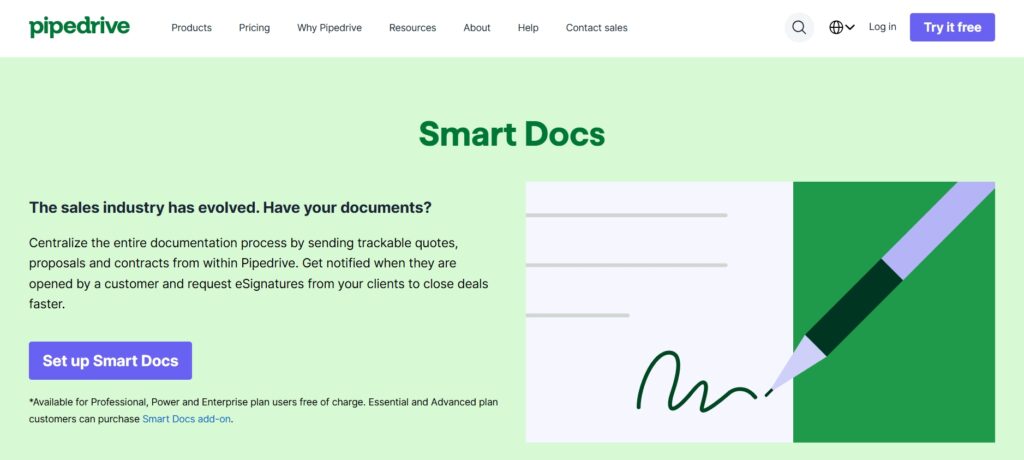
Email templates save significant time for high-volume outreach — reps can save their best-performing email formats and personalise them in seconds rather than writing from scratch each time. Smart Docs (a separate add-on at $32.50/company/month) adds document creation, e-signature, and document tracking directly within Pipedrive — a useful addition for teams that currently juggle a separate proposal tool.
5.Reporting, Analytics & Forecasting
Pipedrive’s reporting focus is deliberately sales-outcome-oriented rather than vanity-metric-focused. The core reports answer the questions sales managers actually need answered: win rate by deal stage (where is the pipeline leaking?), average sales cycle length (is it getting longer or shorter?), activities per rep (who is doing the work?), revenue forecast vs actual (how reliable is the pipeline?), and conversion rates between stages (which stage has the biggest drop-off?). Custom dashboards let managers build a view that surfaces the specific metrics relevant to their team’s focus without digging through report menus.
Revenue forecasting (Professional and above) uses deal probability scores to project expected monthly and quarterly revenue — giving leadership a more realistic view of attainment than a simple sum of all open deals. The honest limitation: Pipedrive’s reporting is strong for sales pipeline analytics but relatively thin for the kind of multi-touch attribution, marketing ROI, or cross-department reporting that enterprise teams often need. For those requirements, Salesforce or HubSpot’s reporting layers are more appropriate.
6.Integrations & App Marketplace
Pipedrive integrates with 400+ apps through its marketplace and native connections, covering the key workflow categories that sales teams typically need alongside their CRM. The integrations that matter most in practice are the email tools (Gmail, Outlook — both native), video meeting tools (Zoom, Google Meet, Microsoft Teams — for logging call outcomes), marketing automation (ActiveCampaign, Mailchimp — for passing leads between marketing and sales workflows), and accounting tools (QuickBooks, Xero — for creating invoices from closed deals without re-entering data).
| Category | Popular Integrations |
|---|---|
| Gmail, Outlook | |
| Marketing | Mailchimp, ActiveCampaign |
| Automation | Zapier, Make |
| Accounting | QuickBooks, Xero |
| Support | Zendesk, Intercom |
| Scheduling | Calendly |
Pipedrive Pricing Plans (2026 — Accurate)
Pipedrive uses a per-user, per-month pricing model with five tiers. All prices below are on annual billing — monthly billing costs 21–35% more depending on the plan. A 14-day free trial is available on all plans with no credit card required, giving you full feature access to evaluate the platform before committing. Annual billing saves 22–26% compared to monthly rates.
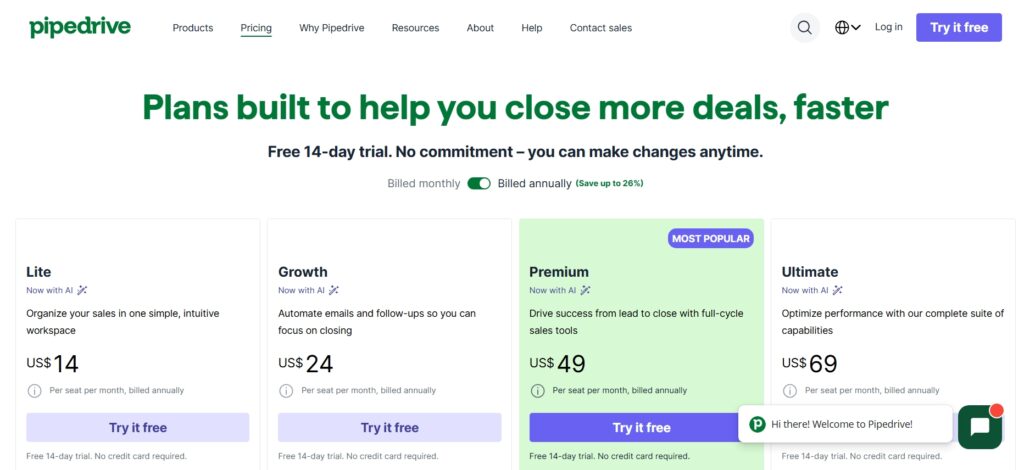
| Plan | Annual Price (per user/mo) | Key Features Unlocked | Best For |
|---|---|---|---|
| Essential | $14/user/mo | Pipeline management, contacts, email integration, mobile app | Solopreneurs, basic pipeline tracking |
| Advanced | $29/user/mo | Email sync + AI, workflow automation, meeting scheduling, email templates | Small sales teams — best value tier |
| Professional | $59/user/mo | Revenue forecasting, Smart Docs, custom reporting, team management | Sales managers needing reporting depth |
| Power | $69/user/mo | Advanced permissions, project management, phone support, additional customisation | Scaling teams with manager-level controls |
| Enterprise | $99/user/mo | Unlimited customisation, dedicated account manager, premium support, enhanced security/compliance | Large organisations, regulated industries |
A few important pricing notes that most reviews don’t cover. First, the Essential plan at $14/month has no email tracking, no workflow automation, and no meeting scheduling — making it essentially a digital Rolodex rather than a productive sales tool. For most teams, Advanced at $29/month is the realistic minimum that delivers meaningful productivity gains. The $15/month premium for Advanced over Essential pays for itself in the first week through automation time savings alone for anyone managing more than 10 active deals per month. Second, the popular add-ons are priced per company (not per user): LeadBooster ($32.50/month), Campaigns — email marketing ($16/month), Web Visitors — contact identification ($41/month), and Smart Docs ($32.50/month). If your team needs several of these, budget for the add-ons explicitly rather than comparing headline plan prices alone. Third, a 10-person team on Advanced at annual billing pays $290/month ($3,480/year) — a meaningful budget commitment that deserves the 14-day trial evaluation before committing.
Pros and Cons of Pipedrive
Advantages of Pipedrive
- Best-in-class visual pipeline — deal visibility is clearer than any competitor at this price point
- Extremely intuitive UI — reps onboard in hours, not weeks, which means actual adoption rather than CRM shelfware
- Activity-based selling focus keeps teams doing the right actions consistently
- Two-way email sync logs every email automatically — no manual data entry after each interaction
- Workflow automation (Advanced+) eliminates the most common follow-up gaps
- Mobile app is genuinely strong — full pipeline access and deal updates on the go
- 14-day free trial with no credit card required on all plans
Disadvantages of Pipedrive
- No permanent free plan — Essential at $14/month is the minimum, and Advanced at $29/month is the realistic starting point
- Add-ons (LeadBooster, Campaigns, Smart Docs) significantly increase the true cost for teams that need them
- Marketing automation is thin — not a replacement for dedicated tools like ActiveCampaign or Mailchimp
- Customer support tooling is absent — for teams that manage post-sale customer relationships in the same platform, HubSpot’s Service Hub integration is a better fit
- Reporting depth is limited at lower tiers — revenue forecasting requires Professional ($59/month)
Who Should Use Pipedrive?
Best Use Cases
Pipedrive is the right CRM for B2B sales teams where deal tracking, follow-up consistency, and pipeline visibility are the primary operational challenges. Startups and SMBs that have outgrown spreadsheets but don’t need enterprise-grade customisation or marketing suite integration will find Pipedrive delivers more usable value per dollar than any competitor in its price range. Agencies and consultants who manage a relatively small number of high-value client relationships benefit from the activity-based model that ensures no client relationship goes cold from neglect. SaaS businesses with defined trial-to-paid or renewal sales cycles will find the visual pipeline and automation features map cleanly to those processes. Real estate sales teams find Pipedrive particularly well-suited because its pipeline model mirrors the property sales journey intuitively.
Who Should Avoid It
Pipedrive is not the right fit for large enterprises that need extensive custom object modelling, complex approval workflows, or deep ERP integration — Salesforce is the appropriate tool there. Marketing-led businesses where the marketing and sales teams need to share contact timelines, campaign attribution, and lead nurturing workflows in a single platform will find HubSpot’s all-in-one model significantly better. Companies that need customer support ticketing, help desk, or service operations within the same CRM should look at Zoho CRM (which integrates with Zoho Desk) or HubSpot (which includes Service Hub). And businesses on a strict budget for whom $29/user/month for a productive CRM is genuinely too high should evaluate HubSpot’s free CRM tier before committing to Pipedrive.
Pipedrive vs Alternatives
The most useful comparison is not a star-rating table but an honest assessment of which tool is right for which specific situation. Here’s how Pipedrive stacks up against the three platforms it’s most commonly evaluated against:
| Factor | Pipedrive | HubSpot CRM | Zoho CRM | Salesforce |
|---|---|---|---|---|
| Starting Price | $14/user/mo | Free / $15/user/mo | Free / $14/user/mo | $25/user/mo |
| Pipeline UX | Best-in-class | Good | Good | Complex |
| Marketing Automation | Limited | Excellent | Strong | Enterprise-grade |
| Ease of Use | Excellent | Very Good | Moderate | Complex |
| Automation Depth | Strong (sales-focused) | Very Strong | Very Strong | Deepest |
| Free Plan | No | Yes | Yes (3 users) | No |
| Best For | Sales-first teams | Marketing + sales together | Custom workflows, budget | Enterprise ops |
Pipedrive vs HubSpot
HubSpot is the natural alternative when marketing and sales need to operate from the same platform. Its free CRM is genuinely generous, and the integrated marketing hub means your marketing automation, email campaigns, landing pages, and CRM data all share a single contact timeline. The trade-off is that HubSpot’s Sales Hub paid plans become expensive quickly, and the CRM can feel overwhelming for pure sales teams who only need pipeline management and follow-up automation. Pipedrive’s cleaner, more focused interface means reps actually use it daily — a CRM that’s used beats a CRM that’s comprehensive but ignored. Choose HubSpot when marketing and sales automation need to be unified; choose Pipedrive when the sales team needs the best-in-class pipeline experience without the marketing complexity.
Pipedrive vs Zoho CRM
Zoho CRM offers significantly more customisation depth and AI features (Zia) at a lower price point than Pipedrive, particularly on the Enterprise tier. For teams that need complex multi-module customisation, deep workflow automation, or integration with the Zoho ecosystem (Zoho Books, Zoho Desk, Zoho Campaigns), Zoho CRM delivers more per dollar. Pipedrive wins on simplicity and user experience — it’s faster to onboard, easier for non-technical reps to use daily, and the visual pipeline is more intuitive than Zoho’s interface. The decision often comes down to whether your priority is feature depth and customisation (Zoho) or adoption rate and pipeline clarity (Pipedrive).
Is Pipedrive Worth It in 2026?
For sales-focused teams where closing more deals, improving follow-up consistency, and giving managers clear pipeline visibility are the primary goals — yes. Pipedrive’s strength is not breadth of features but depth of execution in a specific and important use case: making the daily work of sales easier to do consistently. The visual pipeline is genuinely the best in its class. The automation tools address the highest-impact follow-up gaps. The email sync eliminates the most tedious manual CRM maintenance. And the UI is clean enough that reps actually keep it updated, which is the single most important thing a CRM has to achieve.
The honest answer for who should look elsewhere: if you need marketing automation, customer support workflows, or deep enterprise customisation in the same platform, Pipedrive’s deliberate focus on sales pipeline management becomes a limitation rather than a strength. In those cases, HubSpot (marketing + sales together) or Zoho CRM (customisation + features at lower cost) serve you better. Start with the 14-day free trial — it’s enough time to import your real deals, build your actual pipeline stages, and test the workflow automation that’s relevant to your specific sales process. Judge it by how your team responds to it in practice, not by feature count on a comparison page.
Conclusion: Final Thoughts on Pipedrive
Pipedrive remains one of the best sales CRMs in 2026 for businesses that want pipeline clarity, consistent follow-up, and actionable analytics without the complexity of enterprise platforms. Its visual pipeline model, activity-based selling philosophy, and clean interface make it the CRM most likely to actually get used daily by reps — which is ultimately what determines whether a CRM delivers ROI. At $29/user/month on the Advanced plan (annual billing), it’s competitively priced for the value it delivers to sales-first teams. Use the free trial, test it on your real deals, and let your team’s adoption rate tell you whether it’s the right fit.
Is Pipedrive good for beginners?
Yes — Pipedrive is consistently rated as one of the easiest CRMs to learn and use. The visual pipeline interface is immediately intuitive for anyone who understands the concept of a deal moving through stages, and most reps are productive within their first day. The deliberate simplicity is a design philosophy, not a limitation — Pipedrive avoids the feature sprawl that makes platforms like Salesforce require weeks of training. For teams that have struggled with CRM adoption, Pipedrive’s accessibility is a genuine competitive advantage.
Does Pipedrive offer a free plan?
No — Pipedrive does not have a permanent free plan. However, it offers a 14-day free trial on all plans with no credit card required, giving you full access to evaluate the platform’s features before committing. The trial is enough time to import your real deals, set up your pipeline stages, and test workflow automation. The lowest paid plan is Essential at $14/user/month (annual billing), though most teams find Advanced at $29/user/month is the realistic starting point for productive daily use.
Is Pipedrive better than HubSpot CRM?
For pure sales pipeline management and deal tracking, yes — Pipedrive’s visual pipeline, cleaner interface, and sales-focused design make it the stronger choice for sales-first teams. HubSpot CRM is better when you need marketing automation, email campaigns, and customer support workflows in the same platform alongside your sales CRM. HubSpot also has a genuinely useful free CRM tier that Pipedrive doesn’t match. The decision comes down to whether you need sales-only depth (Pipedrive) or marketing + sales integration (HubSpot).
Can Pipedrive automate follow-ups?
Yes — workflow automation is available from the Advanced plan ($29/user/month annual) and above. You can automate follow-up tasks triggered by deal stage changes (e.g., when a deal moves to Proposal Sent, automatically create a follow-up task for 3 days later), inactivity alerts (notify the rep when a deal hasn’t had any activity for 7 days), email sequences (send a follow-up email 2 days after the initial outreach if no reply), and lead assignment rules. These automations directly address the most common reasons deals go cold — missed follow-ups and inconsistent process execution.
Is Pipedrive suitable for remote teams?
Yes — Pipedrive is cloud-based with no desktop installation required, and its mobile apps for iOS and Android are among the strongest in the CRM category. Reps can log calls, update deal stages, check their activity schedule, and add notes from the field without needing to be at a computer. The visual pipeline is equally accessible on mobile as on desktop. For distributed sales teams managing deals across time zones, the automatic email logging means the CRM stays current without requiring reps to manually update records from their phones.
Does Pipedrive support third-party tools?
Yes — Pipedrive integrates with 400+ apps through its marketplace and native connections. Key integrations include Gmail and Outlook (native two-way email sync), Zoom and Google Meet (call logging), ActiveCampaign and Mailchimp (marketing automation handoffs), QuickBooks and Xero (accounting), Zapier and Make (custom automation workflows), Calendly (meeting scheduling), Zendesk (customer support ticketing), and Slack (deal notifications). The REST API allows custom integrations for tools not in the marketplace.
Is Pipedrive secure?
Yes. Pipedrive is GDPR compliant, uses SSL/TLS encryption for all data in transit and AES-256 encryption at rest, and offers role-based access controls so reps only see the deals and contacts relevant to their work. Two-factor authentication is available across all plans. The Enterprise plan adds enhanced security features including IP restrictions and detailed audit logs. Pipedrive undergoes regular independent security audits and has published a clear privacy policy and Data Processing Agreement for GDPR-regulated organisations.
What industries use Pipedrive most?
Pipedrive’s strongest adoption is in SaaS and technology companies (where defined trial-to-paid or renewal cycles map cleanly to pipeline stages), digital agencies and consultancies (where a small number of high-value relationships need consistent nurturing), real estate (where the property sales journey fits the visual pipeline model naturally), financial services (advisors managing prospect-to-client pipelines), and professional services businesses. The common thread is B2B sales with structured deal cycles where visibility and follow-up consistency are the primary operational challenges.





I am Ashish Yadav a software engineer and AI tools researcher with over five years of practical experience working with real-world systems and automation. I am founder of CognifyFuture, where I analyzes, tests, and breaks down AI tools with a focus on what actually works—not what’s trending.
My content is built on hands-on usage, not theory. Instead of generic advice, I focuses on real implementation—how AI tools can be used to automate tasks, improve efficiency, and solve any specific business or individual problems.
Through CognifyFuture, My aims is to eliminate confusion around AI by delivering clear, honest, and actionable insights that help users make smarter technology decisions.







