Affiliate Disclosure: This PicLumen review may contain affiliate links. If you sign up through them, I may earn a small commission at no extra cost to you. I personally tested PicLumen across multiple workflows over 7 days and my honest experience shapes everything written here.
PicLumen is an AI-powered image and video generation platform that turns simple text or existing images into visuals — from realistic photos to animated clips. It blends multiple advanced models (including Flux.1 and other leading engines) to serve creators of all kinds with a unified experience — and unlike most AI image tools, it offers unlimited generation through Relax Mode even on the free plan.
What Is PicLumen?
PicLumen is an advanced AI image and video generator that allows anyone to create high-quality visuals from simple text prompts or reference images — without any design skills. What makes it stand out from many competitors is the combination: text-to-image generation, image editing tools (background removal, upscaling, inpainting, colorisation), and a community hub, all in a single browser-based platform with no software to install. The free plan’s unlimited Relax Mode is one of the most accessible on-ramps in the entire AI image generation category.

Why PicLumen Is Gaining Traction in 2026
PicLumen is gaining rapid popularity because it solves a genuine tension in the AI image generation market: most serious tools are either expensive (Midjourney at $10–$30/month, no free tier), technically complex (Stable Diffusion requires local setup), or limited in editing capability (DALL·E charges per image with minimal post-generation tools). PicLumen sits in a practical middle ground — affordable, accessible from any browser, with a multi-model approach that covers realistic photography, anime, fantasy, and line art from a single interface.
The platform’s free plan includes unlimited generation in Relax Mode — slower queue but genuinely unlimited — alongside a commercial licence, 500-image cloud storage, and 30-day creation history. That combination makes it one of the most genuinely usable free tiers in the category, rather than a crippled trial. The iOS app extends this to mobile creation, which most desktop-first AI tools don’t match.
Who Should Use PicLumen — With Practical Examples
Rather than listing user types generically, here are the specific problems PicLumen actually solves.
1. Content Creators & Bloggers
The problem most bloggers face with visuals isn’t a lack of options — it’s that stock photos feel generic and off-brief. You write an article about “AI tools changing creative workflows” and the only relevant stock image is a person typing on a laptop. PicLumen solves this by generating exactly the image you describe: “futuristic AI workspace with glowing data streams, warm amber lighting, cinematic composition.” The reference upload feature lets you keep a consistent visual style or character across multiple articles, which is something stock libraries simply cannot offer.
2. Small Business Owners
Professional photography and designer costs are the primary visual marketing barrier for small businesses. A product photoshoot for an ecommerce store can cost $500–$2,000; a single PicLumen Pro subscription costs $20/month and delivers 4,800 Lumens — enough for hundreds of product mockups, lifestyle images, and campaign creatives. The background removal and upscaling tools mean the AI-generated images can be polished to professional quality without needing Photoshop. A boutique fashion store owner, for instance, can generate lifestyle imagery for Instagram Reels and TikTok ads without any camera equipment or staff.
3. Social Media Managers
The problem with template-based social content is exactly that it looks template-based — audiences have seen the same Canva layout dozens of times and scroll past it without registering. PicLumen lets social managers generate custom, platform-native visuals — vertical videos, dynamic loop-ready images, and stylised graphics — that look genuinely original because they are. For managers posting daily across multiple accounts, the ability to describe a visual concept and have it generated in under a minute changes the content production economics significantly.
4. Educators & Students
Static slides and text-heavy materials fail to hold student attention in the way that visual storytelling does. PicLumen lets educators generate custom diagrams, historical scene recreations, scientific concept illustrations, and engaging graphics for presentations — without needing a graphic design background. A history teacher can generate a visually accurate recreation of a medieval marketplace for a lesson on trade routes; a science teacher can illustrate a complex cellular process with a custom AI-generated diagram tailored to their curriculum.
5. Entrepreneurs & Startups
Early-stage startups need professional-looking brand materials — website images, pitch deck visuals, product mockups — but rarely have the budget for a design agency or the time to build design skills from scratch. PicLumen’s Standard plan at $10/month covers logo concept generation, brand visual exploration, product renders, and marketing material creation at a cost that’s negligible against the alternative. The ability to iterate rapidly (generate, review, adjust the prompt, regenerate) also makes it useful for validating visual identity concepts before committing to a final direction.
6. Game Developers & Animators
Concept art, character design, environment backgrounds, and UI assets are all time-intensive to produce manually. PicLumen’s support for reference-guided generation — where you upload an existing character design and prompt it into a new pose, environment, or style — makes it genuinely useful for indie game developers who need consistent visual assets without a full art team. The variety of style models (realistic, anime, fantasy, line art) means assets from different parts of the same game can be kept visually cohesive without starting from zero each time.
Key Features of PicLumen
AI-Powered Image Generation
PicLumen’s image generator transforms text prompts into visuals in seconds, with multiple model options covering realistic photography, anime and illustration, fantasy art, sketch/line art, and more. The reference image feature — upload an image to guide the AI’s composition, character, or style — is one of the more practically useful features for creators who need visual consistency across a project. The 1 Lumen = 1 standard image pricing makes credit consumption easy to track and predict.

Templates & Style Options
PicLumen provides a library of predefined templates and style options that serve as starting points for different creative needs. Style presets cover professional marketing aesthetics, anime-style characters, fantasy environments, minimalistic line art, and photorealistic scenes. These presets significantly reduce the trial-and-error that beginners go through when learning to prompt effectively — you pick a style that matches your creative direction, write the content description, and the style parameters are applied automatically.

Customisation & Editing Tools
Beyond generation, PicLumen includes a built-in editing suite that covers the post-generation workflow most creators need: background removal for clean product cutouts, image upscaler for HD resolution output, AI coloriser for converting black-and-white photos to colour, style transfer for applying a visual aesthetic to existing images, inpainting for editing specific regions of a generated image, and remix tools for creating variations. This integrated editing capability removes the need to export images to separate tools for basic refinement — a workflow improvement that adds up significantly for creators producing visual content daily.

Export Quality & Formats
PicLumen exports in high resolution across the standard formats needed for web, social media, and print use. The export options are straightforward — download directly or share to the community hub — with resolution and format choice available depending on plan tier. For most content creator and marketing use cases (social media graphics, blog images, ad creatives, product mockups), the export quality is sufficient for direct use without additional processing.

My Hands-On Experience With PicLumen (7 Days, Free Plan)
I tested PicLumen’s free plan across a week of real creative work — not demo prompts, but actual tasks I needed to accomplish: a featured image for a tech article, a YouTube thumbnail for an AI comparison video, and a product mockup for an ecommerce client. Here’s an honest account of each.
Test 1: Blog Featured Image
Goal: Generate a high-quality featured image for an AI-related blog post without using generic stock photography.
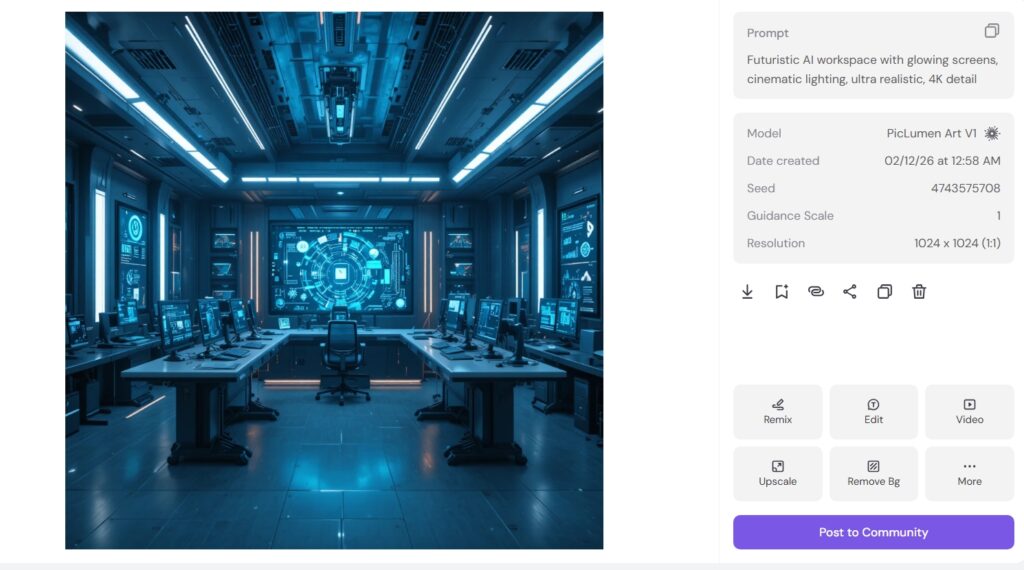
Prompt used: “Futuristic AI workspace with glowing screens, cinematic lighting, ultra realistic, 4K detail”
Generation time: ~45–60 seconds in free Relax Mode. Fast mode (paid) runs at ~10–15 seconds. For a one-off image, the free mode wait time is entirely acceptable. For batch content production, the paid speed is worth the upgrade.
Output quality: Strong lighting and depth, good colour contrast, minor hand distortion on background characters (a common AI generation artefact across all tools). The image was immediately usable as a blog featured image without post-processing. For bloggers who currently spend 10–15 minutes searching stock libraries for a vaguely relevant image, this is a straightforward improvement in both speed and result quality.
Test 2: YouTube Thumbnail
Goal: Create a high-contrast AI tool comparison thumbnail with dramatic visual impact.
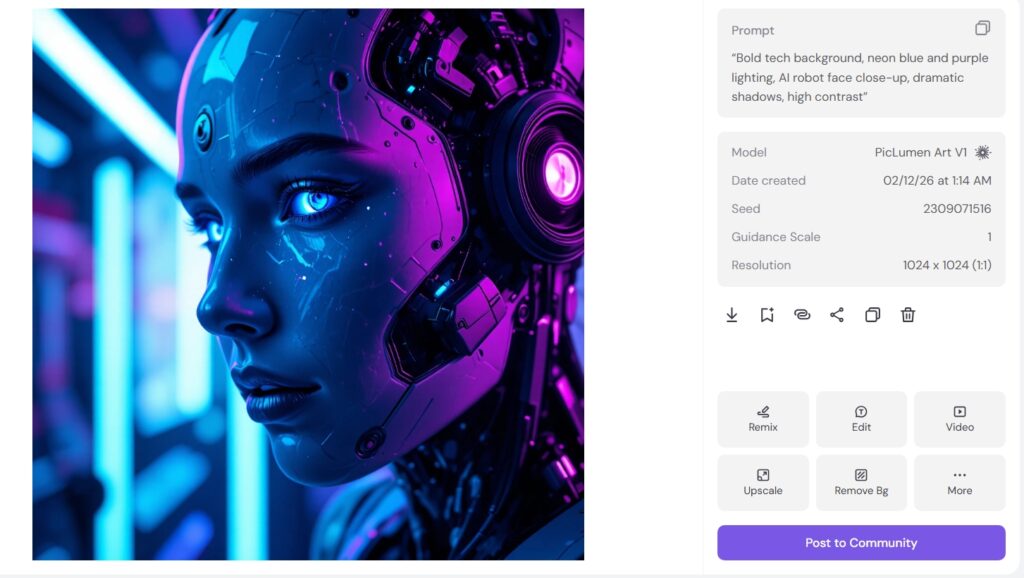
Prompt used: “Bold tech background, neon blue and purple lighting, AI robot face close-up, dramatic shadows, high contrast”
Result: Strong visual impact, clickable aesthetic, neon colour treatment was on-brief. The image needed a minor external text overlay (I used Canva to add the title text), but the background visual itself was usable and attention-grabbing. My honest take: PicLumen is excellent for generating the background visual component of thumbnails. Final text styling and composition still benefits from Canva or Photoshop for the overlay work — think of it as PicLumen generating the raw visual asset and Canva handling the typography layer.
Test 3: Ecommerce Product Mockup
Goal: Create a lifestyle product mockup for a smartwatch without a professional photoshoot.
Workflow: Uploaded the product reference image, then prompted: “Smartwatch on modern wooden desk, natural daylight, realistic photography style, shallow depth of field.” Used background enhancement after generation.
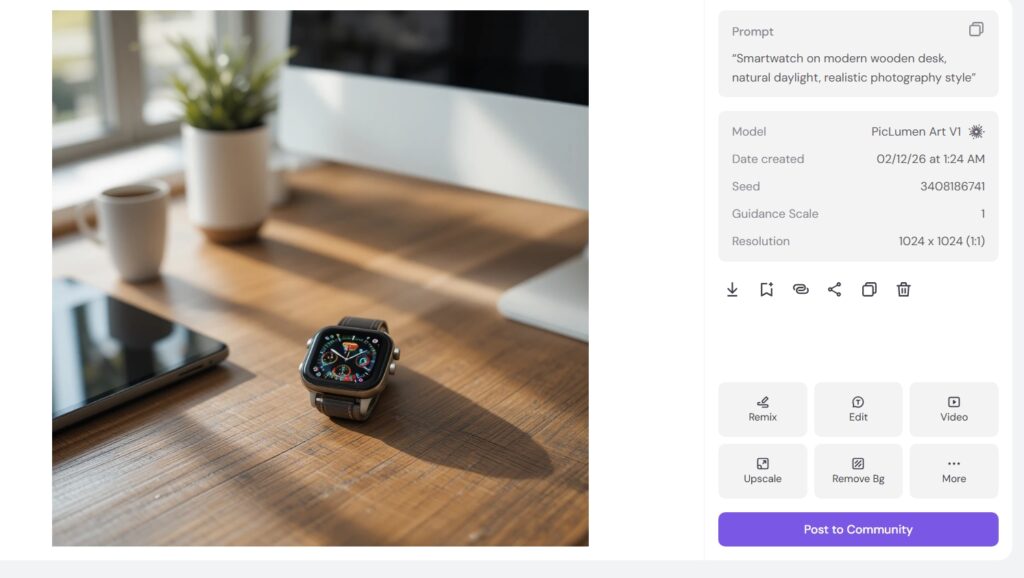
Result: Professional-looking lifestyle mockup without a photoshoot. The reference image upload preserved the product’s physical appearance reasonably well while placing it in the described environment. For ecommerce sellers generating product images for multiple SKUs or platform listings, this workflow replaces product photography costs that can run into hundreds per shoot.
Performance Summary (7 Days, Free Plan)
| Criteria | My Rating | Notes |
|---|---|---|
| Ease of Use | ⭐⭐⭐⭐⭐ | No learning curve — functional from minute one |
| Output Quality | ⭐⭐⭐⭐ | Strong for marketing/blog use; occasional detail artefacts |
| Free Plan Value | ⭐⭐⭐⭐ | Unlimited Relax Mode + commercial licence is genuinely generous |
| Professional Control | ⭐⭐⭐ | Advanced settings available but less depth than Midjourney/Leonardo |
What I Couldn’t Test on the Free Plan
Since I tested exclusively on the free plan, I wasn’t able to fully evaluate priority fast generation (10–15 second speeds vs 45–60 second Relax Mode), concurrent batch job processing (2 simultaneous jobs on Standard, 5 on Pro), premium model access and advanced editing features gated behind paid plans, or the full commercial licensing benefits that differ between tiers. If any of those features are core to your workflow, the Standard or Pro plan evaluation requires testing with those features active — the pricing section below covers what each tier unlocks.
My Honest Real-World Verdict
After 7 days of consistent use across real creative tasks, PicLumen earned its place as a reliable daily tool for content creators and marketers who need custom visuals quickly and affordably. It’s genuinely beginner-friendly — no prompt engineering expertise required to get usable results. It works well for bloggers, marketers, and social media managers who need regular visual content. It meaningfully reduces dependency on stock image libraries. It’s not the right tool for professional digital artists who need the fine-grained aesthetic control that Midjourney or Leonardo AI provide — but for its target audience, it delivers real value at a price point that makes the ROI calculation easy.
How to Use PicLumen: Step-by-Step
Step 1: Sign Up
Visit piclumen.com and click “Launch App.” Register with an email address and password or sign in with your Gmail account for quicker access. Free accounts are available immediately with no payment information required — you receive 10 daily Lumens and unlimited Relax Mode access from the first session.

Step 2: Choose a Style or Model
Browse the model and style options — realistic, anime, fantasy, line art, and others. Select the style that matches your creative intent. For marketing visuals, the realistic model produces the cleanest output; for character-driven content, anime or fantasy models give more stylistic control. Choosing the right model before writing your prompt produces significantly better first-generation results than using the default.

Step 3: Write Your Prompt or Upload a Reference
Type a text prompt describing what you want to create — subject, style, lighting, mood, and composition. For character consistency or style matching, upload a reference image alongside the prompt and PicLumen will incorporate its visual characteristics into the generation. The more specific your prompt, the better the result: “woman in a coffee shop” generates something generic, while “young woman with dark hair at a wooden café table, morning light, shallow depth of field, warm tones, photography style” generates something usable.

Step 4: Customise the Output
After generation, use the built-in editing tools to refine the result: remove the background for a clean cutout, upscale to HD resolution, apply the coloriser if working with monochrome images, or use inpainting to adjust specific regions without regenerating the whole image. These post-generation tools are what transform a good AI output into a professionally polished visual ready for actual use.

Step 5: Export & Share
Export in high-resolution format for your intended use — web, print, or social media. Share directly through PicLumen’s community hub or download for use on your own platforms. Designs can be saved to your account history for future remixing or reuse on new projects.
PicLumen Pricing (2026 — Accurate)
PicLumen uses a Lumen-based pricing model — 1 Lumen equals 1 standard image generation. Your plan determines your monthly Lumen allocation, generation speed, concurrent job capacity, and storage. Here are the verified 2026 plan details:
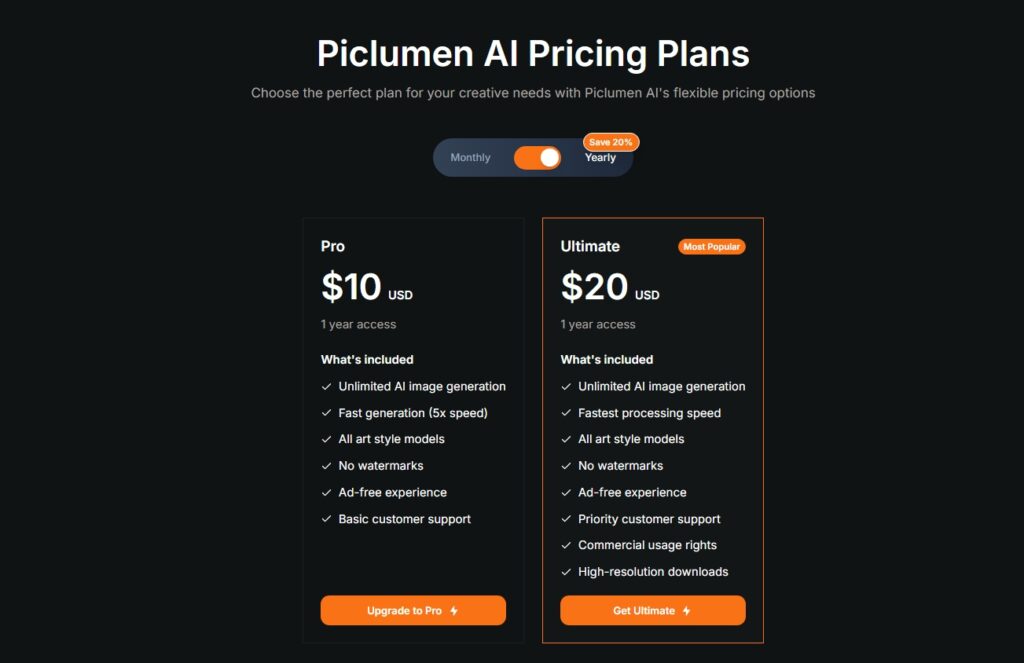
| Plan | Price | Monthly Lumens | Batch Size | Concurrent Jobs | Cloud Storage |
|---|---|---|---|---|---|
| Free/Basic | $0 | 10/day + unlimited Relax Mode | 2 images | 1 | 500 images, 30-day history |
| Standard | $10/mo | 1,800/month | 4 images | 2 | 5,000 images, unlimited history |
| Pro | $20/mo | 4,800/month | 4 images | 5 | 50,000 images, unlimited history |
Both paid plans include commercial licensing rights, advanced editing tools (upscaling, inpainting, background removal, style transfer), access to third-party models, and annual billing discounts of approximately 20%. Additional Lumen top-up packs are available for subscribers who occasionally need more generation capacity without upgrading their plan permanently.
Comparing to competitors: Midjourney’s Basic plan costs $10/month for 200 images, operates through Discord, and has no free tier. DALL·E charges per image through ChatGPT Plus ($20/month). PicLumen’s Standard at $10/month gives 1,800 images/month with built-in editing tools — a meaningfully different value proposition for creators who need volume and editing flexibility rather than maximum artistic quality.
PicLumen Pros & Cons
Pros
- Unlimited Relax Mode on the free plan — genuinely unlimited generation (slower queue) with commercial licence included
- Multiple AI model styles in one platform — realistic, anime, fantasy, sketch, and line art all available without switching tools
- Built-in editing suite — inpainting, outpainting, upscaling, background removal, and colorisation without external editors
- 1 Lumen = 1 image — simple, predictable credit system that’s easy to budget against
- Generous free tier — 500-image cloud storage, 30-day history, commercial licence, and Relax Mode on $0
- Reference image support for character and style consistency — fills a gap that pure text-to-image tools leave
- Web-based with iOS app — accessible from any device, no software installation
- Community hub for sharing, remixing, and inspiration — active and genuinely useful for learning prompt techniques
Cons
- Relax Mode can be slow during peak usage periods — generation times vary significantly based on server load
- Free plan’s 10 daily fast Lumens run out quickly for active users — the real free experience is Relax Mode, not fast generation
- Advanced editing tools (inpainting, outpainting) require a paid plan — free users have limited post-generation editing
- Output quality for complex or highly specific prompts can vary — multiple iterations sometimes needed
- Less aesthetic control depth than Midjourney or Leonardo AI for advanced creative users
- Occasional UI glitches and difficulty locating past prompts — the history and organisation features have room to improve
PicLumen vs Alternatives
Read the Best 10 AI Tools for Image Generation in 2026 Click Here
| Platform | Starting Price | Strengths | Limitations |
|---|---|---|---|
| PicLumen | Free / $10/mo | Free tier, built-in editing, multiple styles, Relax Mode | Less artistic control, slower on free |
| Midjourney | $10/mo (no free) | Best aesthetic quality, parameter control | Discord-only, no editing tools, no free plan |
| DALL·E / ChatGPT | $20/mo (Plus) | Precise outputs, conversational prompting | Per-image cost, limited editing |
| Leonardo AI | Free / $12/mo | LoRA training, multiple models, API access | Higher paid cost, steeper learning curve |
| Stable Diffusion | Free (local) | Full control, infinite customisation | Technical setup required, no editing UI |
Tips to Get the Most Out of PicLumen
Write Specific, Structured Prompts
The most impactful improvement any PicLumen user can make is in prompt specificity. Describe your subject, then the style, then the lighting and mood, then any compositional or camera notes. “Futuristic city skyline with neon lights, cinematic lighting, ultra-realistic, aerial drone shot at golden hour” will produce a fundamentally better result than “futuristic city.” Use the community feed to study prompts that produced images you admire — reverse-engineering effective prompts is the fastest way to improve your own.
Test Multiple Styles for New Projects
When starting a new creative project, run the same core prompt through three or four different style models before committing to one visual direction. The same subject description produces dramatically different results across the realistic, anime, fantasy, and line art models — and finding the right aesthetic foundation early saves generation credits on post-generation refinement. Once you’ve found the model that fits your project, use it consistently across all generations to maintain visual coherence.
Leverage Reference Images for Consistency
For any project requiring multiple images of the same character, product, or visual style, use PicLumen’s reference upload feature from the first generation. Establishing a reference early — uploading an existing image that captures the visual direction you want — ensures subsequent generations maintain coherence. This is especially valuable for article series with a consistent illustrative style, product listings across multiple SKUs, or any storytelling project where character consistency matters.
Use Editing Tools Before Declaring a Generation Failed
Many users discard a generation that’s 80% right when inpainting could fix the 20% that isn’t. Before spending another Lumen on a full regeneration, try using the inpainting tool to correct specific areas — a distracting background element, an incorrect colour region, or a compositional issue in one corner. Small, targeted edits often transform a good-but-not-quite result into a usable final image without the credit cost of starting over.
Manage Your Daily Lumens Strategically
On the free plan, your 10 daily fast Lumens are best used for the first generation of a new prompt — where you want fast feedback on whether the prompt is working. Once you’ve confirmed a prompt is producing the right direction, switch to Relax Mode for variations and iterations. This extends your fast generation capacity for genuinely new creative directions rather than spending it on iterative refinements that don’t require speed.
Conclusion: Is PicLumen Worth It in 2026?
Yes — particularly for content creators, bloggers, social media managers, small businesses, and students who want professional-quality custom visuals without the cost of stock photography, the complexity of Stable Diffusion, or the price of Midjourney. PicLumen’s combination of a genuinely generous free tier, integrated editing tools, multiple model styles, and simple 1-Lumen-per-image pricing makes it one of the most practically accessible AI image generators available in 2026.
For users who need maximum artistic quality on specific aesthetic styles, Midjourney or Leonardo AI remain stronger choices. For users who need full technical control and don’t mind setup complexity, Stable Diffusion is still the benchmark for customisation. But for the broad category of creators and businesses who need good visuals fast and affordably, PicLumen delivers consistently. Start with the free plan — the unlimited Relax Mode gives you enough capacity to evaluate it properly before deciding whether the Standard or Pro upgrade is worth it for your workflow.
What is PicLumen used for?
PicLumen is an AI image generator that lets users create digital art, illustrations, and realistic images from text prompts or reference photos. It’s used by designers, marketers, bloggers, educators, and small business owners to produce custom visuals for social media, websites, blog posts, product mockups, and creative projects — without needing design skills or expensive software. It also supports short AI video generation from images, making it a versatile content creation tool.
Is PicLumen free or paid?
Both. PicLumen’s free plan gives 10 daily fast Lumens plus unlimited image generation in Relax Mode — a slower queue but genuinely unlimited — along with a commercial licence, 500-image cloud storage, and 30-day history. Paid plans are Standard ($10/month, 1,800 Lumens) and Pro ($20/month, 4,800 Lumens), both with faster generation, larger batch sizes, more concurrent jobs, expanded storage, and advanced editing features. Annual billing offers approximately 20% savings.
Can PicLumen generate realistic images?
Yes. PicLumen’s realistic model produces photographic-quality images with accurate lighting, textures, and compositional quality suitable for marketing, blog visuals, and product mockups. Combined with the upscaling and background removal tools, the output can be refined to professional quality for most content creator and marketing use cases. For the most demanding photorealistic outputs where every detail matters, Midjourney’s PhotoReal capabilities are stronger — but PicLumen’s realistic model handles most everyday content needs well.
How does PicLumen compare to Midjourney?
Midjourney produces higher artistic quality images, particularly for stylised and cinematic outputs. PicLumen wins on accessibility and value: a free plan with unlimited Relax Mode (Midjourney has no free tier), a simpler browser-based interface (Midjourney requires Discord), built-in editing tools including background removal, upscaling, and inpainting (Midjourney has none), and significantly more generation volume for the price. Midjourney is the better choice for professional artists prioritising maximum image quality. PicLumen is better for everyday creators, marketers, and businesses prioritising volume, editing capability, and cost.
Is PicLumen good for beginners?
Yes — it’s one of the most beginner-friendly AI image generators available. The interface is clean and straightforward, style presets handle the model selection complexity, and you don’t need any prompt engineering knowledge to get usable results from day one. The free plan’s unlimited Relax Mode lets beginners experiment extensively without any financial commitment. The main learning curve is in developing prompt specificity — the better you describe what you want, the better the output — but the community feed provides plenty of prompt examples to learn from.
What are Lumens in PicLumen?
Lumens are PicLumen’s generation credits — 1 Lumen equals 1 standard image generation. The free plan gives 10 daily fast Lumens plus unlimited Relax Mode. Standard plan gives 1,800 Lumens/month and Pro gives 4,800 Lumens/month. Lumens reset monthly on paid plans. Additional Lumen top-up packs are available for purchase. The simplicity of the 1:1 ratio (one Lumen, one image) makes credit consumption easy to track and budget, unlike token-based systems where consumption varies dramatically by feature and resolution.
What is Relax Mode in PicLumen?
Relax Mode is PicLumen’s slower generation queue that’s available to all users — including free plan users — without any credit cost. When your daily fast Lumens run out, Relax Mode lets you continue generating images at a slower speed (typically 45–90 seconds versus 10–15 seconds in fast mode), without limits. This makes PicLumen’s free tier genuinely useful for light to moderate use, since the only cost is waiting rather than credits. Relax Mode speeds can be slower during peak usage periods when server demand is high.
Can PicLumen replace traditional design tools?
For many content creation and marketing tasks, yes — but not for all design work. PicLumen generates custom AI images and provides basic editing tools that cover a significant proportion of what bloggers, social media managers, and small businesses previously needed stock photos and graphic designers for. However, it doesn’t replace layout-focused design tools like Canva for composing multi-element designs, text overlay work, or brand template management. The most effective workflow combines PicLumen (for generating the image assets) with Canva or Photoshop (for final composition and text work) rather than treating them as direct substitutes.





I am Ashish Yadav a software engineer and AI tools researcher with over five years of practical experience working with real-world systems and automation. I am founder of CognifyFuture, where I analyzes, tests, and breaks down AI tools with a focus on what actually works—not what’s trending.
My content is built on hands-on usage, not theory. Instead of generic advice, I focuses on real implementation—how AI tools can be used to automate tasks, improve efficiency, and solve any specific business or individual problems.
Through CognifyFuture, My aims is to eliminate confusion around AI by delivering clear, honest, and actionable insights that help users make smarter technology decisions.