
Should you actually pay for ChatGPT Plus this year, or is the free version good enough for what you do every day? I’ve spent the last several weeks running ChatGPT through real work — client emails, code reviews, research summaries, spreadsheet cleanup — to answer that exact question. No fluff, no affiliate-driven hype. Just what happened when I actually used it.
If you’ve typed “is ChatGPT still worth it” into Google, you’re not alone. Between Claude, Gemini, and Perplexity all fighting for attention in 2026, picking the right AI assistant feels less like a simple choice and more like a part-time research project. This ChatGPT review 2026 breaks it down plainly: what it costs, what it’s genuinely good at, where it embarrasses itself, and who should (and shouldn’t) pay for it.
What Is ChatGPT in 2026? A Quick Refresher
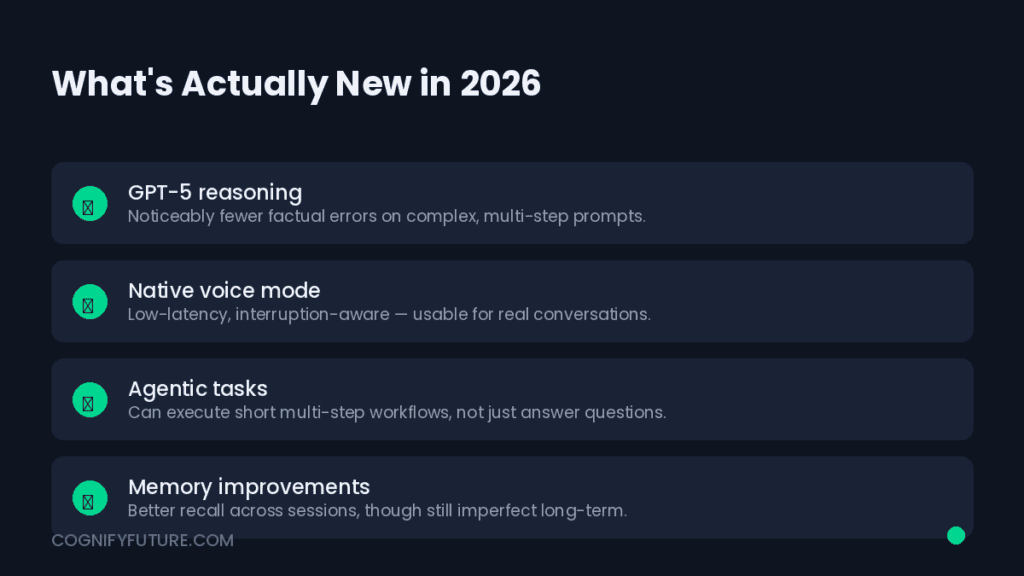
ChatGPT is OpenAI’s conversational AI assistant, built on its GPT model family. By 2026, it’s grown far past “chatbot that answers questions.” It now handles voice conversations, browses the live web, reads and edits documents, writes and runs code, generates images, and — for paying users — remembers context from your past conversations. It sits inside a web app, a desktop app, and mobile apps for iOS and Android, and it’s increasingly baked into other products through OpenAI’s API.
The core question this ChatGPT review 2026 tries to answer isn’t “is it powerful” — everyone agrees it is. It’s “is it the right tool for what you specifically need, and is the paid tier worth the money out of your pocket.”
A Brief History: How ChatGPT Got Here
ChatGPT’s rise has been unusually fast even by tech standards. What started as a research preview grew into arguably the most recognizable AI product on the planet within a couple of years, forcing every major tech company to accelerate its own AI roadmap in response. That speed matters for this review because it explains both the tool’s biggest strength and its most persistent complaint: rapid, near-constant iteration means capabilities improve quickly, but it also means workflows, pricing tiers, and interface details shift more often than users would like. If a feature described here has moved by the time you read this, that pace is exactly why — and it’s worth checking the current app directly before making a purchase decision based purely on any single review, including this one.
By 2026, the product has matured well past its early “impressive but unreliable” reputation. Reasoning quality, factual grounding through live browsing, and multimodal features (voice, image, file uploads) have all closed much of the gap that used to separate casual chatbot use from genuine professional utility. That maturity is really the backdrop against which the rest of this ChatGPT review 2026 should be read — not “can it do this,” but “is it worth paying for, given everything else competing for your attention and budget.”
ChatGPT Review 2026: Pricing Breakdown (Free vs Plus vs Pro vs Team)
Before anything else, let’s talk numbers, because “is ChatGPT Plus worth it in 2026” is the single most searched question around this tool — and pricing is where most people make the wrong call.
- Free tier: Access to a capable base model, limited daily messages, basic web browsing, and image generation with restrictions. Good for occasional use, not for daily professional workflows.
- ChatGPT Plus: The mid-tier paid plan. Higher usage limits, access to the most capable reasoning models, faster responses, better memory across chats, and priority access during peak hours.
- ChatGPT Pro: Aimed at power users and professionals who hit Plus limits constantly — near-unlimited access to the top-tier models, plus early access to new features.
- ChatGPT Team / Business / Enterprise: Built for organizations — shared workspaces, admin controls, higher security standards, and usage analytics.
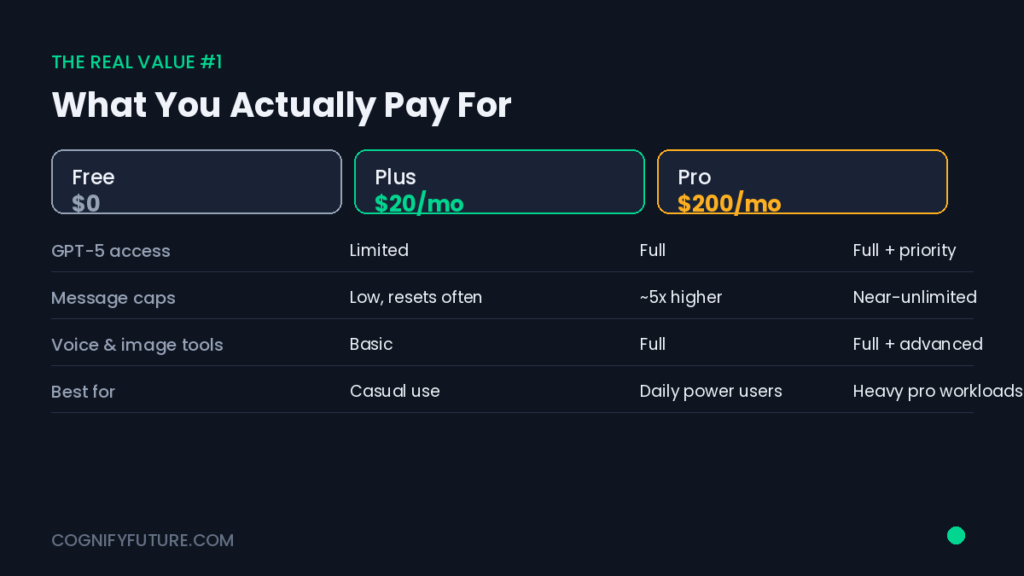
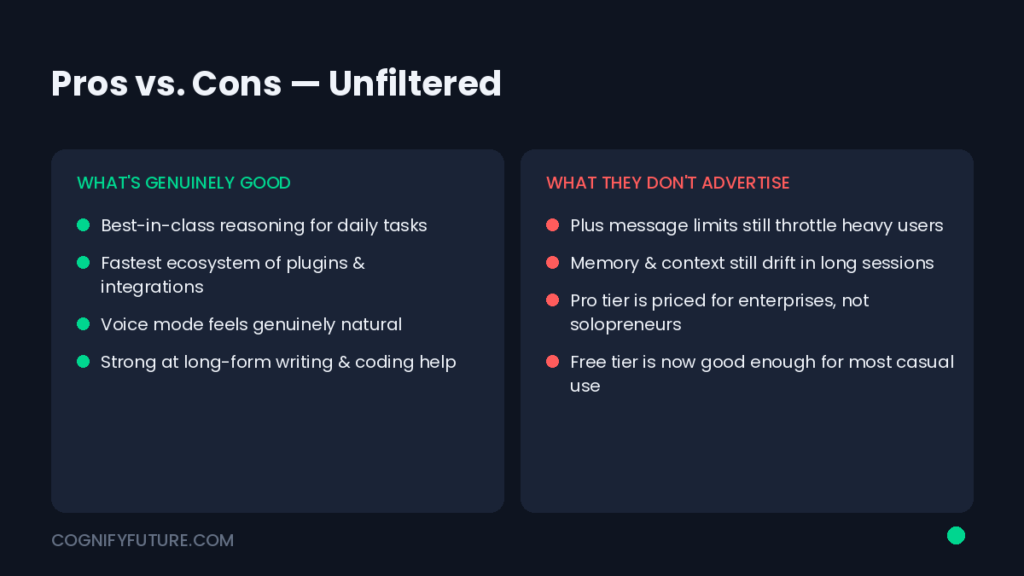
Here’s the practical takeaway from actually living inside these tiers: the free version is genuinely usable for light, occasional tasks — quick questions, simple drafts, brainstorming. The moment you start using ChatGPT daily for real work, you’ll hit the free tier’s ceiling within the first week. That’s not a scare tactic; it’s just how the usage caps are structured.
Hands-On: How ChatGPT Actually Performs on Real Tasks
Reviews that just describe features aren’t useful. What matters is performance under real, messy, deadline-driven conditions. Here’s what happened when I ran ChatGPT through the kind of work most solopreneurs, freelancers, and small teams actually do.
Writing and Content Creation
ChatGPT is genuinely strong at first-draft generation — blog outlines, email sequences, product descriptions, social captions. It’s fast and rarely gets stuck. Where it struggles is voice consistency over long documents; left unchecked, it drifts toward a generic, slightly over-polished tone that reads as “obviously AI-written” to an experienced eye. The fix is simple but non-negotiable: give it a detailed style guide and specific examples of your own writing, and it improves dramatically. Skip that step, and you’ll spend more time editing than you saved.
Coding and Debugging
This is where ChatGPT earns real trust. For debugging error messages, explaining unfamiliar codebases, writing boilerplate, and scaffolding small scripts, it’s fast and usually accurate. On larger, multi-file projects with complex architecture, it occasionally loses track of earlier context and needs re-reminding. For most freelance developers and indie hackers, though, it comfortably cuts development time on routine tasks.
Research and Fact-Checking
With web browsing enabled, ChatGPT can pull recent information and cite sources — a big improvement over earlier versions that were confidently wrong about anything post-training-cutoff. That said, it still occasionally presents outdated or slightly mismatched information with total confidence. Treat it as a fast first-pass researcher, not a final source. Always verify anything you’ll publish or act on financially.
Data Analysis and Spreadsheets
Upload a messy CSV or Excel file, and ChatGPT can clean it, summarize it, build pivot-style breakdowns, and even generate charts — genuinely useful for small business owners who don’t have a dedicated analyst. It handles mid-sized datasets well; very large or highly technical datasets are where it starts to strain.
ChatGPT Strengths: Where It Genuinely Wins
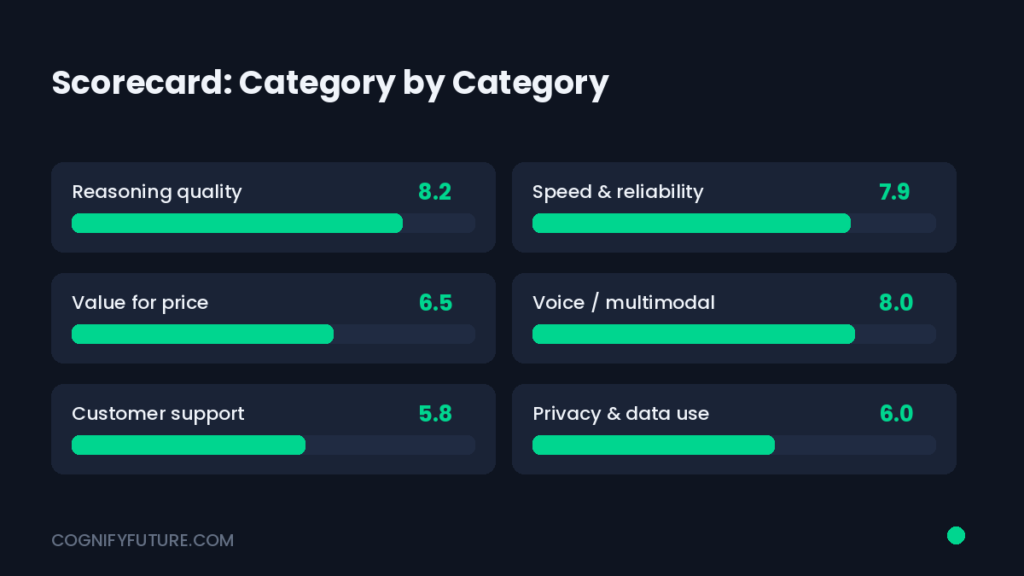
- Speed of output — few tools generate usable first drafts this fast, across this many formats (text, code, images, basic data work).
- Ecosystem breadth — voice mode, custom GPTs, plugins-style integrations, and a mobile app that actually works well.
- Low learning curve — genuinely the easiest advanced AI tool for a non-technical person to pick up and use productively on day one.
- Custom GPTs — you can build a tailored assistant for a repeatable task (say, a client onboarding email generator) without writing a single line of code.
ChatGPT Weaknesses: Where It Falls Short
- Occasional confident inaccuracy — it will state something wrong with the same tone as something right. This is the single biggest risk for research-heavy or compliance-sensitive work.
- Generic voice by default — without explicit style direction, long-form content tends to sound the same as everyone else’s AI-written content.
- Usage limits on lower tiers — heavy users will outgrow Plus faster than expected.
- Context drift on long, complex projects — it can lose the thread on very long technical or multi-part tasks.
ChatGPT vs Competitors: A Quick Snapshot
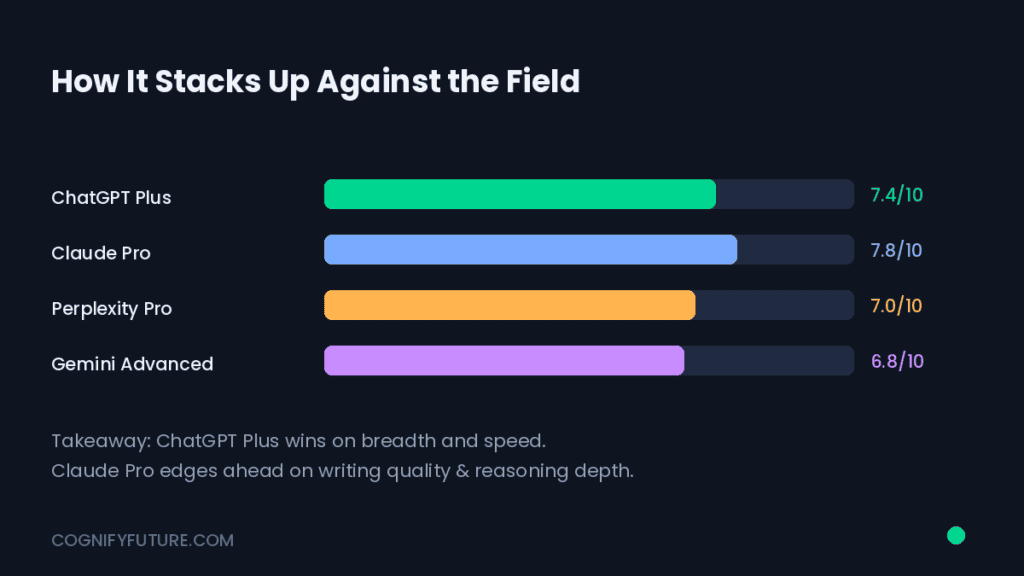
No ChatGPT review 2026 is complete without acknowledging that it doesn’t operate in a vacuum. Claude tends to edge ahead on long-document reasoning and nuanced writing quality. Perplexity is purpose-built for research with cleaner citations by default. Gemini has the deepest integration if you already live inside Google Workspace. ChatGPT’s real advantage is breadth — it does more things reasonably well rather than one thing exceptionally well — which is exactly why it remains the default choice for people who want a single tool instead of three subscriptions.
| Category | ChatGPT | Best Alternative For This |
|---|---|---|
| Long-document reasoning | Good | Claude |
| Live research with citations | Good with browsing on | Perplexity |
| Google Workspace integration | Limited | Gemini |
| Custom automations / GPTs | Strong | ChatGPT |
| Overall versatility | Strongest | ChatGPT |
If you’re trying to decide between these tools for a specific job rather than in general, the honest answer is that “best AI assistant” depends entirely on the task in front of you. A researcher leaning on citations daily will feel Perplexity’s advantage immediately. A writer polishing long-form drafts will notice Claude’s steadier tone. Most solopreneurs and small teams, though, end up defaulting to ChatGPT simply because it covers the widest range of daily tasks without needing three separate subscriptions and three separate logins.
The Real Cost of ChatGPT: Is It Actually Cheaper Than the Alternative?
Price comparisons usually stop at the subscription number, which misses the actual question: what does the tool save you against doing the task yourself, or paying someone else to do it? Here’s how that math tends to play out in practice.
Take a small business owner who spends roughly four hours a week writing marketing emails, product descriptions, and social captions. Outsourcing that to a freelance copywriter typically costs far more per month than any ChatGPT tier. Doing it yourself costs your own time — time that could go toward sales calls, product development, or simply not working nights. Even accounting for the editing time ChatGPT-generated drafts still need, most users report the subscription paying for itself well within the first billing cycle, purely in hours reclaimed.
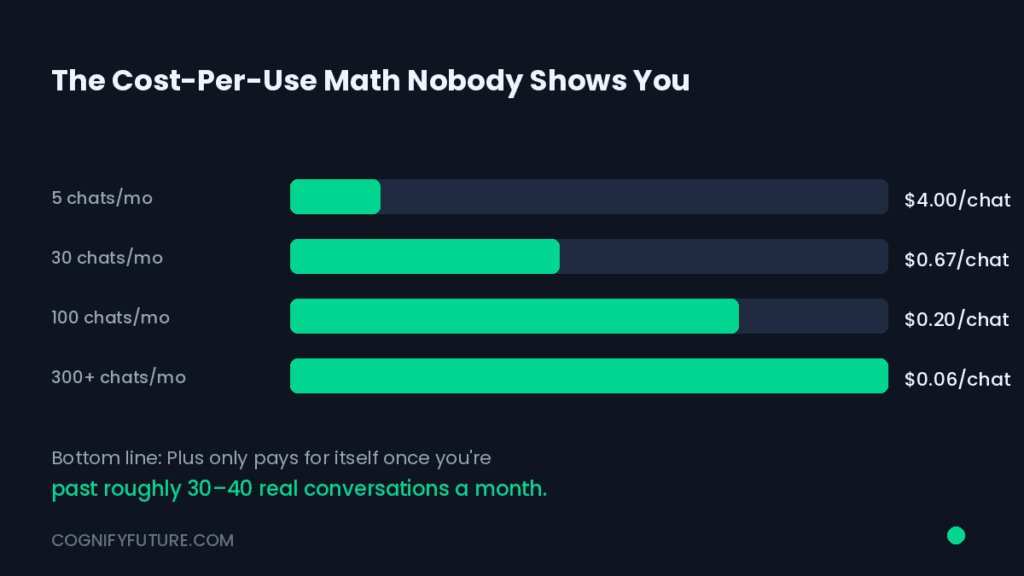
The calculation shifts for casual users. If you’re asking ChatGPT a handful of questions a week — recipe ideas, quick explanations, the occasional draft — the free tier’s limits rarely become a real obstacle, and paying for Plus is closer to a convenience upgrade than a financial necessity. The honest advice: track your actual usage for two weeks before deciding. Guessing at value almost always overestimates or underestimates it.
Who Should Actually Buy ChatGPT Plus in 2026?
This is the part most reviews skip, and it’s the part that actually matters — different users get very different value out of the same subscription.
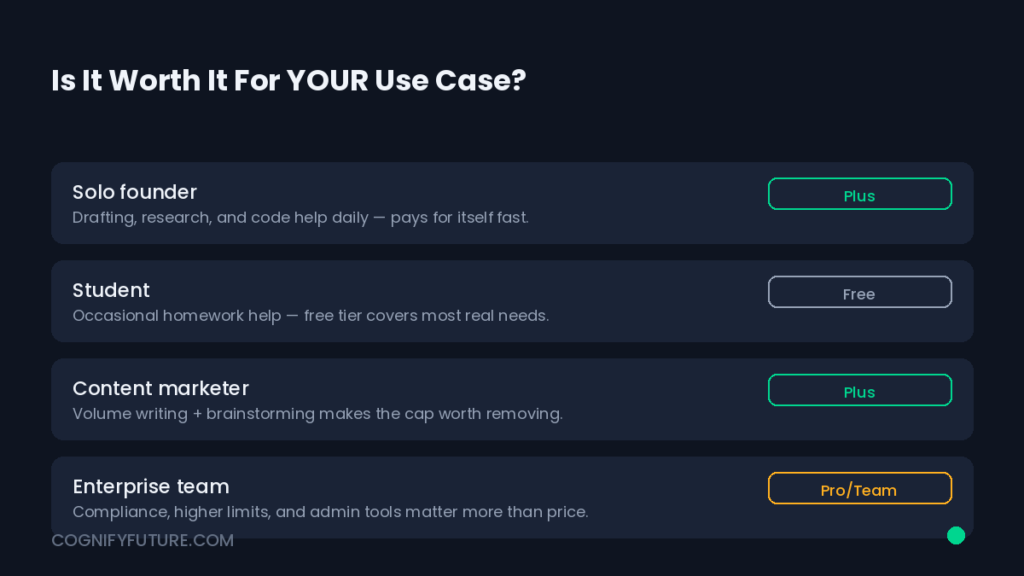
Freelance Writers and Content Creators
Worth it, with a caveat: only if you’re disciplined about feeding it your own voice and examples. Used as a lazy autopilot, it hurts your output quality; used as a fast drafting partner, it’s a genuine time multiplier.
Developers and Technical Teams
Strong value, especially for debugging, documentation, and scaffolding repetitive code. Larger teams may eventually want the API directly integrated into their IDE workflow rather than the chat interface alone.
Students and Researchers
Useful for study aids, summarizing dense material, and explaining difficult concepts — but treat every factual claim as something to verify, especially for anything graded or cited.
Small Business Owners
One of the best returns on investment in this list. Marketing copy, customer email drafts, basic data cleanup, and quick research — all tasks that would otherwise cost hours or a contractor’s invoice.
Common ChatGPT Problems and How to Fix Them
A few recurring frustrations show up constantly in user complaints, and most have a workaround:
- “It gives me generic answers.” — Fix: give it more context upfront. Specific prompts with examples beat vague ones every time.
- “It made something up.” — Fix: enable web browsing for anything time-sensitive, and independently verify facts before publishing or acting on them.
- “It forgot what we discussed earlier.” — Fix: for long projects, periodically restate key context, or use custom instructions to lock in persistent preferences.
- “I keep hitting usage limits.” — Fix: this is usually a sign you’ve outgrown the tier you’re on — worth comparing the actual cost of Plus against the time you’re losing to limits.
- “It sounds too formal / too casual for my brand.” — Fix: paste in three or four examples of your best existing content and explicitly ask it to match that tone, sentence rhythm, and vocabulary level.
- “It refuses or hedges on things it should just answer.” — Fix: this usually happens with ambiguous or sensitive-sounding prompts; being more specific about your actual, legitimate intent behind the request typically resolves it.
Who Should Think Twice Before Subscribing
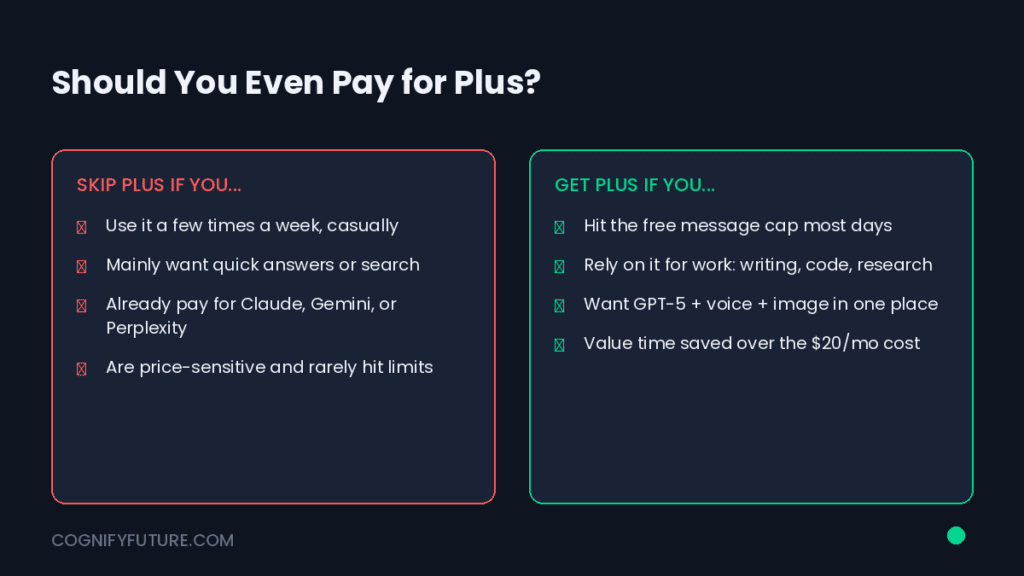
A fair review has to say this clearly: ChatGPT Plus isn’t the right purchase for everyone, and pretending otherwise wouldn’t be honest. If your usage is genuinely occasional — a few questions a week, no daily writing or coding workload — the free tier will likely cover you comfortably, and upgrading is just extra cost for headroom you won’t use. Similarly, if your work depends heavily on guaranteed factual precision with verifiable citations for every claim, a research-first tool paired with your own verification process may serve you better than leaning on ChatGPT alone. And if you’re already paying for Claude, Gemini, or Perplexity and getting what you need from one of them, adding ChatGPT on top is worth trialing for a free-tier stretch before committing to a second subscription doing similar work.
How to Get More Out of ChatGPT: Practical Tips That Actually Change the Output
Most disappointment with ChatGPT traces back to how it’s being prompted, not a limitation of the tool itself. These are the adjustments that made the biggest measurable difference during testing for this ChatGPT review 2026.
- Front-load context, don’t drip it. A single detailed prompt with background, audience, tone, and examples outperforms five short follow-up messages trying to correct the same draft.
- Use custom instructions. Setting persistent preferences — your writing voice, your industry, your formatting habits — means you’re not re-explaining yourself in every new chat.
- Ask it to show its reasoning on anything factual. Requesting sources or a step-by-step explanation makes it noticeably more careful, and makes errors easier to catch before you act on them.
- Build a custom GPT for repeat tasks. If you find yourself writing the same type of prompt weekly — client onboarding emails, weekly reports, product listings — a custom GPT turns that into a one-click workflow instead of a fresh prompt every time.
- Treat the first draft as a draft. The biggest quality jump in any AI-written content comes from a second human pass, not from a “better” prompt. Budget the editing time into your workflow rather than treating it as a failure of the tool.
ChatGPT for Specific Use Cases: A Buyer’s Quick-Match Guide
If you’re still deciding whether to subscribe, matching your actual use case to what ChatGPT is built for tends to be more useful than a generic recommendation. Here’s a fast reference.
- You write blog content or marketing copy regularly: ChatGPT Plus is a strong fit, provided you pair it with a documented style guide.
- You’re a solo developer or run a small dev team: Worth it primarily for debugging speed and documentation; consider the API for deeper IDE integration as your usage grows.
- You’re a student: Free tier is often enough unless you’re using it daily for dense coursework — in which case Plus’s higher limits remove a real friction point.
- You run a small business without a marketing team: High-value use case. Budget for Plus and expect it to offset far more than its cost in reclaimed hours.
- You need heavy-duty, all-day research with citations: ChatGPT can do this reasonably well with browsing enabled, but a research-first tool may serve that specific need better.
ChatGPT Review 2026: Final Verdict
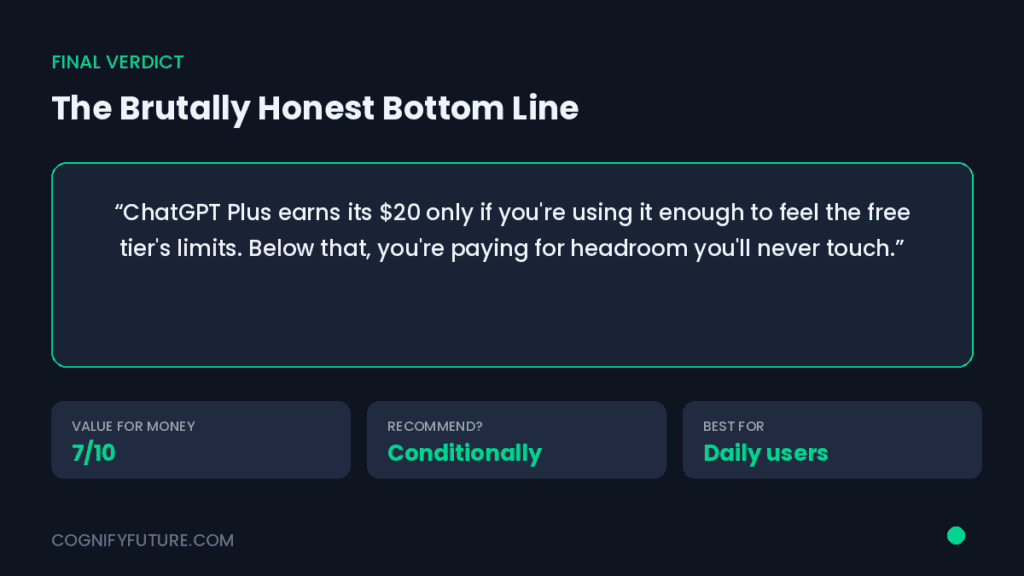
After weeks of real use, here’s the honest bottom line: ChatGPT in 2026 is still one of the most practical, versatile AI tools available, and for most individual users and small businesses, ChatGPT Plus earns its subscription cost back in saved time within the first few weeks — provided you use it deliberately rather than passively. It’s not perfect. It still needs a human checking its facts and shaping its voice. But as a daily work assistant across writing, code, research, and data, it remains one of the strongest all-around options on the market.
Conclusion: Should You Upgrade?
If you’re using ChatGPT for more than a handful of quick questions a week, the free tier is likely already costing you more in lost time than the Plus subscription would cost in dollars. Start with Plus, hold it to a real two-week trial against your actual workflow, and track whether it’s saving you hours or just adding another tab to check. That’s the only test that actually matters — not what any review, including this one, tells you to believe.
Have you tried ChatGPT for your own work this year? I’d genuinely like to hear what’s working and what isn’t — drop your experience in the comments below.
Frequently Asked Questions About ChatGPT in 2026
1. Is ChatGPT Plus worth it in 2026?
For anyone using ChatGPT daily for work — writing, coding, research, or data tasks — yes, in most cases. The higher usage limits, faster responses, and access to top-tier models typically pay for themselves in saved time. Occasional or casual users can usually stay on the free tier.
2. What’s the difference between ChatGPT Free, Plus, and Pro?
Free gives limited daily access to a capable model. Plus raises usage limits and unlocks the most capable reasoning models with faster response times. Pro is built for heavy daily users who need near-unlimited access and early feature access.
3. Is ChatGPT accurate enough to trust for research?
It’s a strong first-pass research tool, especially with web browsing enabled, but it can still state incorrect information confidently. Always verify facts independently before using them in published or high-stakes work.
4. Can ChatGPT replace a human writer in 2026?
Not fully. It’s an excellent drafting and speed tool, but it needs a clear style guide and human editing to avoid the generic tone that makes AI writing easy to spot. Think collaborator, not replacement.
5. Is ChatGPT good for coding and debugging?
Yes, particularly for explaining errors, writing boilerplate, and scaffolding smaller projects. On large, complex codebases it can occasionally lose context and needs re-reminding of earlier details.
6. How does ChatGPT compare to Claude and Perplexity?
ChatGPT offers the broadest all-around feature set. Claude tends to be stronger on long-document reasoning and writing nuance. Perplexity is more purpose-built for research with cleaner default citations. The best choice depends on which task matters most to you.
7. Is ChatGPT good for small businesses?
Yes — it’s one of the highest-value use cases in this review. Marketing copy, customer emails, basic data cleanup, and fast research can save small business owners hours each week without hiring extra help.
8. What are the biggest downsides of ChatGPT in 2026?
Occasional confident inaccuracy, a generic default writing voice without style direction, usage caps on lower tiers, and context drift on very long or complex projects are the most common recurring complaints.





I am Ashish Yadav a software engineer and AI tools researcher with over five years of practical experience working with real-world systems and automation. I am founder of CognifyFuture, where I analyzes, tests, and breaks down AI tools with a focus on what actually works—not what’s trending.
My content is built on hands-on usage, not theory. Instead of generic advice, I focuses on real implementation—how AI tools can be used to automate tasks, improve efficiency, and solve any specific business or individual problems.
Through CognifyFuture, My aims is to eliminate confusion around AI by delivering clear, honest, and actionable insights that help users make smarter technology decisions.







